Update Expiring Insurance for a Vendor in the Company Directory
Hintergrund
Procore sendet Ihnen In Procore, the term Insurance Manager refers to an internal employee (or multiple employees) at your company who serve as your organization's primary point of contact(s) for ensuring that the insurance policies for your contractors, subcontractors, and other vendors are in compliance with requirements and that their required policies and certificates are kept up-to-date.
Dinge, die Sie beachten sollten
Wenn Sie das ERP-Integrationen-Tool für Sage 300 CRE aktiviert haben, sind die folgenden Versicherungsfelder in einem Procore-Unternehmensdatensatz jetzt gesperrt, wenn Procore-Daten mit Sage 300 CRE synchronisiert werden. Sie müssen diese Aktualisierungen im integrierten ERP-System vornehmen: Versicherungsart (z. B. Allgemein, Kfz, Haftpflicht und Arbeiterversicherung), Gültigkeitsdatum, Ablaufdatum, Limit, Name und Policennummer.
Prerequisites
Steps
Trinkgeld
Fügen Sie zunächst einen Versicherungsanbieter als Unternehmen in Ihrem Unternehmensadressbuch hinzu. Siehe Hinzufügen oder Bearbeiten eines Lieferanten/Unternehmens zum Unternehmensadressbuch.
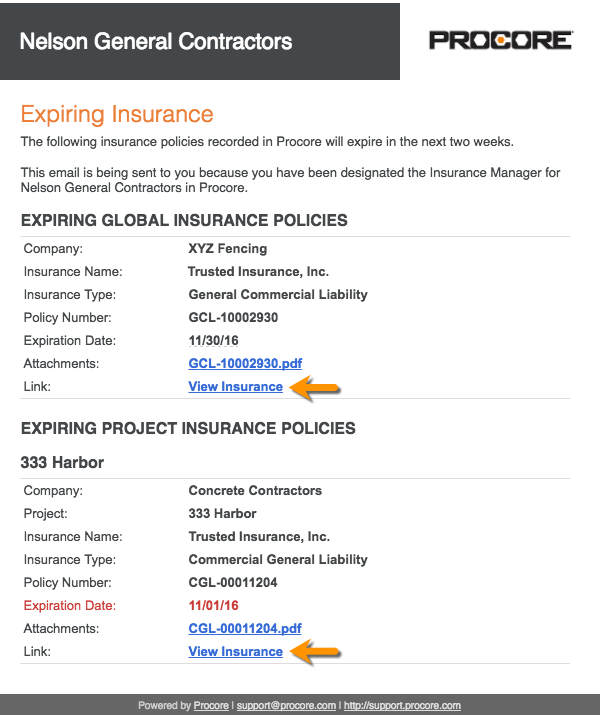
In your email client, open the 'Expiring Insurance' email from Procore.
Click the View Insurance link.
If you are not logged into Procore, log in.
Update the value in any cell with the blue caret symbol.
OR
Click Edit to change the status, add an attachment, or enter insurance notes.Click Save.