Anpassen der Spaltenanzeige im Vorqualifizierungs-Tool
Hintergrund
Sie können die Spalten im Vorqualifizierungen-Tool so anpassen, dass es für Sie relevante Daten anzeigt.
Dinge, die Sie beachten sollten
Erforderliche Benutzerberechtigungen: "Schreibgeschützt"-Berechtigungen oder höher für das Vorqualifizierungen-Tool.
Steps
Navigate to the company's Prequalifications tool.
Click the vertical ellipsis (⋮).
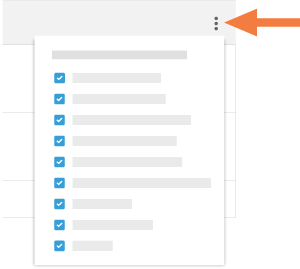
Choose from these options:
Show a Column
Place a mark in the checkbox next to a column name to have it show on the Prequalifications page. The default setting is to show all available columns.Hide a Column
Remove the mark from the checkbox that corresponds to the column you want to hide on the Prequalifications page.
See Also
Loading related articles...