Resource Planning Detailed Data Mapping

Overview

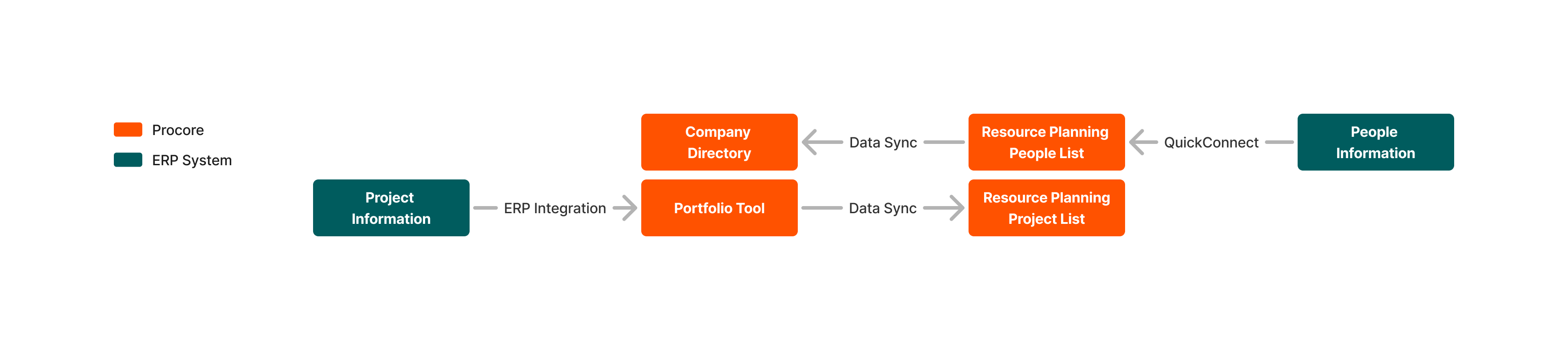
Customers have four options when it comes to how they manage data in Resource Planning and other Procore tools. Customers choose where they want to manage data. That data is then synced between Resource Planning and other tools in Procore. The data that is synced is listed below based on where you choose to manage your data.

Data flows between various systems are supported by:

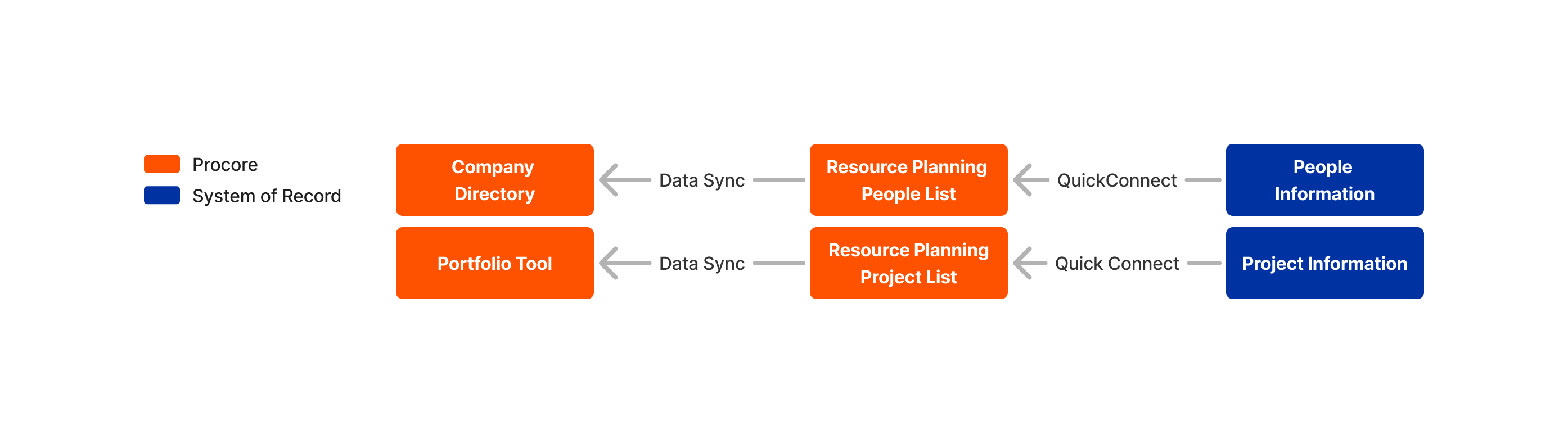
  • Quick Connect - This integration tool syncs data from a system of record to Resource Planning.
    Note: This option is available to customers with an approved Resource Planning integration.

  • Internal Data Sync - This syncs information between the Resource Planning Tool and other tools in Procore.

  • ERP Integrations - This syncs information between a Customer's ERP system and Procore's Portfolio tool and the Resource Planning People list.
    Note: To purchase an ERP integration that syncs projects, Customers must also purchase Procore Financials.

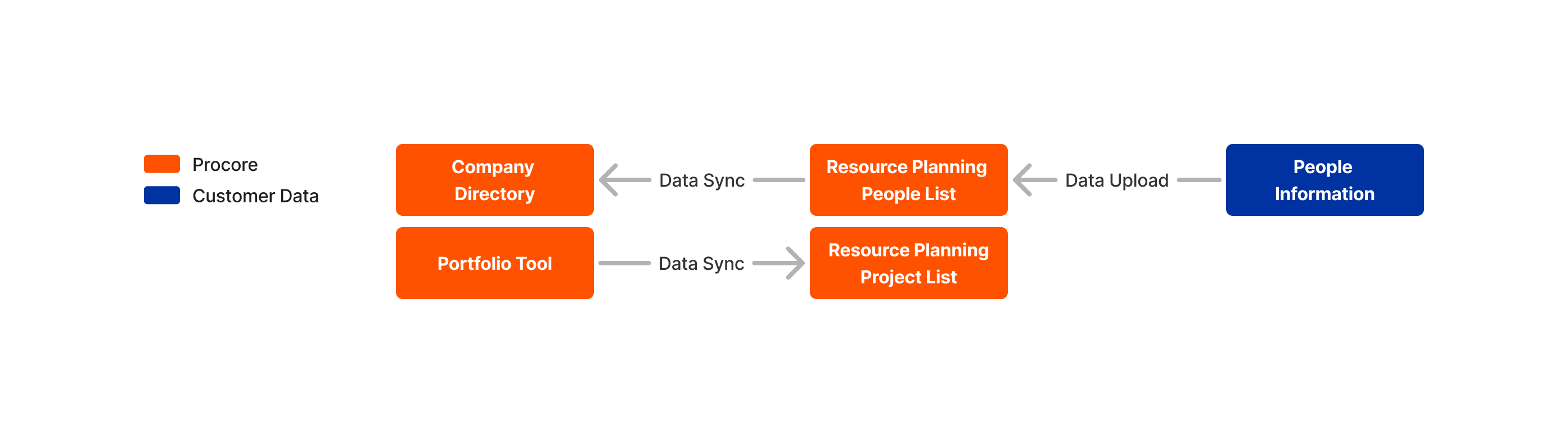
  • Data Upload - This is a one-time data upload where a Customer's People and Project data is uploaded into Resource Planning.
Detailed Data Mapping

Customers have the following options available when it comes to how they manage data in Resource Planning and other Procore tools:

  1. Manage People and Projects from your System of Record.

  2. Manage People and Projects from ERP.

  3. Manage People from Resource Planning, Manage Projects from the Portfolio tool.

Manage People and Projects from your System of Record

Customers manage people and project information in a system of record, and use QuickConnect to sync both people and projects in Resource Planning. People and project information then sync to the Company Directory and Portfolio tools.

Resource Planning People And Projects From Sor

People

Show/Hide Data Mapping

COMPANY DIRECTORY

DATA SYNC

RESOURCE PLANNING

QUICK CONNECT

ERP

First Name

Erp Green Arrows

First Name

Erp Green Arrows

First Name

Last Name

Erp Green Arrows

Last Name

Erp Green Arrows

Last Name

Status (Active, Inactive)

Erp Green Arrows

Status (Active, Inactive)

Erp Green Arrows

Record Status or Date Terminated

Employee ID

Erp Green Arrows

Employee ID

Erp Green Arrows

Employee ID

Mobile Phone

Erp Green Arrows

Mobile Phone

Erp Green Arrows

Phone /Cell Phone

Email Address

Erp Green Arrows

Email Address

Erp Green Arrows

Email Address

Job Title

Erp Green Arrows

Job Title

Erp Green Arrows

Trade Number / Trade ID

N/A

N/A

Tags

Erp Green Arrows

Tags

N/A

N/A

Hourly Wage

Erp Green Arrows

Pay Rate

N/A

N/A

Date of Birth

Erp Green Arrows

Date of Birth

N/A

N/A

Hired Date

Erp Green Arrows

Hired Date

N/A

N/A

Gender

Erp Green Arrows

Sex

N/A

N/A

Union

Erp Green Arrows

Union Number / Union ID

Projects

Show/Hide Data Mapping

PORTFOLIO TOOL

DATA SYNC

RESOURCE PLANNING

QUICK CONNECT

SYSTEM OF RECORD

Project Name

Erp Green Arrows

Project Name

Erp Green Arrows

Project Name / Description

Status (Active, Inactive)

Erp Green Arrows

Status (Active, Inactive)

Erp Green Arrows

Job Status

Project Number

Erp Green Arrows

Project Number

Erp Green Arrows

Job Number

Address

Erp Green Arrows

Address 1

Erp Green Arrows

Address 1

N/A

N/A

Address 2

Erp Green Arrows

Address 2

City

Erp Green Arrows

City

Erp Green Arrows

City

State

N/A

State

Erp Green Arrows

State

ZIP

Erp Green Arrows

Postal Code

Erp Green Arrows

Zip Code

Start Date

Erp Green Arrows

Start Date

Erp Green Arrows

Job Start Date

Completion Date

Erp Green Arrows

Est. End Date

Erp Green Arrows

Completion Date

N/A

N/A

Tags

Erp Green Arrows

Tags

N/A

N/A

Customer

Erp Green Arrows

Customer Number

N/A

N/A

Project Manager

Erp Green Arrows

Project Manager

N/A

N/A

Project Type

Erp Green Arrows

Project Class ID

Manage People and Projects from ERP

Customers manage people in a system of record and use QuickConnect to integrate people to Resource Planning. People information then syncs to the Company Directory. At the same time, Customers use an ERP integration to manage project information which syncs to the Portfolio tool. Project information then syncs to Resource Planning.

Sor And Erp

People

Show/Hide Data Mapping

COMPANY DIRECTORY

DATA SYNC

RESOURCE PLANNING

QUICK CONNECT

SYSTEM OF RECORD

First Name

Erp Green Arrows

First Name

Erp Green Arrows

First Name

Last Name

Erp Green Arrows

Last Name

Erp Green Arrows

Last Name

Status (Active, Inactive)

Erp Green Arrows

Status (Active, Inactive)

Erp Green Arrows

Record Status / Date Terminated

Employee ID

Erp Green Arrows

Employee ID

Erp Green Arrows

Employee Number

Mobile Phone

Erp Green Arrows

Mobile Phone

Erp Green Arrows

Phone / Cell Phone

Email Address

Erp Green Arrows

Email Address

Erp Green Arrows

Email Address

Job Title

Erp Green Arrows

Job Title

Erp Green Arrows

Trade Number / Trade ID

N/A

N/A

Tags

Erp Green Arrows

Tags

N/A

N/A

Hourly Wage

Erp Green Arrows

Pay Rate

N/A

N/A

Date of Birth

Erp Green Arrows

Date of Birth

N/A

N/A

Hired Date

Erp Green Arrows

Date Hired

N/A

N/A

Gender

Erp Green Arrows

Sex

N/A

N/A

Union

Erp Green Arrows

Union Number / Union ID

Projects

Show/Hide Data Mapping

ERP SYSTEM

ERP INTEGRATION

PROCORE

DATA SYNC

RESOURCE PLANNING

Project Name

Erp Orange Arrows

Project Name

Erp Orange Arrows

Project Name

N/A

N/A

Status (Active, Inactive)

Erp Orange Arrows

Status (Active, Inactive)

Project Number

Erp Orange Arrows

Project Number

Erp Orange Arrows

Project Number

Address

Erp Orange Arrows

Address

Erp Orange Arrows

Address 1

City

Erp Orange Arrows

City

Erp Orange Arrows

City

State

Erp Orange Arrows

State

N/A

State

ZIP

Erp Orange Arrows

ZIP

Erp Orange Arrows

Postal Code

N/A

N/A

Start Date

Erp Orange Arrows

Start Date

N/A

N/A

Completion Date

Erp Orange Arrows

Est. End Date

Manage People from Resource Planning, Manage Projects from the Portfolio Tool

Customers can use a one-time data upload to upload their people data into Resource Planning. Going forward, Customers manage people information in Resource Planning which syncs to the Company Directory. Customers manage Project information in the Portfolio tool which syncs to Resource Planning.

Data Upload

People

Show/Hide Data Mapping

COMPANY DIRECTORY

DATA SYNC

RESOURCE PLANNING

DATA UPLOAD

CUSTOMER DATA

First Name

Erp Green Arrows

First Name

Erp Green Arrows

First Name

Last Name

Erp Green Arrows

Last Name

Erp Green Arrows

Last Name

Status (Active, Inactive)

Erp Green Arrows

Status (Active, Inactive)

Erp Green Arrows

Status

Employee ID

Erp Green Arrows

Employee ID

Erp Green Arrows

Employee ID

Mobile Phone

Erp Green Arrows

Mobile Phone

Erp Green Arrows

Mobile Phone

Email Address

Erp Green Arrows

Email Address

Erp Green Arrows

Email

Job Title

Erp Green Arrows

Job Title

Erp Green Arrows

Job Title (ID)

N/A

N/A

Assignable

Erp Green Arrows

Assignable

N/A

N/A

Can receive email

Erp Green Arrows

Can receive email

N/A

N/A

Can receive SMS

Erp Green Arrows

Can receive SMS

N/A

N/A

Date of Birth

Erp Green Arrows

Date of Birth

N/A

N/A

Date of Hire

Erp Green Arrows

Date of Hire

N/A

N/A

Emergency Contact Email

Erp Green Arrows

Emergency Contact Email

N/A

N/A

Emergency Contact Name

Erp Green Arrows

Emergency Contact Name

N/A

N/A

Emergency Contact Mobile Number

Erp Green Arrows

Emergency Contact Mobile Number

N/A

N/A

Emergency Contact Relationship

Erp Green Arrows

Emergency Contact Relationship

N/A

N/A

Gender

Erp Green Arrows

Gender

N/A

N/A

Group

Erp Green Arrows

Group (ID)

N/A

N/A

Hourly Wage

Erp Green Arrows

Hourly Wage

N/A

N/A

User

Erp Green Arrows

User

Projects

Show/Hide Data Mapping

PROCORE

DATA SYNC

RESOURCE PLANNING

Project Name

Erp Orange Arrows

Project Name

Status (Active, Inactive)

Erp Orange Arrows

Status (Active, Inactive)

Stage

Erp Orange Arrows

Job Stage

Project Number

Erp Orange Arrows

Project Number

Address

Erp Orange Arrows

Address 1

City

Erp Orange Arrows

City

ZIP

Erp Orange Arrows

Postal Code

Start Date

Erp Orange Arrows

Start Date

Completion Date

Erp Orange Arrows

Est. End Date

See Also

Loading related articles...