What fields are in an estimate and how are they calculated?
Background
After adding takeoffs for the project, you can view project estimates, set labor costs and profit margins, and generate downloadable proposals. You can also manually enter information on an estimate without takeoffs. Each section on the Estimating page displays the appropriate elements of the project’s proposals, such as material quantity and costs, labor and labor costs, inclusions and exclusions, and an overall summary of the proposal. See What fields are in an estimate and how are they calculated?
Answer
Data in an estimate typically flows left to right, and then into the summary section.
There are two different ways that you can show labor in an estimate.
Individual Labor Rate - When using labor rates, you set the labor rate as the cost per hour/minute, and then indicate how many minutes or hours are needed. You can also include a 'difficulty' multiplier that indicates how many people are needed to perform the work.
Unit Cost Pricing for Labor - When using unit cost pricing for labor, labor is set at a flat rate. It calculates labor as Quantity x Labor Cost.
Based on your settings, you will see different fields in the estimate.
The default setting for how you show labor is configured in your tool's settings:
Bid Board and Portfolio Planning tool - Configure Bid Board Settings
Estimating tool - Configure Default Estimating Settings
You can also update the settings for a specific project by clicking vertical ellipsis  for the estimate, and turning the "Use 'Unit Cost' pricing for labor" toggle
  ON or
ON or  OFF.
OFF.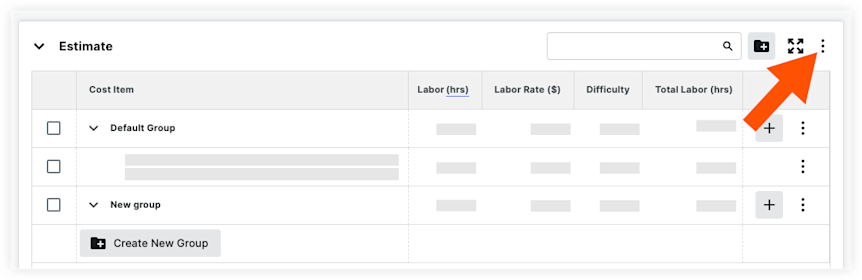
Column Name | Column Type | Override? | Description |
|---|---|---|---|
Labor Tax % | Standard | Yes | The percent at which to apply tax to labor. |
Labor Tax $ | Calculated | No | Labor Tax is equal to (Total Labor Sales + Overhead) x Labor Tax %. |
Material Tax % | Standard | Yes | The percent at which you want to apply tax to materials. |
Material Tax $ | Calculated | No | Material Tax is equal to Total Material Sales x Materials Tax %. |
[Other Taxes] | Based on what other cost types you have, you will see additional taxes. Other taxes is equal to Total [type] Sales x [type] Tax. | ||
Total Taxes | Calculated | No | Total Taxes is equal to Labor Tax + Material Tax + [Other Tax]. |
Others
Column Name | Column Type | Override? | Description |
|---|---|---|---|
Bonding | Standard | Yes | How much insurance percentage you pay based on Total Sales, Adjustments, and Taxes. Bonding is equal to (Total Sales + Total Adjustments + Taxes) x Bonding %. |
[Custom Adjustments] | Standard | Yes | Additional adjustments added. The amount is equal to (Total Sales + Total Adjustments+ Taxes) x [Custom Adjustment %]. |
Total Other | Calculated | No | Total Others is equal to the sum of all adjustment amounts in this section. |
Total
Column Name | Column Type | Override? | Description |
|---|---|---|---|
Total | Calculated | No | The Total Sales Price + Total Adjustments + Total Taxes + Total Other. |