What is the tendering and estimating integration?
Overview
The tendering and estimating integration allows you to create tender package directly from an estimate. By connecting the two experiences, user no longer need to recreate estimates in the Tendering tool. This allows you to send out accurate tender invitations more quickly, saving time in a competitive market. After a tender is submitted, you can update your estimate to reflect the submitted tender with a single click.
Candidates for the beta use both the Estimating and Enhanced Tendering tools.

Key features
Create tender packages directly from an estimate, without re-entering information.
Import price amounts from submitted tenders back into your estimate.
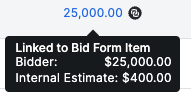
Tool tip show both the initial estimate and the levelled tender amounts.
Considerations
You can create multiple tender packages from the project's estimating tool.
Each estimate creates one tender package.
A separate tender form is created for each group within an estimate.
Cost codes are not currently pulled into a tender form.
You can edit a tender form to add sections, however this may mean the data would be mismatched and unit quantity item would be rolled up into a total amount when importing back into Estimating.
Line items in a tender form default to 'Amount' for the 'Response field type'.
If you are using a unit based quantity estimate in the estimating tool, you can can edit line item on the tender form to unit quantity. When you import tenders back to your estimate, they will sync correctly because the units match in the estimating tool.
If you are NOT using unit based quantity but update the tender form to unit based quantity, you must either have the tenderer resubmit with 'Amounts' or alter the tender in the Tendering tool before importing. Otherwise, the units will not match and you will see an error.
Tenders must be submitted to be imported into the Estimating tool.
See Also
Loading related articles...