Unlock a signed unconditional lien waiver as a payment application contact

 General availability in select markets (United States)

Flag Us Procore Pay is available in the United States. It is designed for main contractors and owner-builders who act as their own main contractors on a job. Procore Pay extends the payment application management functionality in the Procore web application to handle the payment process between main and specialty contractors.

Background

Procore Pay protects signees by automatically locking signed unconditional lien waiver. With Procore Pay, your signed lien waiver is only unlocked and available to the main contractor after you receive the payment application payment in full. However, you can unlock a lien waiver at any time. Because signing an unconditional lien waiver releases your lien rights, it is recommended that you only unlock the lien waiver after getting paid. If you decide to unlock a signed unconditional lien waiver before you receive payment, you do so at your own risk.

Things to Consider

  • Required User Permissions:

    • To unlock a signed, unconditional lien waiver, 'Read Only' level permission on the project's commitment tool and you must be assigned as 'payment application contact' on the commitment.

  • Additional Information:

    • You must submit your payment application before the valuation period's 'due date'.

Prerequisites

Steps

  1. Navigate to the Project level commitment tool.

  2. Locate the contract for the payment application with the signed unconditional lien waiver. Then click its Number link to open it.

  3. In the commitment, click the Payment applications tab.

  4. Locate the payment application with the signed unconditional lien waiver. Then click the payment application # link to open it.

  5. In the payment application's General tab, scroll down to the lien waivers card.

  6. Optional. To unlock the lien waiver, click Unlock. This button is only visible to the .

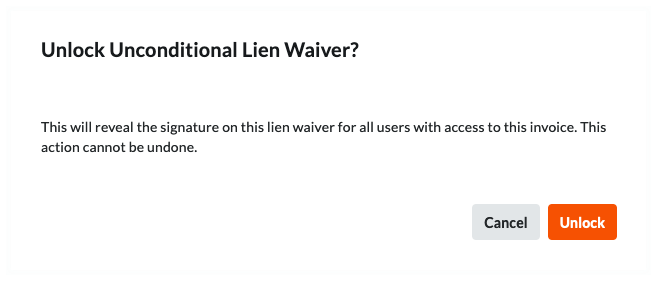
    Unlock Signed Unconditional Lien WaiverAn Unlock unconditional lien waiver? message appears.
     Warning

    Unlocking an unconditional lien waiver before receiving payment releases your lien rights. Ensure that you want to proceed with this action before clicking the Unlock button. This action cannot be undone.

    Unlock Unconditional Lien Waivers

  7. If you are sure you want to proceed with this action, click Unlock.
    A GREEN banner appears to confirm the unlock action. The GREY banner updates with the message below.

    Manually Unlocked Lien Waiver

Next Steps

See Also

Loading related articles...
