View business entities & accounts as a payor

 General availability in select markets (United States)

Flag Us Procore Pay is available in the United States. It is designed for main contractors and owner-builders who act as their own main contractors on a job. Procore Pay extends the payment application management functionality in the Procore web application to handle the payment process between main and specialty contractors.

Background

During the Procore Pay implementation process, your company's works with Procore to set up Procore Pay. When sending payment, your company might have one (1) or choose to work with Procore to set up multiple business entities to send payment.

Things to Consider

Prerequisites

Steps

  1. Navigate to the Company level Payments tool.
    The subcontractor payment applications tab is active by default.

  2. Click the Payment settings Icons Settings Gear icon.
    This opens the payment settings page.

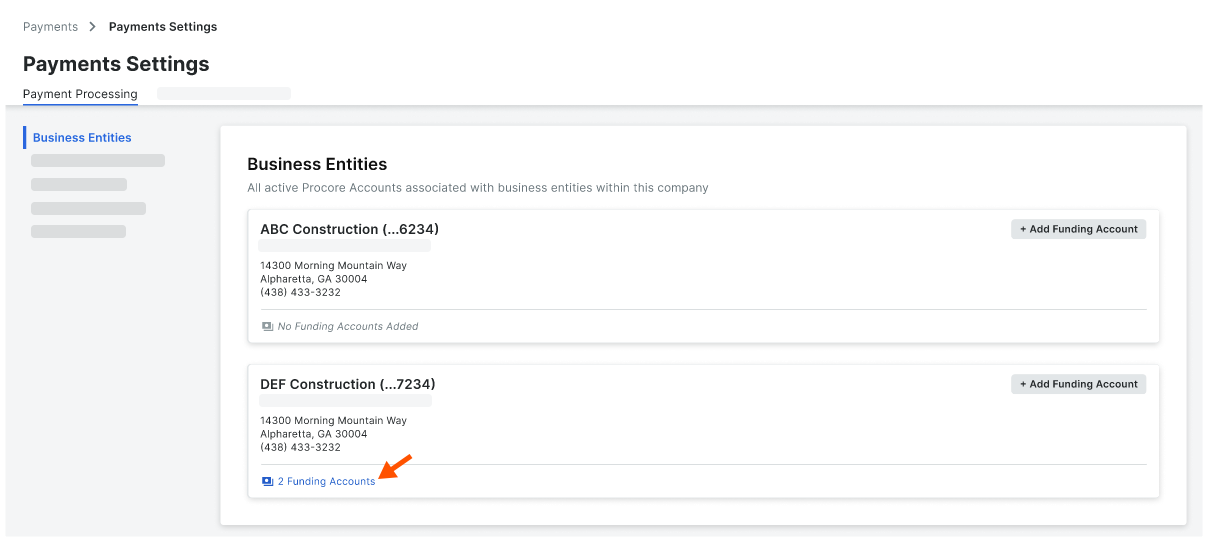
  3. In the Payment setting page, click Business entities.
    This page lists all of your company's business entities.

  4. Optional. If one (1) or more funding accounts exist, click the BLUE funding accounts link to view information for the corresponding entity.

    View Business Entity Funding Accounts

Next Step

See Also

Loading related articles...