General availability in select markets (United States)
Procore Pay is available in the United States. It is designed for main contractors and owner-builders who act as their own main contractors on a job. Procore Pay extends the payment application management functionality in the Procore web application to handle the payment process between main and specialty contractors.
Background
To pay payment applications with Procore Pay, a
In Procore Pay, a payment admin is a designated Procore user who administers the Company level payment tool for that company's Procore account. Typically, one (1) or a small number of trusted users are designated to perform the tasks associated with this role.
must add and verify at least one (1)
In Procore Pay, a funding account is a bank account where money is held by a financial institution and controlled by the payor. This is the 'Pay from' account.
in the Company level Payment tool. A payment admin can add more than one funding account to Procore Pay. However, a disbursement can only have one (1) funding account. Before adding a funding account, your company must open at least one (1)
In Procore Pay, a deposit account is a bank account where money is held by a financial institution to process the payor's authorised transactions. This is the transaction banking account.
For security and verification purposes, all newly added funding accounts must undergo a test before they can be used to fund disbursements. Before adding a new account, contact your dedicated Procore Point of Contact or customer success.
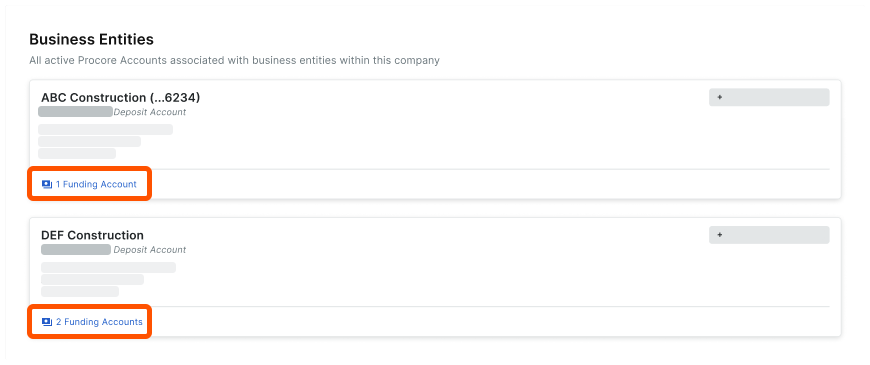
Click the Payment settings icon. This opens the payments settings page. The 'Business entities' page in the 'payment processing' tab is active by default. This page lists all of your company's business entities that have been configured to pay payment applications.
For each business entity, click the funding account(s) link to view the account information.
Funding accounts table
The table below details the elements for the funding accounts table. Verified funding accounts can receive a
In Procore Pay, a drawdown request refers to the request to process the drawdown of funds from a payor's funding account, to transmit the funds to the payor's deposit account. This is also referred to as a Fedwire Drawdown.
when creating a
A disbursement is the action of paying out money from a fund. In Procore Pay, a disbursement withdraws funds from a main contractor's funding account and transmits them to the main contractor's deposit account. Payment orders are then issued to withdraw funds from the deposit account to pay payment applications.
.
Element
Type
Description
Learn more...
Nickname
Field
A payment admin enters the account nickname when linking an account. The nickname allows payment disbursers to identify an account when creating disbursements. It also protects your financial privacy by eliminating the need to provide disbursers with the full bank account number.
A payment admin enters a unique bank ID portion to be part of the unique cheque number issued to the next payment application payout from this account. A payout is a payment application payment in a disbursement.
A payment admin enters a unique Next check no to be part of the unique check number issued to the next payment application payout from this account. A payout is a payment application payment in a disbursement.
Click the vertical ellipsis and choose one of the menu options. The available options in this menu are: Edit, Set as default funding account and Deactivate. On the default account, only Edit and Deactivate are available. On a deactivated account, only Edit is available.
 Procore Pay is available in the United States. It is designed for main contractors and owner-builders who act as their own main contractors on a job. Procore Pay extends the payment application management functionality in the Procore web application to handle the payment process between main and specialty contractors.
 icon.