Set Bidder Information for a Company in the Project Directory
Things to Consider
Bidder information added in the Project level Directory is added to the Company level Directory.
To apply these settings to all projects, see Set Bidder Information for a Company in the Company Directory.
Steps
Navigate to the Project level Directory tool.
Click the Companies tab.
Click Edit next to the company.
OR Click the company name.
Click the Bidder Info tab.
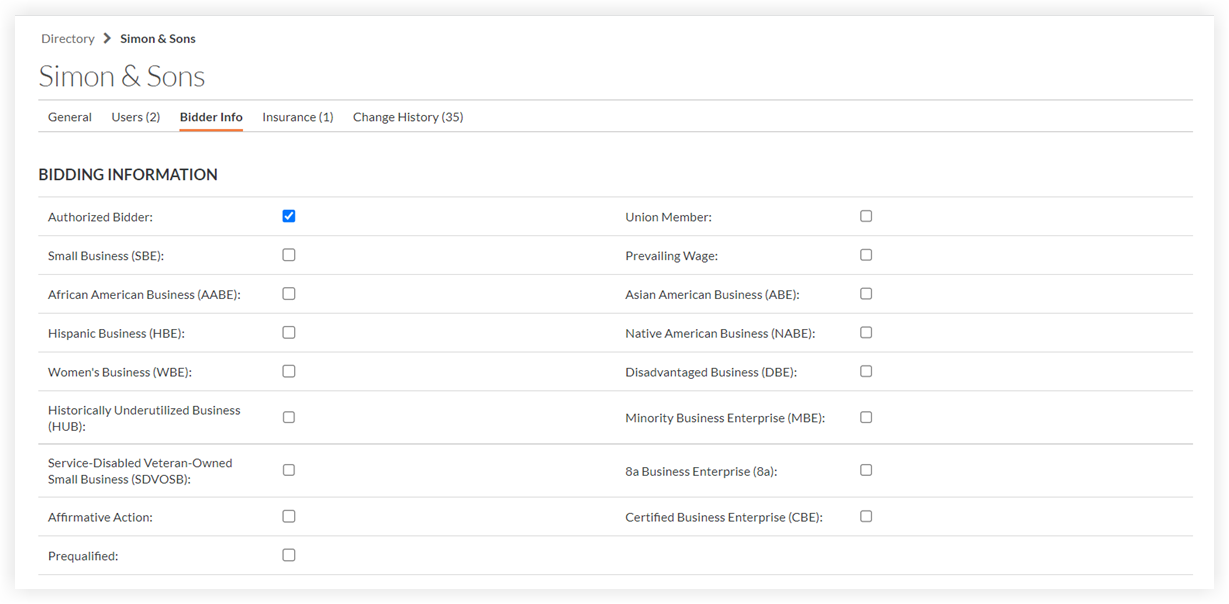
Authorized Bidder: Mark this checkbox to designate an Authorized Bidder. This is for reporting purposes only and does not affect Procore emails.
Mark the checkboxes for any of the relevant attributes for the company.
Set trades and cost codes so that the company will appear when searching by trade or cost code in the Bidding tool.

Trade: A classification for the company's work type (e.g., Electrical, Mechanical, HVAC). If your trades are not set up, see Add a Custom Trade.
Cost Code: Select which cost codes apply to this company.
Click Save.
Enter a comment in the 'Leave a Comment' section.
Optional: Click the stars to rank the company, and view this information when searching for bidders in Procore.
Click Post Comment.


See Also
Loading related articles...