View Drawings (iOS)
Beta - Diseño de varias columnas para iPad
Ahora está disponible un nuevo diseño de dos y tres columnas para iPads, lo que facilita la navegación por diferentes herramientas. El diseño de dos columnas funciona con todas las herramientas, mientras que el diseño de tres columnas es para documentos, planos, formularios y especificaciones. Los administradores de la compañía pueden habilitar la versión beta de la experiencia de tableta multicolumna (iOS) en Procore Explore.
 icon.
icon. icon for the set or drawings that you want to view.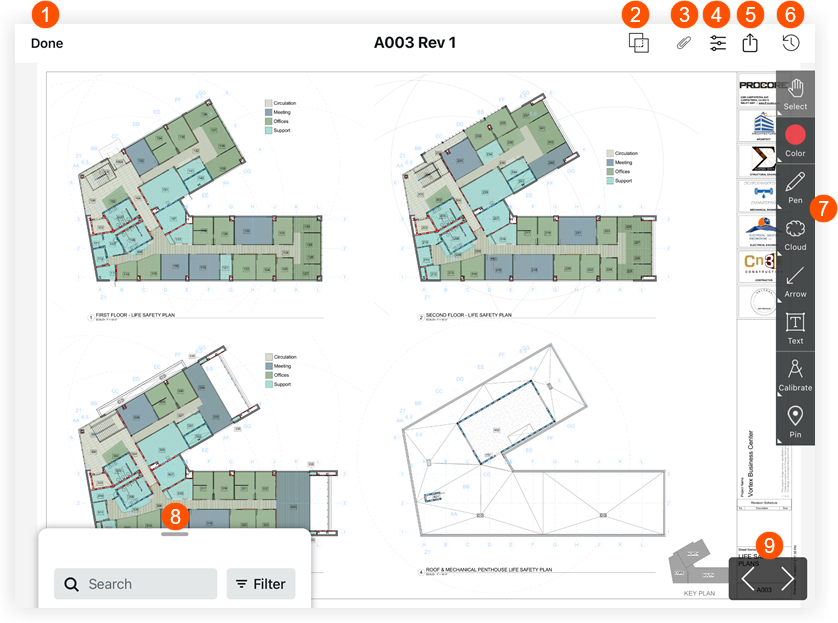
 Tap Done if you want to return to the drawing log.
 Tap Drawing Comparison to view the differences between two drawing revisions. See
  Tap Attachments to view any attachments that have been added as attachments or markups to the drawing.
 Tap Filters to toggle between Published and Personal layers or markups. See
  Tap Recent to view a list of recently viewed drawings.
 Tap a tool on the Markup Toolbar to markup your drawings. See
  Tap the search bar to search for text that appears on drawings.
 Tap the left or right arrows to switch to different drawings.