Add a Section Box to an Autodesk® Navisworks® Model
Background
Procore recommends applying a 'Section Box' to your Navisworks® model prior to publishing. Unlike a Navisworks® 'Section Plane', a 'Section Box' provides a defined boundary that allows Procore to calculate the camera view center, optimizing web performance on mobile devices. This action is important because it helps to prevent rendering issues, especially on models using a 'Shared' or 'World' coordinate system.
Things to Consider
Prerequisites
Ensure you've installed the following on a Windows® computer:
Autodesk® Navisworks®
Procore BIM Plugin
Apply a 'Section Box' to your model before publishing. Navisworks® Section Planes are not published to Procore.
Steps
Configure the Section Box in Navisworks®
Open your model in Navisworks®.
Click the Viewpoint tab and select Enable Sectioning.
Click Mode and select Box.
Define the box's boundaries using one of these methods:
Manual Adjustment: Use the Scale, Move, and Rotate tools to manually fit the box around the specific portion of the model you want to publish.
Fit Selection: Select an item (or multiple items) in the Selection Tree (i.e., Architectural or Structure models are usually good options). Click the Fit Selection button to automatically snap the box to that specific geometry.
Save the section box:
Right-click and select Save Viewpoint.
Name it as you want.
Link to Home View & Publish to Procore
Once the Section Box is configured on your model, do the following:
In the Procore BIM Plugin while setting the Home View:
If setting up a new view, click Add.
If updating an existing model version, click Edit.
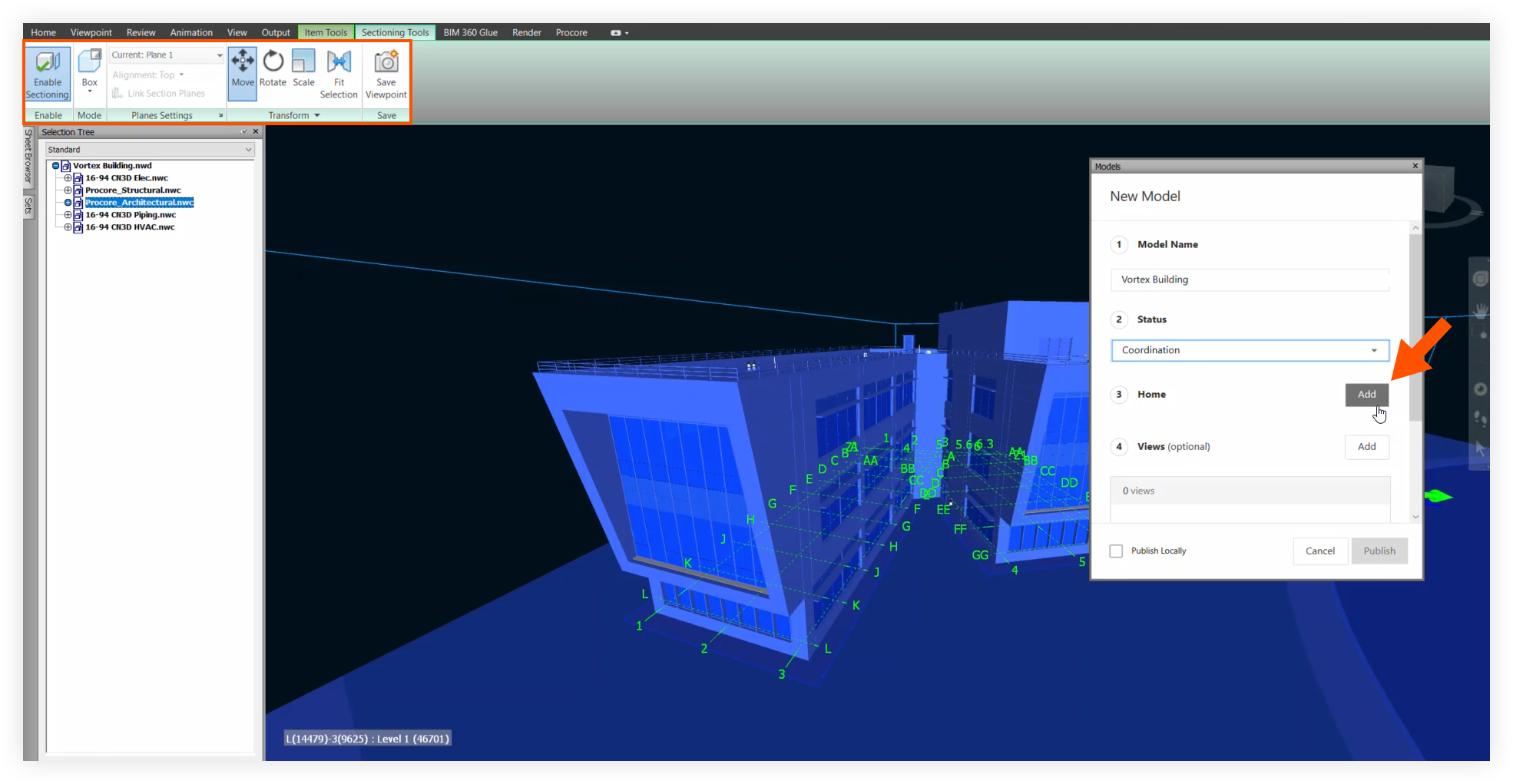
Click Save to link the Section Box to the Home View.
Ensure the following:
All the required model information fields are complete.
The Section Box is visible.
Continue with Publish a Model to Procore.
See Also
Loading related articles...