Personalizar la visualización de la columna en la herramienta de precalificación
Fondo
Puede personalizar las columnas en la herramienta Precalificaciones para que muestre datos que sean relevantes para usted.
Aspectos a tener en cuenta
Permisos de usuario requeridos: permisos de nivel "Solo lectura" o superiores en la herramienta Precalificaciones.
Steps
Navigate to the company's Prequalifications tool.
Click the vertical ellipsis (⋮).
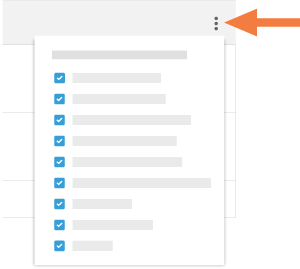
Choose from these options:
Show a Column
Place a mark in the checkbox next to a column name to have it show on the Prequalifications page. The default setting is to show all available columns.Hide a Column
Remove the mark from the checkbox that corresponds to the column you want to hide on the Prequalifications page.
See Also
Loading related articles...