ERP DMSA App Installation Guide

Background

When you're working with Procore to implement an ERP integration, your implementation specialist might guide you to install a custom app in your company's Procore account that will create a DMSA through which the integration can manage the flow of data. Not all integration implementations will require this step.

 Warning

Do NOT take the actions described in this article unless your integration implementation specialist has explicitly advised you to do so.
Things to Consider

  • Required User Permissions:

    • 'Admin' level permissions on the company's Directory tool.

Prerequisites

  • Wait for your integration implementation specialist to direct you to take these steps.

Steps

  1. Log in to your Procore account.

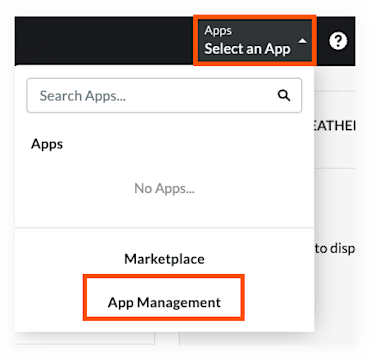
  2. Select App Management from the Apps menu in the toolbar.

    Select App Management

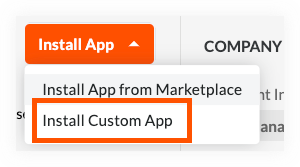
  3. Choose Install Custom App from the Install App menu.

    Install Custom App

  4. Enter the App Version ID for your ERP connector type according to the table below, then click Install.


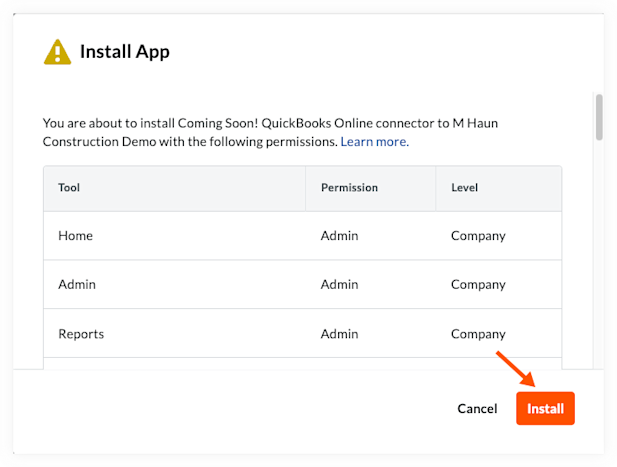
5. A window will open to confirm the permissions the app requires to be installed successfully. These permissions have already been configured by Procore, and no modification is required. Click Install to continue.

App Install Permissions
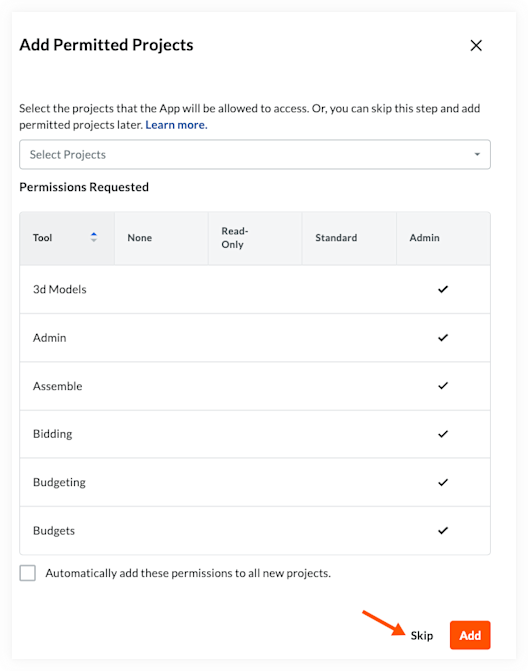
6. You may be prompted to 'Add Permitted Projects'. If this window appears during your installation, click Skip.

Add Permitted Projects
7. Installation is complete.

ERP Integration Type

App Version ID

Sage 300 CRE®

6abd9d40-ee8d-4aac-ae04-586d74b4f2e8

Sage 100 Contractor®

3f12716f-4737-4c82-953b-27a01e30e813

Sage Intacct®

cb22d63e-2805-4a8d-b690-f45f43340b33

Trimble® Spectrum

d90a5306-b28c-4b5f-96bd-dee055d4c5f0

QuickBooks® Desktop

356c71df-2963-4c58-ace8-85b311f47d33

Xero™

ebb7162a-f4a3-4c2e-854e-2c342ac3f4f5

Trimble® Vista

b0f554b5-df2b-4267-9c11-a3faf1bfc39a

Acumatica®

8309975f-648f-4bc5-b90c-82a12dc9638b

MYOB Advanced Construction

a9d2a2eb-0143-4395-af0e-ab8d1a83f891

CMiC

Internal DMSA: 03f51833-6b06-4196-b0fe-a89238d1241d External DMSA: 5df6a815-1849-435f-b358-01e4c110128f

Yardi Voyager®

77d82867-835e-4842-94f1-4a6266983b80

MRI Platform X®

e60e1147-13c8-40f0-a8b0-e3a0f35a074a

NetSuite®

872c86c9-3995-4a48-81d5-958fee81e2a4

QuickBooks® Online

76b45f67-5c7f-45fc-84c0-de6e61161484

Workday®

504b3f0c-8a49-4019-b43f-5d250aee86f5

ERP Professional Services

61d36a90-62a3-4d49-9cfb-566622ec118d

Sage 300 CRE®

6abd9d40-ee8d-4aac-ae04-586d74b4f2e8

Next Steps

  • Reach out to your integration implementation specialist to let them know this action is complete.

See Also

Loading related articles...