Comment les fichiers PDF verrouillés ou restreints sont-ils gérés dans l’outil de gestion de documents ?

Disponibilité régionale

L’outil de gestion de documents est disponible dans certains pays. Il n’est pas encore disponible pour les comptes Procore aux États-Unis. Pour en savoir plus, veuillez contacter votre point de contact Procore.

Arrière-plan

Les fichiers PDF restreints (également appelés fichiers verrouillés) chargés dans l’outil de gestion de documents du projet fonctionnent différemment des fichiers sans restrictions de sécurité. Lorsqu’un fichier restreint est chargé, ses fonctionnalités peuvent être limitées dans Procore en fonction des restrictions de sécurité qui s’appliquent au fichier.

Nous vous recommandons de charger des fichiers sans aucune restriction de sécurité dans l’outil de gestion de documents pour garantir le plein fonctionnement des fichiers dans Procore.

Answer

Restricted PDF files uploaded to a project's Document Management tool have the following limitations:

  • If a PDF file has viewing restrictions and requires a password to open it, the file cannot be opened or viewed within Procore. You can choose to download the file to your computer and open it in another viewer if you have the appropriate access.

  • A restricted PDF files that is NOT password protected can be opened and viewed in the viewer, but a persistent banner is shown (shown below), stating it is restricted and markup functionality is blocked. Since these files restrict alterations, adding markups to them within Procore would prevent them from being downloaded or distributed from Procore.
    restricted-file-banner-doc-mgmt.png

How to Tell if Your PDF Has Copying or Editing Restrictions

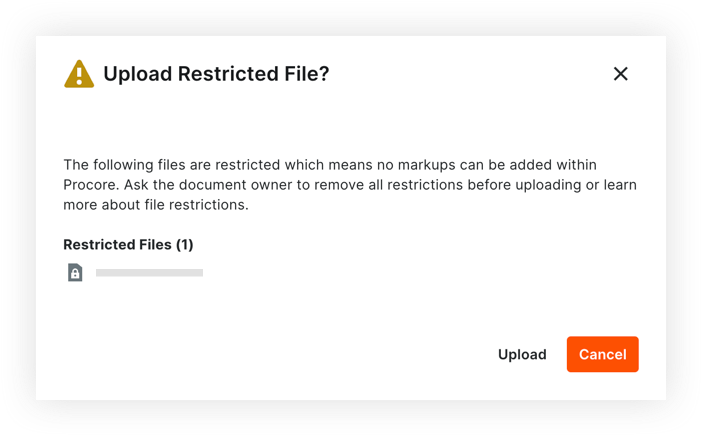
If you upload a PDF file from your local computer to the Document Management tool, Procore checks the PDF for security restrictions. You can choose to cancel attaching the file, or to proceed.

If the PDF has copying or editing restrictions, a warning message appears with any files that are restricted (shown below).upload-restricted-file-doc-mgmt.png

See Also

Loading related articles...