Comment configurer la fonctionnalité de facturation et de paiement des sous-traitants pour Procore + QuickBooks ?
Réponse
Si vous disposez d’une autorisation de niveau « Admin » dans l’outil Intégrations ERP de l’entreprise, vous pouvez terminer la configuration initiale de la QuickBooks® pour ordinateur de bureau fonction Factures de sous-traitant afin que votre équipe puisse synchroniser les factures de Procore vers QuickBooks® pour ordinateur de bureau.
Éléments à prendre en compte
Autorisations utilisateur requises:
Pour terminer la configuration initiale, Autorisations de niveau « Admin » dans l’outil Intégrations ERP de l’entreprise.
Pour activer cette fonction et désigner les approbateurs de comptabilité qui seront autorisés à synchroniser les factures, vous devez être le commanditaire exécutif de votre entreprise.
Exigences:
Cette fonctionnalité vous oblige à configurer un élément de service de retenue de garantie comme spécifié ci-dessous, même si votre entreprise n’applique généralement pas de retenue de garantie aux factures des sous-traitants.
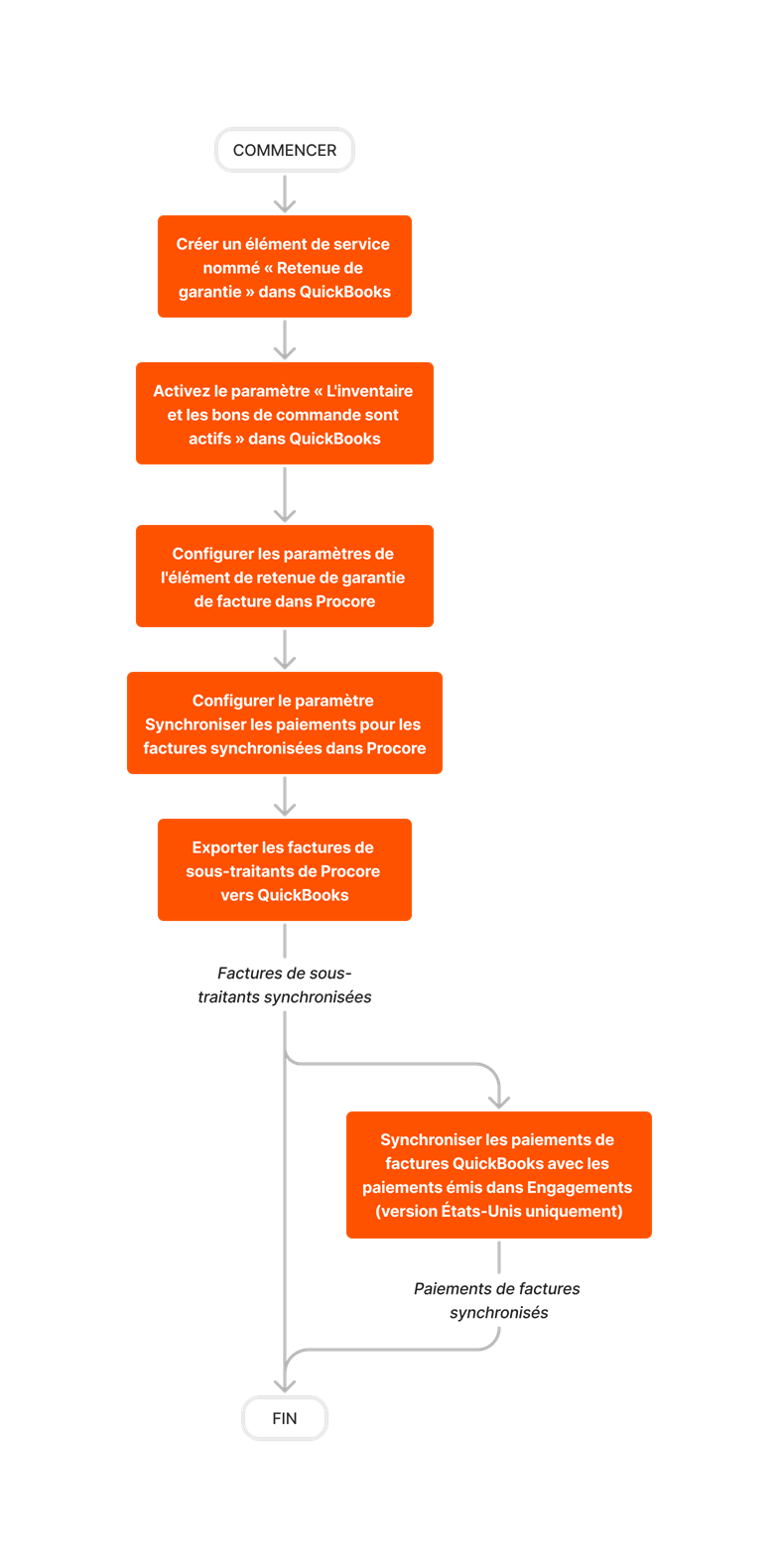
Diagramme de flux de travail
Follow the steps below to setup the subcontractor invoices any payments feature for Procore + QuickBooks® pour ordinateur de bureau. If you are using the US or Canada edition of QuickBooks® pour ordinateur de bureau, this lets you export subcontractor invoices from Procore to QuickBooks® pour ordinateur de bureau.
Limited Release
The ability to sync QuickBooks® pour ordinateur de bureau Bill Payments with Payments Issued in the Commitments tool is currently supported with Procore + QuickBooks® pour ordinateur de bureau U.S. Edition. It is NOT currently supported with the Procore + QuickBooks® pour ordinateur de bureau Canada Edition.