Quelle est la différence entre l’acceptation d’une invitation Procore et la création d’un compte d’entreprise Procore gratuit ?
Version limitée
Les comptes Procore gratuits ne sont actuellement disponibles qu’aux États-Unis et au Canada.
Les comptes Procore gratuits ne sont actuellement disponibles qu’aux États-Unis et au Canada.
Procore propose deux méthodes distinctes pour accéder à la plateforme. Dans les deux cas, vous devez configurer un identifiant utilisateur pour pouvoir vous connecter à Procore.
Accepter une invitation à partir d’un compte d’entreprise Procore existant.
Vous êtes un employé de l’entreprise et avez été invité à vous connecter à Procore.
Vous êtes un collaborateur de l’entreprise et avez été invité à travailler sur les projets de l’entreprise dans Procore.
Création d’un compte d’entreprise Procore gratuit pour votre entreprise de construction où vous pouvez gérer votre équipe, les informations sur l’entreprise, le profil de l’entreprise, ainsi que les appels d’offres auxquels votre entreprise a été invitée. Vous pouvez également accéder aux projets où vous êtes un collaborateur pour d’autres comptes d’entreprise Procore.
Ci-dessous, nous vous guiderons à travers les différences entre ces processus pour vous aider à choisir la bonne voie pour vos besoins.
Répondez à l’invitation de votre employeur ou d’un partenaire commercial à rejoindre son organisation Procore en tant qu’utilisateur.
Open the welcome email.
If you are brand new to Procore, click Get Started.
Note: If you have used Procore for a project in the past and already have a password, click Login. Then continue with How to Log in to Procore Web (app.procore.com).
Enter a password in the Password field.
The password must meet the following requirements:
Procore's Password Requirements:
Cinq (8) caractères ou plus
Au moins une (1) lettre majuscule
Au moins une (1) lettre minuscule
Au moins un (1) numéro
Au moins un (1) caractère spécial ( !@#$ %^&*)
Les mots de passe doivent correspondre
Vous ne pouvez pas réutiliser vos quatre (4) derniers mots de passe
As your password begins meeting the password requirements, the circles next to the requirements are marked.
Note: In the image below, the password still needs a special character.
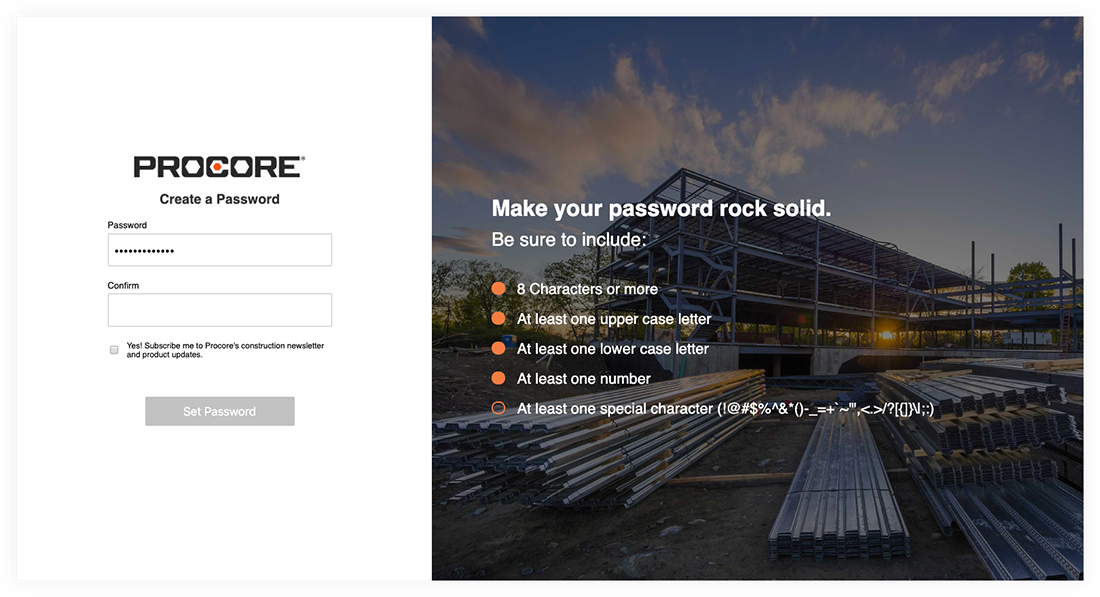
Enter the same password again in the Confirm field.
If you want to subscribe to Procore's Construction Newsletter and receive information about product updates, mark the checkbox.
Click Set Password.
The system will log you into Procore using your email address and new password.
Les comptes Procore gratuits ne sont actuellement disponibles qu’aux États-Unis et au Canada.
Créez le compte d’entreprise Procore gratuit de votre entreprise pour débloquer diverses fonctionnalités, telles que la visualisation et l’accès aux projets et appels d’offres Procore, la gestion de votre profil d’équipe et d’entreprise, etc.
When creating a free Procore Company account, there is a waiting period while Procore verifies your company information. See How are businesses approved to be listed on the Procore Construction Network?
Click here to open the signup page.
Note: You can also click Sign Up from the Procore Construction Network page.
On the Name and Email page, enter the following information:
First Name
Last Name
Company Email Address
If you do not yet have a Procore Login, follow these steps:
From your email, click the link to verify your email address.
Enter your password and mark the checkbox after you review the 'Privacy Notice' and 'User Terms of Service'. Then click Continue to Login.
Log in to Procore using your company email address and password.
Enter information about your company and click Search.
Review the matching companies.
If one of the companies matches your company, follow these steps:
Click Request to Join next to your company.
Select your role from the dropdown list.
Mark the checkbox if you would like to receive updates from Procore.
Click Submit.
If none of the companies match your company, follow these steps:
Enter your company's information.
Mark the checkbox if you would like to receive updates from Procore.
Click Create Account.
Loading related articles...