Copier les codes de coût de l’entreprise dans un projet
Arrière-plan
A Cost Code identifies a specific type of work on a project to track its associated expenses, such as labor, materials, and equipment.
Éléments à prendre en compte
Autorisations utilisateur requises :
Vous avez besoin de l’un des éléments suivants :
Autorisation de niveau « Admin » dans l’outil Admin au niveau projet.
Autorisations de niveau « Lecture seule » ou « Standard » dans l’outil Admin au niveau projet avec l’autorisation granulaire « Gérer les codes SDP » activée dans votre modèle d’autorisation.
Limitations:
For customers using the Company level ERP Integrations tool
The default segments in WBS are compatible with Procore's ERP Integrations tool. However, some integrations do NOT yet support custom segments.For customers who have independently developed or purchased a third-party solution to integrate with Procore
To take advantage of the custom segment capabilities associated with WBS, any existing API integrations that you have independently developed or purchased to interact with Procore must be updated to support Procore's new WBS API.
Conditions préalables
Steps
Navigate to the Project level Admin tool.
Under 'Project Settings', click the Work Breakdown Structure link.
In the 'Segments' list, click the Cost Codes link.
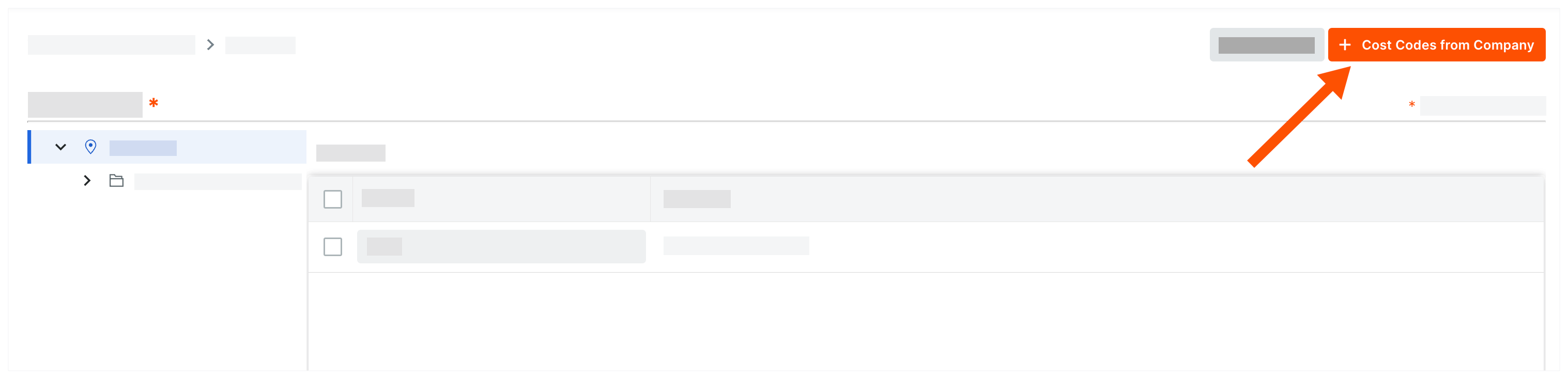
Click Cost Codes from Company.
In the 'Add Cost Codes to this Project' window, choose from these options:
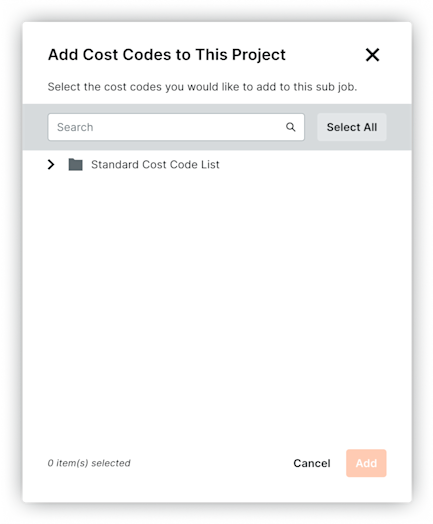
To copy all company cost codes to the project, click Select All.
To select specific cost codes, type a code in the Search Cost Codes box and highlight the codes to add.
To choose cost codes, expand the desired segment items and highlight the segment items to copy.
Click Add.
Next Steps
See Also
Loading related articles...