Définir les informations du candidat pour une entreprise dans l’annuaire du projet
Éléments à prendre en compte
Les informations du candidat ajoutées dans l’annuaire au niveau projet sont ajoutées à l’annuaire au niveau entreprise.
Pour appliquer ces paramètres à tous les projets, voir Définir les informations de Candidat d’un Entreprise dans le Entreprise Annuaire.
Escalier
Accédez à l’outil Annuaire au niveau projet.
Cliquez sur l’onglet Entreprises .
Cliquez sur Modifier à côté de l’entreprise.
OU Cliquez sur le nom de l’entreprise.
Cliquez sur l’onglet Informations sur le candidat .
Candidat autorisé: Cochez cette case à cocher pour désigner un candidat autorisé. Ceci est uniquement à des fins de rapport et n’affecte pas les e-mails Procore.
Cochez les cases de l’un des attributs pertinents pour l’entreprise.
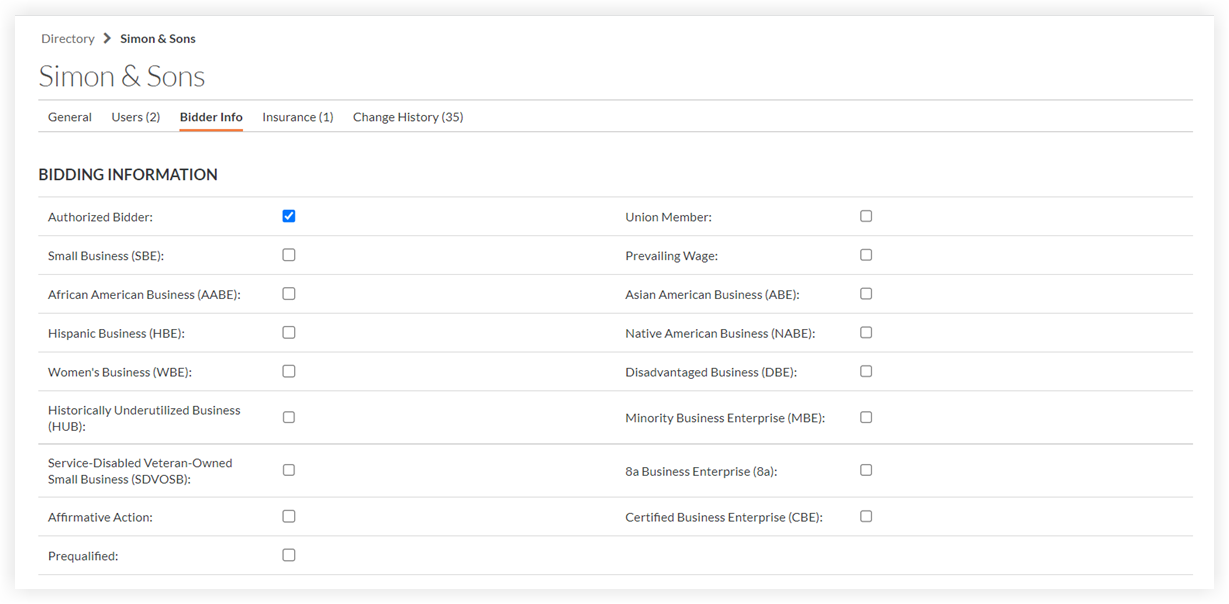
Définissez les métiers et les codes de coût afin que l’entreprise apparaisse dans les recherches par métier ou par code de coût dans l’outil répondre à un appel d'offres.

Métier: Classification selon le type de travail de l’entreprise (p. ex., électrique, mécanique, CVC). Si vos métiers ne sont pas configurés, voir Ajouter un métier personnalisé.
Code de coût: sélectionnez les codes de coût qui s’appliquent à cette entreprise.
Cliquez sur Enregistrer.
Saisissez un commentaire dans la section « Laisser un commentaire ».
Optionnel: Cliquez sur les étoiles pour classer l’entreprise et afficher ces informations lors de la recherche de candidats dans Procore.
Cliquez sur Publier un commentaire.


Voir aussi
Chargement des articles connexes...