Télécharger une version précédente d’un fichier dans l’outil Documents au niveau entreprise
Fond
Lorsqu’un utilisateur charge une nouvelle version d’un fichier dans l’outil Documents, la version mise à jour remplace la version précédente. Si vous devez afficher les versions précédentes d’un fichier, vous pouvez télécharger une copie de chaque version à partir de l’historique des versions du fichier.
Éléments à prendre en compte
Autorisations utilisateur requises :
Autorisations « Lecture seule » ou supérieures dans l’outil Documents au niveau entreprise.
ETSi le fichier est marqué comme privé, l’accès doit vous être accordé via les paramètres d’autorisation du fichier. Voir Gérer les autorisations pour les documents au niveau entreprise.
Informations complémentaires :
Si vous disposez de l’autorisation « Admin » dans l’outil Documents, vous pouvez afficher le registre des téléchargements pour voir une liste des utilisateurs qui ont téléchargé le fichier.
Escalier
Accédez à l’outil Documents .
Sélectionnez le fichier dont vous souhaitez afficher les versions.
Si le panneau Informations n’est pas déjà ouvert, cliquez sur l’icône Infos
 .
.Sous Version, cliquez sur le lien correspondant au nombre de versions.
Remarque: comme indiqué dans l’image ci-dessous, vous cliqueriez sur le numéro « 2 » pour ouvrir l’historique des versions.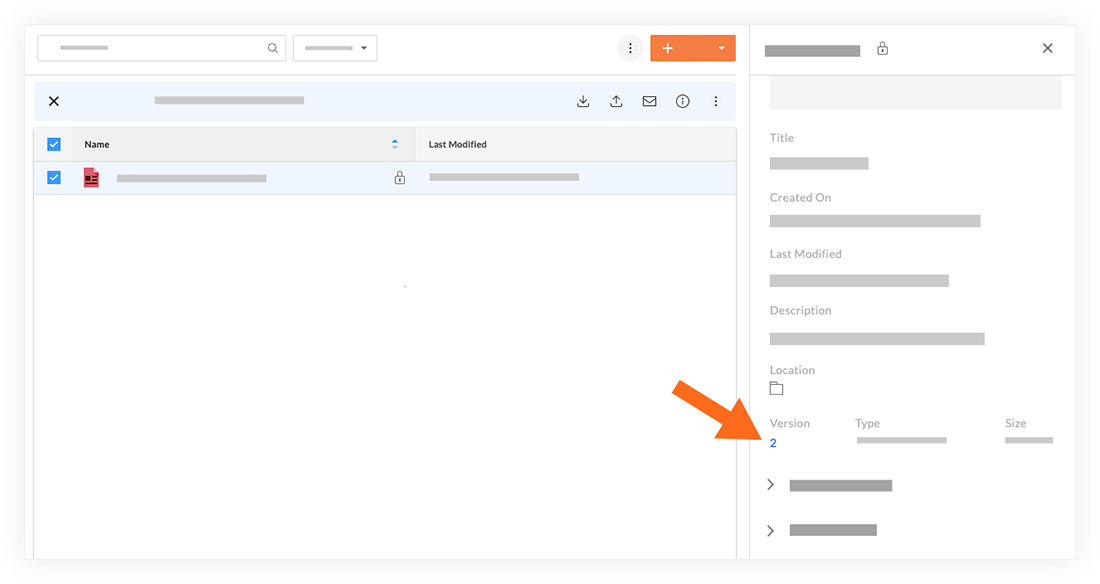
Passez votre souris sur la version que vous souhaitez télécharger.
Cliquez sur l’icône Télécharger
 .
.
Remarque: ceci télécharge une copie du fichier sur votre ordinateur.
Voir aussi
Chargement des articles connexes...