Créer des modèles de renonciation au privilège

 General Availability in Select Markets (United States)

flag-us.png Procore Pay is available in the United States. It is designed for General Contractors and Owner-Builders who act as their own General Contractors on a job. Procore Pay extends the Invoice Management functionality in the Procore web application to handle the payment process between general and specialty contractors.

Background

Payment Admins and Payments Disbursers can use the 'Payment Requirements' link on the 'Payment Settings' page in the Company Payments tool to create lien waiver templates for use on your Procore projects. Templates let you define your company's legal language and the layout of your project's lien waivers. They also allow you to customize the content with legal language that satisfies state-specific regulations. You can also add variables as placeholders in a template. A placeholder is a content insertion point that automatically inserts variable text sourced from Procore in the copy.

 Tips

What should I include in a lien waiver template? If this is your first time creating a lien waiver template in Procore, see What is a lien waiver? Because lien waiver laws and requirements are varied, Procore recommends contacting an attorney when writing your lien waiver copy to ensure it complies with laws and requirements.

Things to Consider

Conditions préalables

Video

Steps

  1. Navigate to the Company level Payments tool.

  2. Click the Payments Settings icon-settings-gear-android.png icon.
    This opens the Payment Settings page. The External Bank Accounts tab is active by default.

  3. Click the Payment Requirements tab.

  4. Click the Lien Waivers page.

  5. Click Create.
    This opens the Create Lien Waiver Template panel.

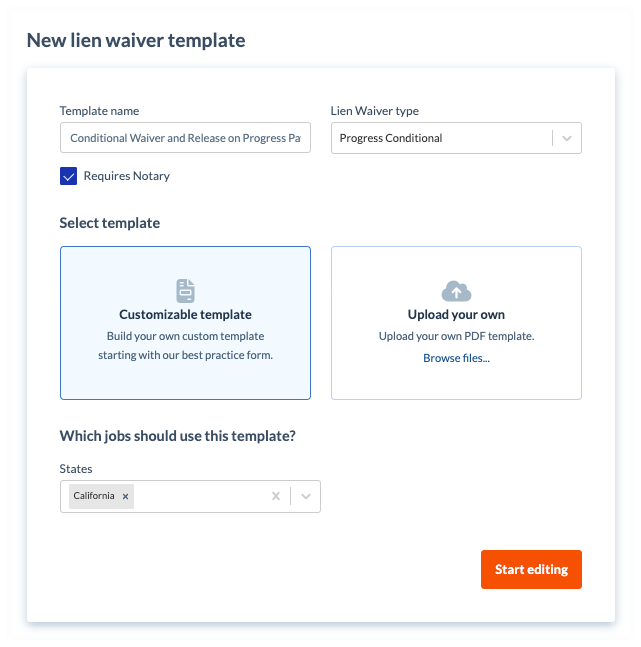
  6. Under New Lien Waiver Template, do the following:
    new-lien-waiver-template.png

     Note

    Un astérisque (*) ci-dessous indique un champ obligatoire.

    • Template Name*
      Type a name for the template.

    • Lien Waiver Type*
      Select the type of lien waiver.

       Pointe

      Que signifie chaque type ? Pour en savoir plus sur chaque option, voir Quels types de modèles de renonciation de privilège pouvez-vous créer ?

    • Optional: Requires Notary.
      Mark the checkbox to include space for a notary public's signature and legal seal. Clear the checkbox to omit this space.

  7. In the Select Template area, choose one of these options:

    • Customizable Template
      Click this option to build your own custom template using our best practice form.

    • Upload Your Own
      Click this option and then click the Browse Files button to select a PDF file to upload from your computer or network.

       Note

      Si votre fichier PDF contient des champs de formulaire prédéfinis, les espaces réservés pour ces champs de formulaire ne sont PAS importés.

  8. Under Which jobs should use this template? do the following:

    • States. Choose from these options in the drop-down list:

      • To apply the template to all states and territories, select All States. This is the default setting.

      • Select the applicable options to apply the template to specific states and territories. You can select one (1) or multiple options.

         Pointe

        La liste des États comprend-elle tous les États et territoires des États-Unis ? La liste des États de Procore comprend les 50 États, le District fédéral (Washington D.C.) et trois (3) territoires majeurs (Guam, Porto Rico et les îles Vierges américaines).

  9. Click Start Editing.

  10. In the template, use the controls in the text editor to add content and adjust the formatting and layout of the template.

  11. Optional: Under Variables, click and drag any variable into the appropriate position on the template.

  12. Optional: To preview the template, click Preview.

     Note

    Au fur et à mesure que vous créez votre modèle, Procore recommande de le prévisualiser pour vous assurer que le modèle fini vous fournit le résultat souhaité. Pour quitter la fenêtre Prévisualiser le modèle, cliquez sur le bouton Fermer .

  13. Click Create.
    Procore adds your template to the Lien Waiver Templates table.

Next Step

See Also

Loading related articles...