Create a Custom Time Type
Arrière-plan
Par défaut, Procore inclut plusieurs types de paiements par défaut (c.-à-d. Temps régulier, Heures supplémentaires, etc.) à utiliser sur une entrée de pointage (voir Créer une entrée de pointage ou Créer une feuille horaire). Si votre organisation utilise des types de paiements supplémentaires, vous pouvez créer des types d’horaires personnalisés à sélectionner dans la liste déroulante Types d’horaires.
Éléments à prendre en compte
Autorisations utilisateur requises:
Autorisations de niveau « Admin » dans l’outil Pointage de l’entreprise.
Types d’horaires par défaut:
Temps régulier
Temps double
Exempter
Vacances
Heures supplémentaires
PTO
Salaire
Vacances
Conditions préalables
L’administrateur Procore de votre entreprise doit demander l’activation de l’outil Pointage au niveau entreprise dans Procore.
Steps
Navigate to the company's Timecard tool.
Click the Configure Settings
 icon.
icon.Scroll to the 'Time Types' section.
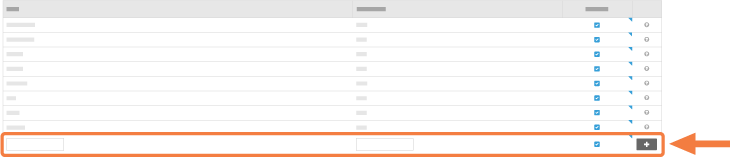
Do the following:
Type: Enter a new time type in the box provided.
Abbreviation: Enter an abbreviation for the time type in the box provided.
Available? Keep the checkbox marked if you would like the pay type to appear in the "Time Type" drop-down menu when entering a timecard entry.
Click Add.
This adds the new time type to the list. Your new time type(s) are now available for use in the "Time Type" drop-down list in the Timecard (see Create a Timecard Entry) and/or Timesheets (see Create a Timesheet) tools.
See Also
Loading related articles...