Importer des saisies des heures Procore dans QuickBooks® Desktop
Arrière-plan
Si votre entreprise traite ses paie à l’aide QuickBooks® pour ordinateur de bureaude , vous pouvez transférer les saisies des heures depuis l’outil Niveau entreprise Feuilles horaires de Procore à l’aide d’un processus simple d’exportation de fichiers.
Éléments à prendre en compte
Versions prises en charge:
QuickBooks® pour ordinateur de bureau 2021 ou avant
QuickBooks® pour ordinateur de bureau 2022 avec QuickBooks® Time
QuickBooks® pour ordinateur de bureau 2022 ou après
Informations complémentaires:
Les mêmes étapes sont utilisées si vous utilisez QuickBooks® pour ordinateur de bureau (2021 ou une version antérieure) ou QuickBooks® pour ordinateur de bureau (2022) avec QuickBooks® Time.
Différentes étapes sont requises pour QuickBooks® pour ordinateur de bureau (2022) sans QuickBooks® Time.
Conditions préalables
Configurez les paramètres de paie de l’outil Feuilles horaires pour QuickBooks® pour ordinateur de bureau.
Révisez le processus dans Transférer des saisies des heures Procore vers QuickBooks® Bureau.
Suivez les étapes décrites dans Exporter une liste de minuteries sous forme de fichier IIF à partir de QuickBooks® Bureau.
Suivez les étapes décrites dans Exporter les saisies des heures de Procore pour les importer dans QuickBooks® Bureau.
Escalier
QuickBooks® Bureau (2022 ou après)
QuickBooks® Bureau avec QuickBooks® Time (2021 ou version antérieure)
QuickBooks® Bureau (2022 ou après)
Connectez-vous en tant qu’Admin QuickBooks® pour ordinateur de bureau en mode mono-utilisateur.
Cliquez sur Fichier.
Cliquez sur Utilitaires.
Cliquez sur Importer.
Cliquez sur Fichiers IIF.
Cliquez sur Importer pour moi. J’y remédierai plus tard.
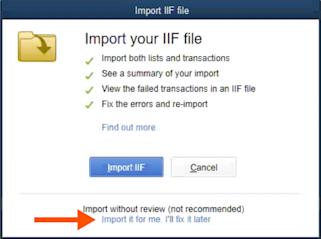
Sélectionnez votre fichier IIF.
Cliquez sur Ouvrir.
Vérifiez que les données sont correctes dans QuickBooks® pour ordinateur de bureau.
QuickBooks® Bureau avec QuickBooks® Time (2021 ou version antérieure)
Connectez-vous à QuickBooks® pour ordinateur de bureau Bureau en tant qu’Admin en mode mono-utilisateur.
Cliquez sur Fichier.
Cliquez sur Utilitaires.
Cliquez sur Importer.
Cliquez sur Timer Activities (Activités du minuteur).
Dans la fenêtre « Importer des activités à partir du compteur », cliquez sur OK.
Sélectionnez votre fichier IIF.
Remarque : Si le message « Ce fichier d’importation a été créé par une ancienne version de QuickBooks Pro Timer » s’affiche, cliquez sur OK pour poursuivre le processus d’importation.Cliquez sur Ouvrir.
Vérifiez que les données sont correctes dans QuickBooks® pour ordinateur de bureau. Pour afficher plus d’informations sur un élément, sélectionnez un élément et cliquez sur Afficher le rapport.
Voir aussi
Chargement des articles connexes...