View Drawings (Android)
Things to Consider
Required User Permissions:
'Read Only' or higher permissions on the project's Drawings tool.
Additional Information:
Drawings can be viewed in offline mode if they were previously viewed and cached on the mobile device.
Connected drawings have a connected
 icon.
icon.
Steps
Navigate to the project's Drawings tool using the Procore app on an Android device.
If necessary, tap the download icon for the set or drawings that you want to view. See Sync and Download Drawings (Android).
Note: You can switch between Grid or List view for drawings by tapping the grid or list
  icon at the top of the screen.
Tap the drawing you want to view.
The following actions are available:
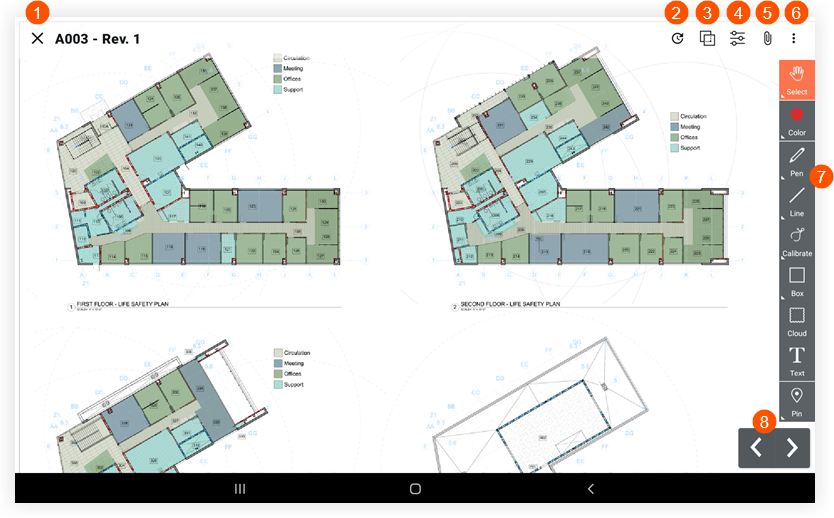
 Tap X if you want to return to the drawing log.
 Tap Recent to view a list of recently viewed drawings.
 Tap Compare Drawings to compare the current drawing with another revision or drawing. See Compare Drawings (Android).
 Tap Filters to toggle between the Published and Personal layers or drawing markups. See What is the difference between personal and published drawing markups?
 Tap Attachments to view any attachments that have been added as attachments or markups to the drawing.
 Tap
Tap  to access the following options:
Attachments: Tap to view attachments (if any) that have been added to the drawing.
Snapshot: Tap to download or email a snapshot of the drawing.
Print: Tap to print the drawing using a connected printer.
Download: Tap to download the drawing to your device.
Email: Tap to email the drawing to users in the project.
 Tap a tool in the Markup toolbar to mark up the drawing. See Mark up a Drawing (Android).Note: To view an item that has been linked on a drawing, tap the linked item on the markup.
 Tap the left or right arrows to switch to different drawings.
See Also
Loading related articles...