View the Executive Dashboard in the Portfolio Tool
Background
The Portfolio tool includes an Executive Dashboard that shows a pictorial view of the active projects in your company's account.
Things to Consider
Prerequisites
To get the most out of your Executive Dashboard, we recommended that your company create the following items for use with Procore:
Steps
Navigate to your company's Portfolio tool.
Click the Executive Dashboard tab.

View each of the available charts:
Projects by Programs. Reveals a pie chart showing the total number of Procore projects in your company's account by program.
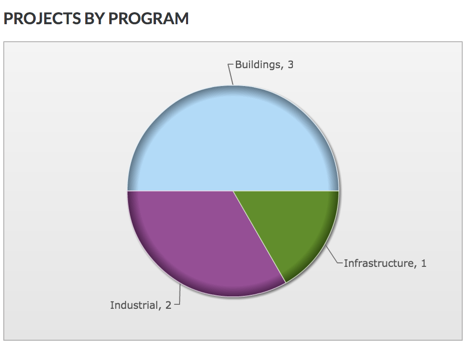
Projects by Stage. Reveals a pie chart showing the total number of Procore projects in your company's account for each project stage.
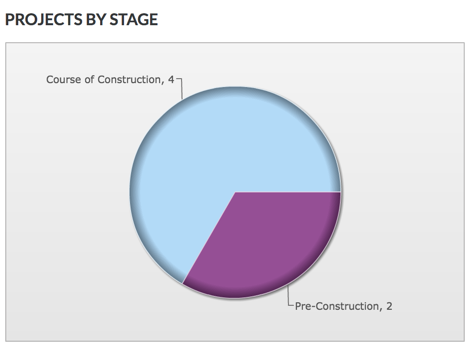
Projects by Type. Reveals a pie chart showing the total number of Procore projects in your company's account for each project type.
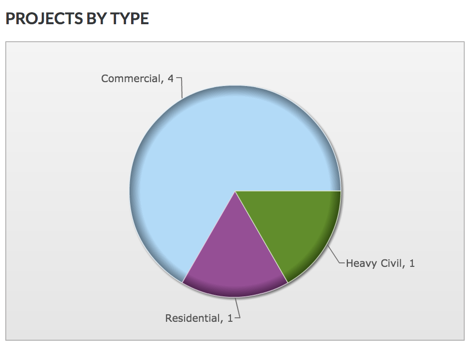
Projects by Department. Reveals a pie chart showing the total number of Procore projects in your company's account for each department.
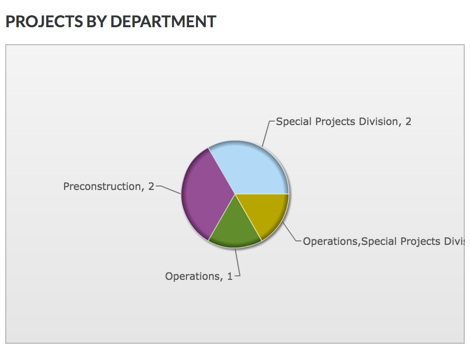
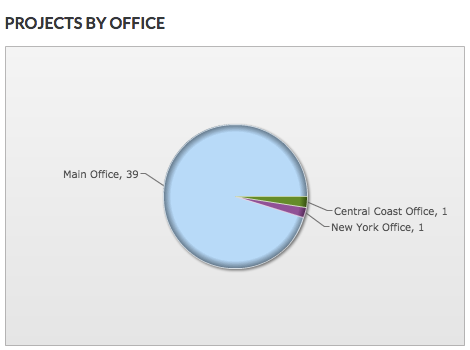
Projects by Office. Reveals a pie chart showing the total number of Procore projects in your company's account for each office location.
See Also
Loading related articles...