Best Practices: Submittal Builder
Introduction
Procore's Submittal Builder is likely one of the fastest and most accurate methods for creating a Submittal Registry if your project has a published specification book. Submittal Builder can find submittals based on specific formatting in a spec book and create a basic submittal register. This guide will show you best practices to help you maximize efficiency when using Procore's original Submittal Builder.
If you are using the AI-powered Submittal Builder version, some of the best practices outlined in this article are less necessary since that system is much less reliant on formatting and is designed to surface 'hidden' requirements.
Who can use Submittal Builder?
Procore's original Submittal Builder is available in English to accounts in the United States, Canada, and Australia.
Procore's AI-powered Submittal Builder is available in English to Enhanced and Premier Procore accounts in the United States, Canada, and Australia.
Ideal Specification Formatting for Submittal Builder
Submittal Builder looks for specific components when it processes a spec book. If these components are missing, few or no submittal items will be detected. Please review the information below and review your spec book to ensure these rules are being followed:
OCR technology is heavily reliant on the quality of the PDF document. For this reason, we highly recommend using Vector-based PDFs whenever possible. See What is the difference between raster and vector content in PDFs? for more information.
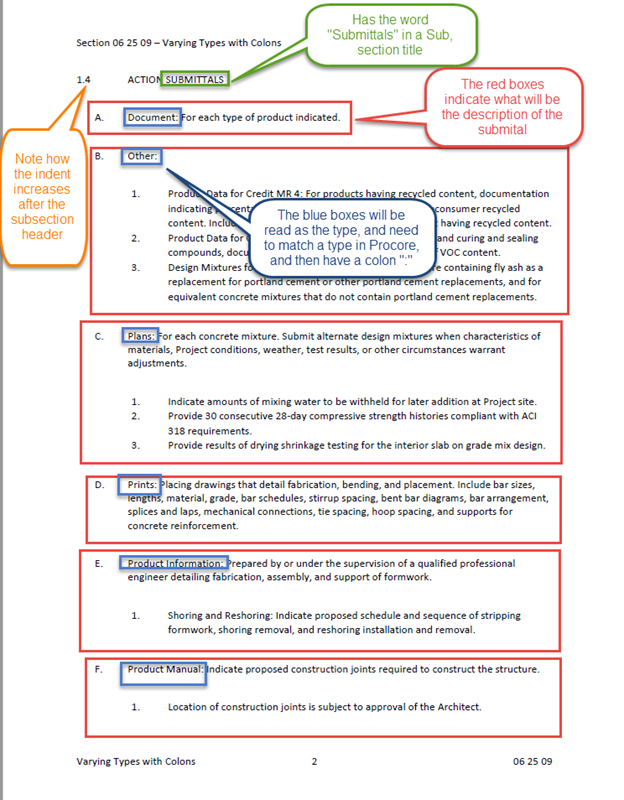
Submittal Builder only looks for submittal information within section headings that have the English word "submittals" in it.
Within the "submittals" subsections, items need to be indented to be captured properly as individual submittal items.
On each item's name, Submittal Builder looks for any exact matches to your company's submittal types (default or custom) before a colon (:). If no exact match is detected, the submittal type will be selected as "Other" by default.
Here is an example of optimal formatting:
Since you can only run Submittal Builder once for each spec section revision on a project, ensuring the spec book has optimal formatting is an important first step so that the system can capture all of the possible submittals. Otherwise, you may need to fo the following:
Manually create submittal items later.
Delete the spec section from the project and re-upload it to run Submittal Builder again.
Upload the spec section as a revision.