Which filters can I apply to the Change Events tool?
Answer
Filters allow you to view a subset of your data. In the Change Events tool, the filter options that you can apply are dependent upon the tab that you are viewing. The illustration below shows you the options in the Detail tab. However, each tab in this tool has different filter options.
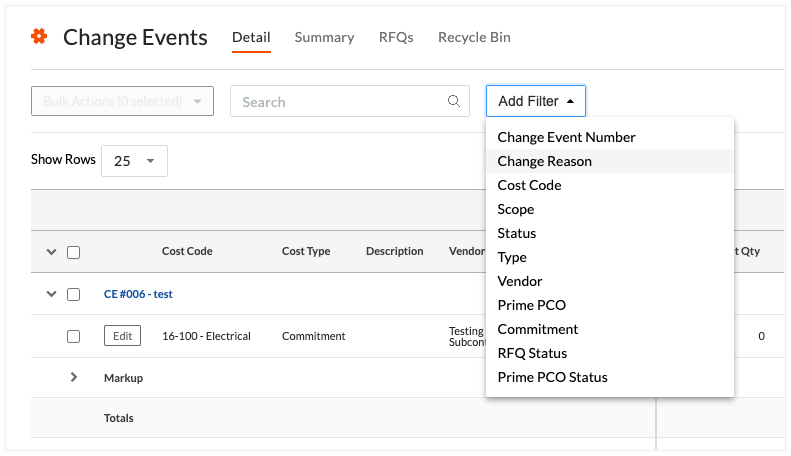
The table below details the filter options for each tab in the project's Change Events tool.
Filter Option | Detail Tab | Summary Tab | RFQs Tab | Recycle Bin Tab |
|---|---|---|---|---|
Change Event Number |
|
| ||
Change Reason |
| |||
Commitment Cost |
| |||
Contracting Company |
| |||
Cost Code |
| |||
Prime PCO Status |
| |||
Prime PCO Price |
| |||
RFQ Status |
| |||
Reason |
|
| ||
Scope |
|
|
| |
Status |
|
|
|
|
Type |
|
|
| |
Vendor |
|

See Also
Loading related articles...