Update Expiring Insurance for a Vendor in the Company Directory
背景
Procore 会自动通过电子邮件将你的 In Procore, the term Insurance Manager refers to an internal employee (or multiple employees) at your company who serve as your organization's primary point of contact(s) for ensuring that the insurance policies for your contractors, subcontractors, and other vendors are in compliance with requirements and that their required policies and certificates are kept up-to-date.
需要考虑的事项
如果为 Sage 300 CRE 启用了ERP集成工具,则当 Procore 的数据与 Sage 300 CRE 同步时,Procore 公司记录中的以下保险字段现在将被锁定。您必须在集成ERP系统中进行这些更新:保险类型(例如,普通保险、汽车保险、雨伞保险和工人保险)、生效日期、到期日期、限额、名称和保单编号。
Prerequisites
Steps
首先在公司目录中将一家保险提供商作为公司添加。请参阅在公司目录中添加或编辑供应商/公司。
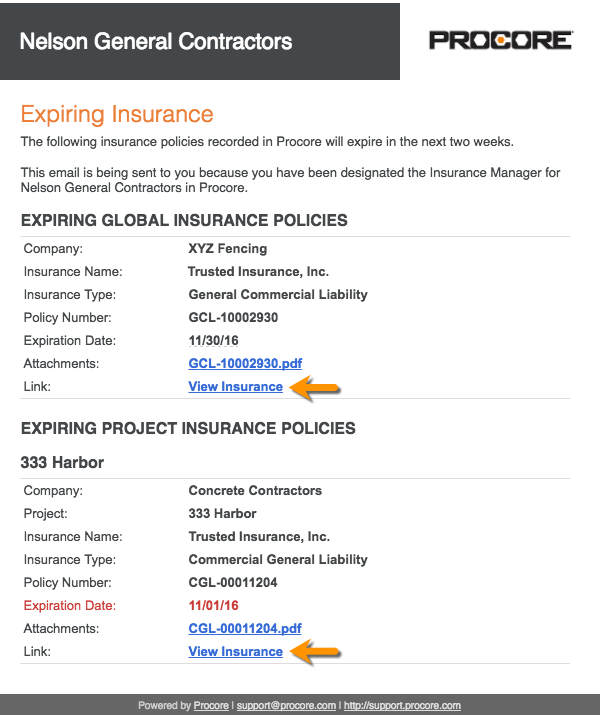
In your email client, open the 'Expiring Insurance' email from Procore.
Click the View Insurance link.
If you are not logged into Procore, log in.
Update the value in any cell with the blue caret symbol.
OR
Click Edit to change the status, add an attachment, or enter insurance notes.Click Save.