View Milestones in Portfolio Financials
Legacy
This information is intended for accounts with Portfolio Financials product in Procore. Please reach out to your Procore point of contact for more information.
This information is intended for accounts with Portfolio Financials product in Procore. Please reach out to your Procore point of contact for more information.
The Milestones section in Portfolio Financials allows you to keep track of high-level milestones for the project, such as the 'Project Start' and 'Project End' dates.All milestones for the project show on a timeline on the Project Page so that you can see dates for milestones in relation to one another. The Milestone section also tracks the status for each milestone, and after a milestone is reached, you can mark the milestone as complete. Depending on your notification settings, you can choose to receive email notifications before milestones approach. All additions and changes to milestones are noted in the Revision History log.
Required User Permissions:
'Full Access' to the project or higher.
Navigate to the Project Page.
Scroll to the Milestones section.
Milestones are shown on a timeline view to indicate project milestones in relation to one another.
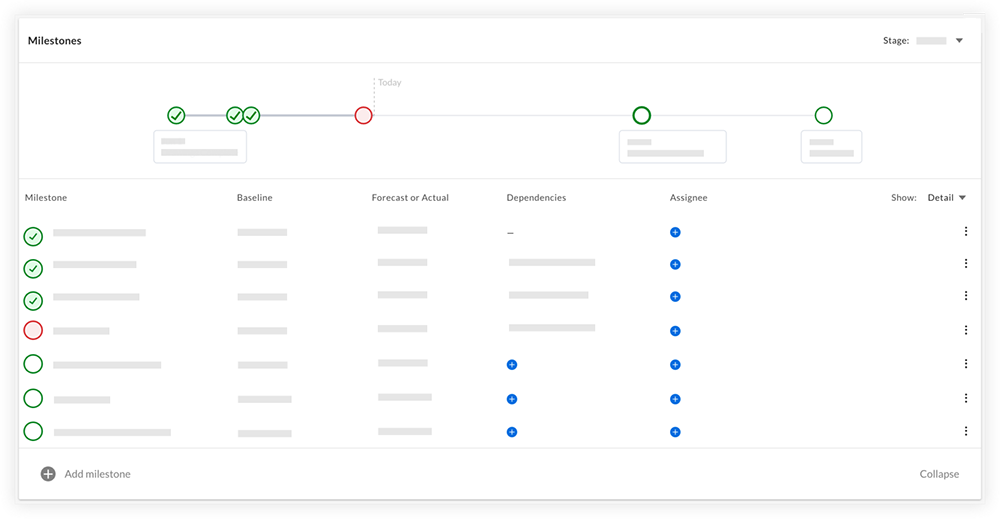
You can see which milestones based on the following icons:
 Green checkmark circle: Indicates a milestone that has been completed on time.
 Red circle: Indicates a milestone that has not been completed by the date set for the milestone.
 Green empty circle: Indicates a milestone that has not been completed, but the date has not passed.
Optional: To view revision history for milestones, click the Show drop-down menu and select Revision History. See View Revision History for Milestones in Portfolio Financials.
Loading related articles...