Edit a Custom Prequalification Question
Background
Once a custom question has been created and added to the Prequalificatioin form you can go back and edit the question.
Things to Consider
Required User Permissions:
'Admin' on the company's Prequalifications tool.
Additional Information:
There is only one Prequalification form for your company.
Any edits will create a new version of the single Prequalification form and will update any existing forms sent to users.
You will not be able to Publish from the Edit page.
If you remove a question you will not be able to add that exact question back later. The question must be reworded to be added at a later date.
Steps
Navigate to the company's Prequalifications tool.
Click the Form tab.

Click the Edit
 icon.
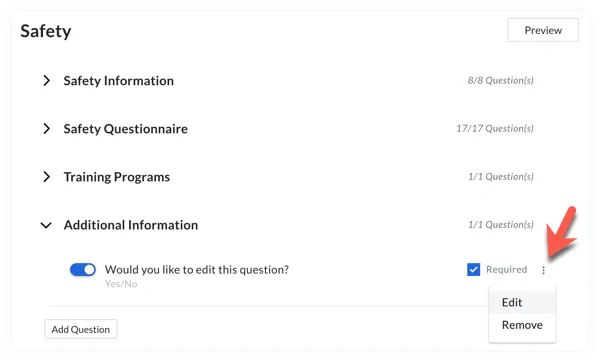
icon.Navigate to a category (e.g. General Information, Safety, Insurance and Bonding, Financials) and click the caret to expand the 'Additional Information' subsection.
Note: Each category on the form has an 'Additional Information' subsection with the option to add custom questions using the Add Question button. Scroll to the end of the section/subsection you want to add a custom question to.Under 'Additional Information', click the vertical ellipses then click Edit.
Edit the question to your preference.
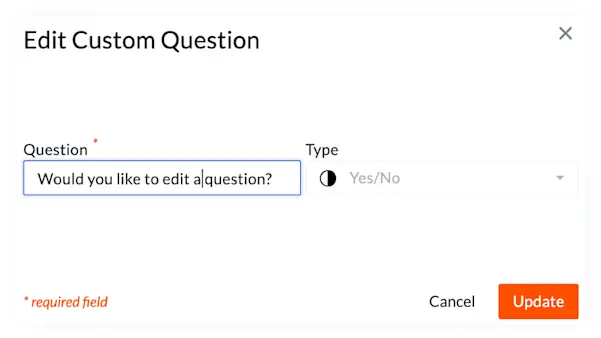
Note: When editing a Yes or No question type you can only update the text in the question field.Click Update.
Edit Question Types
Text: When editing a text type question the format of the response is disabled. You can only edit the question field. Changing the answer format from short answer to paragraph box is not allowed.
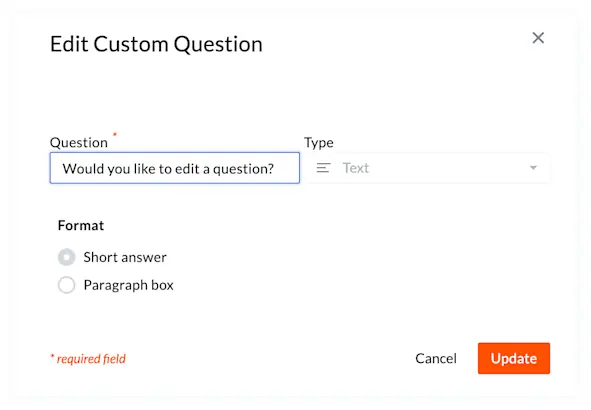
Dropdown: When editing dropdown questions, use the status icon to toggle response options between active and inactive; inactive options are disabled and hidden from the list. While you can still edit the question text, add options, or alphabetize the list, you cannot change a single-select question to a multi-select question after it is created.
The following question types can only be changed when editing the question field text:
Currency
Date
File Upload
Number
Phone Number
Yes/No
See Also
Loading related articles...