What fieldset configurations are recommended for configurable fieldsets?
Background
A Procore account user who has 'Admin' level permission on the company's Admin tool can configure certain configurable fieldsets for supported tools.
With configurable fieldsets, you can control which fields are required, optional or hidden. This simplifies the user interface and allows you to customise forms according to your company-specific requirements. For example, if you want to make sure everyone fills in the 'contributing behaviour' field for an incident report, you can use configurable fieldsets to mark the field as 'Required'. These fieldset configurations will be reflected in your custom report, allowing you to improve your analytics based on what's important to your company.
If you apply a new configuration to a fieldset that is being used by an existing project, the new configuration will be applied when creating a form or update its information. For example, if you change the 'contributing behaviour' fieldset to be 'Required' for an observation, a user will be prompted to update the field when editing the observation.
By configuring tool fieldsets, you can create a company standard according to your business process to ensure consistency and prevent data entry errors. When you configure a fieldset, the fieldset will apply to all new projects with the option to apply it to existing projects. This makes it easier for users to adopt each tool. The answer below provides Procore's recommendations for default fieldset configurations, which are optimised for companies managing around £20M in annual construction volume.
For more information about configurable fieldsets, see What are configurable fieldsets and which Procore tools support them?
For instructions on creating new configurable fieldsets, see Create new configurable fieldsets OR Click here to view the steps.
Navigate to the Company level Admin tool.
Under 'Tool settings', click the tool you want to create configurable fieldsets for.
Click the Fieldsets tab.
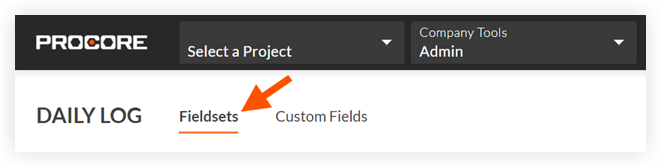
Note: Tools without other setting in the Company level admin tool will open to this page automatically.Click Create fieldset and if required, select the fieldset type.
Enter a name for the fieldset, then click Create.
On the 'Edit Fieldset' page, each field name has the following options:
Do one of the following:
Click the toggle to the ON
 position to make the field visible in the section.
Click the toggle to the OFF
 position to hide the field in the section.
Note: A faded toggle icon indicates that the field is visible and cannot be changed to hidden.
Do one of the following:
Mark the 'Required' tickbox to designate the field as required.
Clear the 'Required' tickbox to designate the field as optional. Notes:
Optional: If available, click Create section to create a new section. See Create custom sections.
Click Save.
In the 'Apply changes to [#] project(s)?' window, click Assign projects to add the fieldset to projects.
In the 'Assign projects' window, mark the tickbox next to each project you want to apply the fieldset to and click Update.
In the 'Apply changes to [#] project(s)?' window, click Confirm.
Optional: To set a fieldset as the default for new projects, click the
 icon at the end of its row on the 'Fieldsets' tab and select Set as new project default. Note
Projects created from a project template that include fieldsets will inherit the fieldsets from the project template instead of your company's default. See Configure a project template.