What is a manual hold on a subcontractor payment application?

 General availability in select markets (United States)

Flag Us Procore Pay is available in the United States. It is designed for main contractors and owner-builders who act as their own main contractors on a job. Procore Pay extends the payment application management functionality in the Procore web application to handle the payment process between main and specialty contractors.

Background

When using Procore Pay to send payments, a Payor's or can use the Company level Payment tool to manage payment holds. Payment application administrators can manage holds with the Project level payment application management tools.

Answer

With Procore Pay, manual holds can be applied to payment for a variety of reasons. These include quality issues, such as when delivered work is subpar or warranty support is uncertain. Holds might also be applied for incomplete work, work not meeting the specified quality level, contract disputes, financial concerns or compliance issues. Whatever your reason for applying a hold, Procore Pay users can apply these hold types on subcontractor payment applications:

  • Payment application holds. A , , and users with 'admin' level permissions on the payment tool can create a payment application hold to alert users about a hold on a specific subcontractor payment application.

  • Vendor holds. A or , can apply a vendor hold to a payment application to alert users to pause payment on all of the vendor's payment applications.

When creating a hold, user can also choose to share the hold with a payment application contact. User can also edit the details of a hold. Once the conditions are satisfied, user can release the hold.

More

What permissions do you need to manage holds on subcontractor payment applications?

Action

Designated Procore Pay roles

Permission level on Procore tools

Payment admin 1

Payment disburser 1

'admin' on payment 1

'Admin' on commitment (payment application administrator)

'Read Only' or 'Standard' on commitments

Create a payment application hold

Minus 32

Edit a payment application hold

Minus 32

View a payment application hold

Minus 32

Release a payment application hold

Minus 32

Create a vendor hold

Minus 32

Minus 32

Minus 32

Edit a vendor hold

Minus 32

Minus 32

Minus 32

View a vendor hold

Minus 32

Release a vendor hold

Minus 32

Minus 32

Minus 32

Do holds prevent users from making payment application payments?

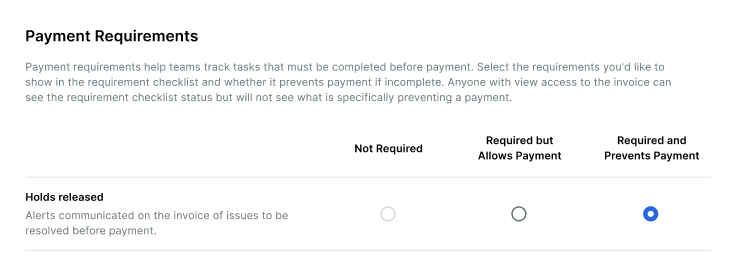
Only if your company's payment admin configures the Holds released setting to use the Required and prevents payment option. See Configure payment requirements as a payor.

Example

To prevent Procore Pay users from paying payment applications, the Required and prevents payments option must turned ON for the Holds released setting.Holds Released Prevent Payments

Important! When the Required and prevents payment setting is turned ON, Procore Pay displays an alert banner on the affected subcontractor payment application(s). It also prevents users from creating disbursements until the hold is released. See Release a manual hold on a payment application.

How long can a hold be placed on a subcontractor payment application?

Users with the required user permissions can place a hold on a subcontractor payment application at any time. Holds can also be released at any time. See Create and apply a manual hold on a payment application.


How do I apply holds?

Procore Pay users with the required user permissions can create and apply holds. To learn how to create a new hold, Create and apply a manual hold on a payment application.


How do I release holds?

To learn how to release a hold on a payment application, see Release a manual hold on a payment application. Once a hold is released, it can be re-applied later.


See Also

Loading related articles...