What is a partial budget line item?
Answer
A partial budget line item is a new budget line item that includes only a budget code. It is sometimes referred to as a 'non-budgeted', 'unbudgeted' or 'missing' line item, because it was NOT included as a planned expenditure on the project's original Budget. To see an example and learn more, see What is a partial budget line item?
In Procore, a partial budget line item is:
A new budget line item that consists of only a budget code as pictured below. See What is a budget code in Procore's WBS?

Can only be added to a budget after the project's original budget is locked. See Lock a Budget
Considered an 'unbudgeted line item' because it is NOT part of the project's original planned expenditures.
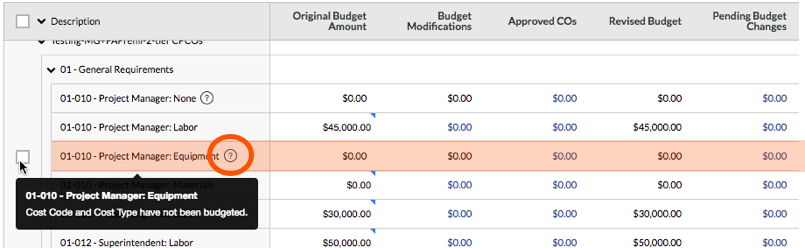
After you add a partial line item to a Budget, a question mark (?) appears next to the line item to it so you can find it later, as illustrated below.
How do I work with partial budget line items?
Important things to keep in mind when working with partial budget line items:
When working with partial line items, users are NOT permitted to perform the following actions:
Users may NOT edit the Budget unit quantity, Budget UoM or Budget unit cost.
Users may NOT edit the original Budget amount.
Users may NOT edit the Forecast to Complete value. See Use the 'Forecast to Complete' feature.
Users may NOT create budget modifications to transfer funds into or out of unbudgeted line items.
To include only partial line items in the Budget tab, add the 'Budget Row Type' filter and then place a tick in the 'Unbudgeted' box.
To exclude partial line item from the Budget tab, add the 'Budget row type' filter and place a tick in the 'Budget' box.
To learn more about applying filter to a budget view, see Apply the view, Snapshot, group and filter options on a budget view.
If a partial line item has not been assigned a cost code or cost type, the word 'None' appears in place of the missing cost code or cost type and the line item is considered to be a partial line item. This is also true when a division is selected as a cost code. Partial line items cannot be added to the Budget.
If the financial item associated with the partial line item is still editable, you can return to the point of creation to add the missing cost code or cost type/category.
If the financial item is NOT editable, the partial line items remain in the Budget with the question mark (?) symbol.
To view partial line items with no cost code assignment in the Budget tab, add the 'cost code' filter and place a tick in the 'None' box.
To view partial line items with no cost type assignment in the Budget tab, add the 'Category' filter and place a tick in the 'None' box.