What is application management?
Background
Procore's App management feature allows Procore administrators to install and manage third-party applications or Apps, on the Procore platform making them available for use in projects.
Types of applications
The Procore platform support different application types. Applications running on the Procore platform fall into three main categories:
Embedded applications are launched from and display directly within the Procore web user interface. By eliminating the need to switch between Procore and external services and sites, embedded applications provide a seamless experience for users and help improve efficiency and streamline workflows. Custom third-party applications developed by Procore customers well as marketplace applications developed by Procore technology partners can take advantage of the embedded experience.
Data Connection applications address the need to import, export or sync data between Procore and external applications or services. Custom third-party applications developed by Procore customers well as marketplace applications developed by Procore technology partners can be implemented and deployed as data connectors.
Agentic / AI-enabled applications incorporates artificial intelligence capabilities into Procore using AI agents and model context protocol (MCP) servers. These agents and MCP servers allow Procore AI to perform cross-system reasoning and actions while strictly respecting user permission boundaries. Data within external systems remains in its host system, while Procore data stays securely inside Procore, allowing agents to securely query live project information without copying or moving underlying data.
Application management in Procore
All app types are managed in Procore using the App management feature within the Procore Company Admin tool. Once an app is installed in a company account, administrators and authorised users can manage its setup, scoping and updates:
Data connection applications: Procore administrators can update, uninstall and reinstall applications, as well as view daily API request usage graphs.
Embedded applications: Procore administrators and project users can install embedded applications directly from the Procore marketplace or custom application links, create application configurations at the Company or Project level and launch them inside Procore.
Agentic / AI-enabled applications: Procore administrators can identify agentic components associated with an application, configure which projects those agents have access to and manage governance permissions. Uninstalling an agentic application automatically and cleanly purges all associated AI components and connections from Procore without leaving behind orphaned configurations.
Company level: Application management at the Company level is accessed through the Company Admin tool.
Portfolio/Procore Home > Core tools > admin > application management
Project level: Application management at the Project level is accessed using the 'Select an application' menu on the top navigation header.
Select an application > Explore > Application management.
Application installation and configuration
Understanding how applications are installed, configured and governed across your organisation is essential before deploying them:
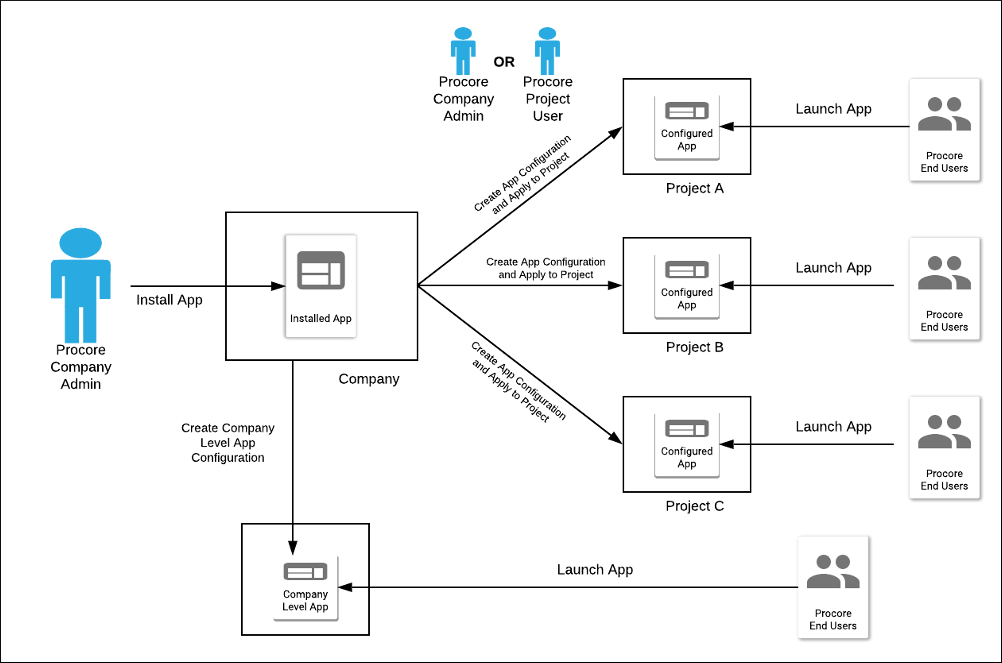
Installation: A Procore administrator discovers and installs an application from the Procore marketplace or installs a custom application directly into their company account. You can filter marketplace searches by specific capabilities.
Configuration & scoping:
Embedded applications can be configured at the Company level for all users or scoped to individual projects with project-specific settings.
Agentic / AI-enabled applications are configured by choosing the specific projects where the AI agent and MCP server connections are permitted to operate.
Governance & permissions: Agentic applications execute actions only with user approval and operate strictly within the bounds of the active user's existing Procore tool permissions.
Application launch & use: End users access embedded applications directly within the Procore interface or interact with enabled AI agents via Procore AI.
Application versioning and update notification
The application and integration you install in your Procore company account follow a semantic version numbering scheme. Semantic versioning involves a set of rules that guide how version numbers are assigned and incremented by the application developer. Semantic versioning is beneficial as it provides meaning about the underlying application code and what has been modified from one version of the application to the next.
A semantic version number takes the form X.Y.Z where X is the major version, Y is the minor version and Z is the patch version (major.minor.patch). As you update applications in your company account, version number elements are incremented depending on the type of change:
major - incremented when incompatible breaking changes are made to the application.
minor - incremented when new features to the application are released in a backward-compatible manner.
Patch - incremented the when bug fixes or other changes not directly affecting the functionality of the application are released.
To learn more about semantic versioning concepts, visit https://semver.org/.
When a new application version is released by a developer, the application management listing for the application will have an 'update available' notification.

Update notifications for marketplace applications appear once the new application version is reviewed by Procore and published to the marketplace. Update notifications for custom-installed applications appear when the developer promotes a new application version to the production env. In this scenario, the developer must provide you with an updated application version ID in order to complete the update.
See Update an installed application for steps to update an application in Application Management.
As you update previously installed application, it is important to note that any application configurations, company or project permission and permitted project setting you have set up will need to be reconfigured for an update application.