What variables can we include as placeholders in a lien waiver template?

 General availability in select markets (United States)

Flag Us Procore Pay is available in the United States. It is designed for main contractors and owner-builders who act as their own main contractors on a job. Procore Pay extends the payment application management functionality in the Procore web application to handle the payment process between main and specialty contractors.
Background

For companies who have purchased Procore Pay, authorised users can create lien waiver templates using content placeholders. A placeholder is a content insertion point for variable text sourced from a Procore tool. To learn more about templates, see What types of lien waiver templates can you create in Procore?

Answer

When creating a lien waiver template, a placeholder is a content insertion point that adds a variable that displays data values from a variety of fields in different Procore tools. Some placeholders are automatically added to Procore's default lien waiver templates. Template creator can add and remove placeholders on both the default and any custom templates.

Example

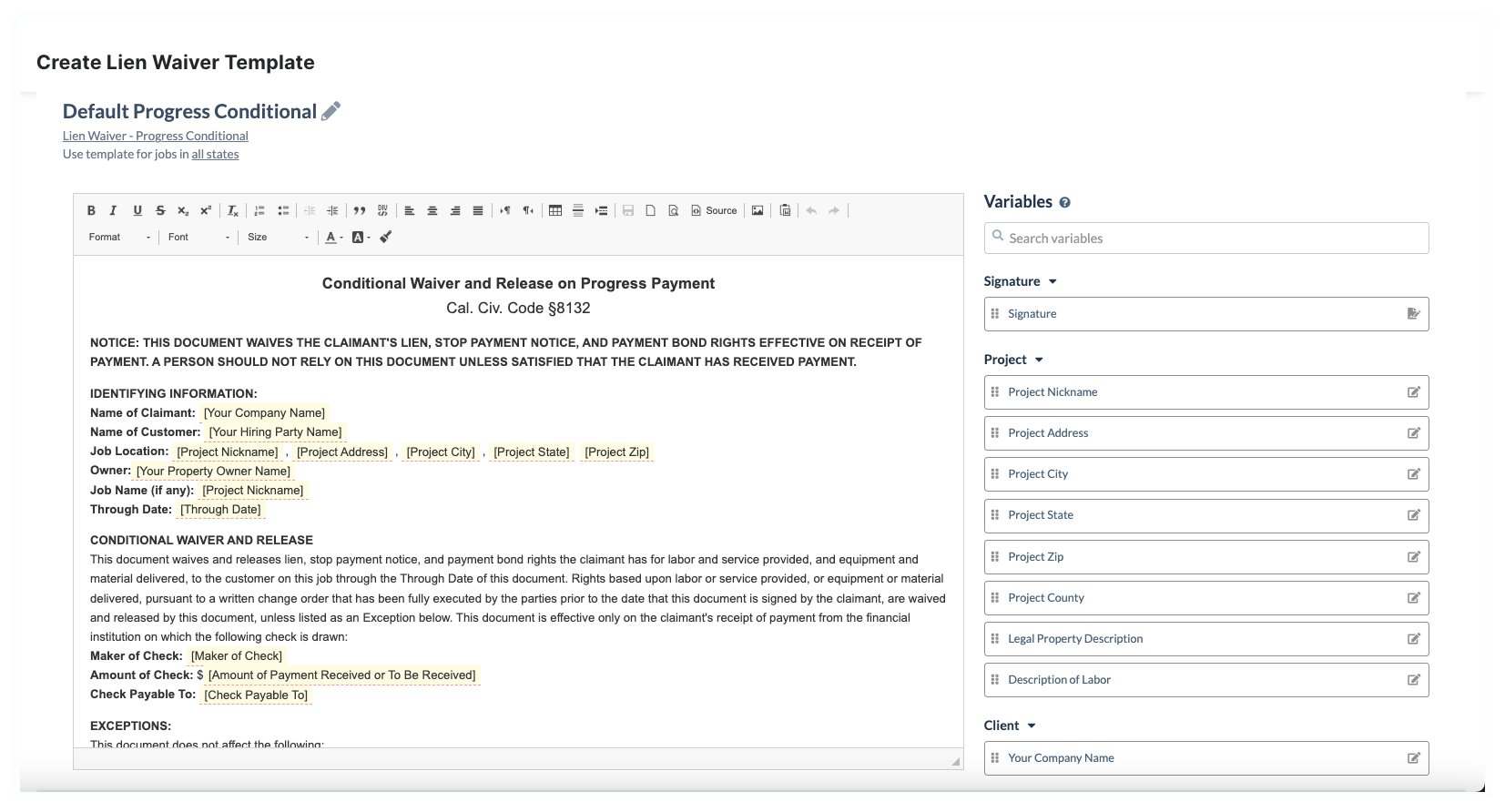
This image shows an example of a lien waiver template being created. The creator can drag and drop variables into the body of your lien waiver template. The YELLOW are the placeholders as they appear in a template.

Create Lien Waiver Template Default Prog Cond

Variables

These tables detail the available variables that can be used as placeholders in a lien waiver template. To learn how to create one, see Create lien waiver templates.

 Tips
  • Are you a main contractor who wants to include your company name as the payor on a lien waiver template? To include your company name on a lien waiver template, you can type your company name directly into the template or add any of these variables: Maker of check, Your main contractor name or Your hiring party name.

  • Do you want to add an unmapped field from Levelset to your lien waiver template? Additional fields in Levelset that do not map to Procore must be manually filled in by the subcontractor when signing a lien waiver.

Project

Variables

Subcontractor mapping

Sub-tier mapping

Owner mapping

Project nickname

Maps to the 'Name' of the Procore project.

Maps to the 'Name' of the Procore project.

Maps to the 'Name' of the Procore project.

Project address

Maps to the 'Address' field in the Project level admin tool's 'Project location' area.

Maps to the 'Address' field in the Project level admin tool's 'Project location' area.

Maps to the 'Address' field in the Project level admin tool's 'Project location' area.

Project city

Maps to the 'City' field in the Project level admin tool's 'Project location' area.

Maps to the 'City' field in the Project level admin tool's 'Project location' area.

Maps to the 'City' field in the Project level admin tool's 'Project location' area.

Project state

Maps to the 'state' field in the Project level admin tool's 'Project location' area.

Maps to the 'state' field in the Project level admin tool's 'Project location' area.

Maps to the 'state' field in the Project level admin tool's 'Project location' area.

Project zip file

Maps to the 'zip file' field in the Project level admin tool's 'Project location' area.

Maps to the 'zip file' field in the Project level admin tool's 'Project location' area.

Maps to the 'zip file' field in the Project level admin tool's 'Project location' area.

Legal property description

Not available with the Levelset integration for Procore Pay.

Not available with the Levelset integration for Procore Pay.

Not available with the Levelset integration for Procore Pay.

Description of labour

Prompts the user to update the 'Description of Labour' field during the signature process. See Sign lien waivers on project payment applications.

Prompts the user to update the 'Description of Labour' field during the signature process. See Sign lien waivers on project payment applications.

Prompts the user to update the 'Description of Labour' field during the signature process. See Sign lien waivers on project payment applications.

Client

Variables

Subcontractor mapping

Sub-tier mapping

Owner mapping

Your company name

Maps to the 'contract company' named in the commitment.

Maps to the sub-tier company.

Maps to the 'Office division'/'Company name' setup in the Procore administrator.

Contact

Variables

Subcontractor mapping

Sub-tier mapping

Owner mapping

Your property owner name

Maps to the 'Property owner' field in the Project level Payment Applications tool's Payment Applications settings page.

Maps to the 'Property owner' field in the Project level Payment Applications tool's Payment Applications settings page.

Maps to the 'Property owner' field in the Project level Payment Applications tool's Payment Applications settings page.

Your property owner address

Not available with the Levelset integration for Procore Pay.

Your main contractor name

Maps to the name of the company that owns the Procore account for the project.

Maps to the name of the company that owns the Procore account for the project.

Maps to the name of the company that owns the Procore account for the project.

Your main contractor's name and address

Maps to the 'Address', 'City', 'Country/state' and 'zip file' of the company that owns the Procore account for the project.

Maps to the 'Address', 'City', 'Country/state' and 'zip file' of the company that owns the Procore account for the project.

Maps to the 'Address', 'City', 'Country/state' and 'zip file' of the company that owns the Procore account for the project.

Your hiring party name

Maps to the name of the company that owns the Procore account for this project.

Maps to the 'contract company' on the commitment that the sub-tier is located on.

Maps to 'Property owner' name listed in Payment Applications setting.

Your hiring party address

Maps to the 'Address', 'City', 'Country/state' and 'zip file' of the company that owns the Procore account for this project.

Maps to the 'Address', 'City', 'Country/state' and 'zip file' of the 'contract company' on the commitment that the Sub-Tier is located on.

Maps to the 'Address', 'City', 'Country/state' and 'zip file' of the 'Property owner' name listed in Payment Applications setting.

Other

Variables

Subcontractor mapping

Sub-tier mapping

Owner mapping

Amount of lien waiver

Prompts the signer to enter te information.

Promps the signer to enter the information.

Space is left for this information to be added outside of Procore.

Total contract amount

Maps to the 'Revised Contract Amount' of the payment application's commitment contract.

Maps to the 'Est. Contract Amount' for the subtier.

Maps to the 'Revised Contract Amount' of the payment application's main contract.

Contract number

Corresponds to the 'Contract #' of the payment application's commitment contract.

Prompts signer to enter the information.

Corresponds to the 'Contract #' of the payment application's main contract.

Contract date

Corresponds to the 'Signed contract received date' of the payment application's commitment contract.

Prompts signer to enter the information.

Corresponds to the 'Signd contract received date' of the payment application's main contract.

Total amount claimed to be due

Corresponds to the 'Current payment due' amount from Line 8 on the payment application's Subcontractor's application for payment.

Corresponds to the 'Amount this payment application' for the subtier payment application.

Corresponds to the 'Current payment due' amount from line 8 on the Prime's application for payment.

Executed amendments to contract price/variations

Corresponds to the 'Net change by variations' amount from line 2 on the subcontractor's application for payment.

Prompts signer to enter the information.

Corresponds to the 'Net change by variations' amount from Line 2 on the Prime's application for payment.

Value of work completed to date

Corresponds to the 'Total completed and stored to date' value from line 4 on the subcontractor's application for payment.

Prompts signer to enter the information.

Corresponds to the 'Total completed and stored to date' value from Line 4 on the prime's application for payment.

Total payable to date

Corresponds to 'Less previous certificates for payment' on line 7 of the contractor's application for payment.

Prompts signer to enter the information.

Corresponds to 'Less previous certificates for payment' on line 7 of the main contract's application for payment.

Amount of payment received or to be received

Maps to the 'Total' on the subcontractor payment application's Bill of Quantities.

Maps to the 'Amount this payment application' for the subtier payment application.

Maps to the 'Total' on the Prime payment application's Bill of Quantities.

Maker of check

Your company name (as configured on the office selected in Project admin).

The 'contract company' on the commitment.

Owner/client vendor name on main contract.

Retention amount

Shows the Line 5 'Total retention' amount (Line 5a + Line 5b) on the subcontractor's application for payment.

Prompts signer to enter the information.

Shows the Line 5 'Total retention' amount (Line 5a + Line 5b) on the contractor's application for payment.

Through date

Maps to the 'Period End' date on the 'General Information' card on the 'General' tab in the subcontractor payment application contract.
Note: When creating a payment application, the 'Period End' matches the 'End Date' of the Open valuation period in the Project level Payment Applications tool by default. However, the 'Period End' can be changed on the payment application.

Maps to the period end date for the payment application against which the subtier payment application is tracked (i.e. not necessarily the payment application against which we may be collecting the waiver)

Maps to the 'Period end' date on the 'General information' card on the 'General' tab in the main contract payment application.

Payment application number/payment application number

Corresponds to the 'payment application #' of the payment application.

Prompts signer to enter the information.

Corresponds to the 'payment application #' of the payment application.

Valuation period start date

Maps to the 'payment application period start date'.

Maps to the 'payment application period start date'.

Maps to the 'payment application period start date'.

Valuation period end date

Maps to the 'Payment application period end date'.

Maps to the 'Payment application period end date'.

Maps to the 'Payment application period end date'.

Cheque payable to

Contract company named in the commitment.

Maps to the 'Sub-tier company name' in the first-tier subcontractor payment application. On a sub-tier lien waiver with a joint check, maps to the name of the first-tier subcontractor (corresponds to the 'contract company' on the commitment) and the sub-tier contractor (corresponds to the 'Sub-tier company name' on the first-tier subcontractor payment application).

Your company name (as configured on the office selected in Project admin).

Project Number

Maps to the Procore project number.

Maps to the Procore project number.

Maps to the Procore project number.

Contract amount plus variations

Shows the 'Programme value' plus the value of an 'Approved' variations on a subcontractor payment application.

Prompts signer to enter the information.

Shows the 'Programme value' plus the value of an 'Approved' variations on a main contract payment application.

Total completed and stored

Maps to the 'Total Completed and Stored to Date' (£) on the subcontractor payment application.

Prompts signer to enter the information.

Maps to the 'Total Completed and Stored to Date' (£) on the main contract payment application.

Percent Complete

Maps to the 'Total completed and stored to date' (%) on the subcontractor payment application.

Prompts signer to enter the information.

Maps to the 'Total completed and stored to date' (%) on the main contract payment application.

Retention percentage

Maps to the 'Work retention this period (%)' value in a subcontractor payment application.

Prompts signer to enter the information.

Maps to the 'Work retention this period (%)' value in a Prime payment application.


Balance to finish

Maps to the 'Balance to Finish' in a subcontractor payment application.

Prompts signer to enter the information.

Maps to the 'Balance to finish' in the main contract payment application, including retention.

Total payable to date less retention

Maps to the 'Total earned less retention' (Line 6) on the payment application's subcontractor's application for payment.

Prompts signer to enter the information.

Maps to the 'Total earned less retention' (Line 6) on the prime payment application's contractor's application for payment.

Original Contract Amount

Maps to the 'original contract amount' of the commitment on the payment application's subcontractor's application for payment. (Line 1)

Prompts signer to enter the information.

Maps to the 'original contract amount' of the main contract on the payment application's contractor's application for payment. (Line 1)

Current date

The system automatically populates the waiver with the current date (Month, Year, Ordinal Day).

The system automatically populates the waiver with the current date (Month, Year, Ordinal Day).

The system automatically populates the waiver with the current date (Month, Year, Ordinal Day).

Description of labour and/or materials

Maps to the commitment's title.

Prompts the user to update the 'Description of Labour and/or Materials during the signature process. See Sign lien waivers on project payment applications.

Space is left for this information to be added outside of Procore.

Personal

Variables

Subcontractor mapping

Sub-tier mapping

Owner mapping

Project location name

Maps to the 'contract company' named in the commitment.

Maps to the sub-tier company.

Maps to the Office division/company name setup in the Company Admin tool.

Project location address

Pulls from the address of the 'contract company' named in the commitment.

Pulls from the address of the sub-tier company.

Pulls from theaddress of the office division/company name setup in the Company Admin tool.

Project location city

Pulls from the address of the 'contract company' named in the commitment.

Pulls from the address of the sub-tier company.

Pulls from theaddress of the office division/company name setup in the Company Admin tool.

Project location state

Pulls from the address of the 'contract company' named in the commitment.

Pulls from the address of the sub-tier company.

Pulls from theaddress of the office division/company name setup in the Company Admin tool.

Project location zip file

Pulls from the address of the 'contract company' named in the commitment.

Pulls from the address of the sub-tier company.

Pulls from theaddress of the office division/company name setup in the Company Admin tool.

User title

Shows the signer's title from the Levelset integration for Procore Pay, if it is available in the signer's account

Shows the signer's title from the Levelset integration for Procore Pay, if it is available in the signer's account

Space is left for this information to be added outside of Procore.

User name

Shows the signer's user name from the Levelset integration for Procore Pay, if it is available in the signer's account

Shows the signer's user name from the Levelset integration for Procore Pay, if it is available in the signer's account

Space is left for this information to be added outside of Procore.

User first name

Shows the signer's first name from the Levelset integration for Procore Pay, if it is available in the signer's account

Shows the signer's first name from the Levelset integration for Procore Pay, if it is available in the signer's account

Space is left for this information to be added outside of Procore.

User last name

Shows the signer's first name from the Levelset integration for Procore Pay, if it is available in the signer's account

Shows the signer's first name from the Levelset integration for Procore Pay, if it is available in the signer's account

Space is left for this information to be added outside of Procore.

See Also

Loading related articles...