When does Procore track my location in the Procore mobile application?
Background
When using the Procore mobile application, you can enable location services on your mobile device to access certain features, including those related to a geofence.
A geofence is a virtual boundary around a real-world geographic area that is determined by your company. This boundary, defined by GPS, triggers a response when a mobile device either enters or exits the designated area.
Answer
General
Tools
Equipment
My Time
Photos
General
How does Procore use my geolocation information?
If a user enables location services on their device, Procore captures their point-in-time location when they take the following actions:
Clock in or out using My Time
Take photos
Scan Equipment Quick Response Code
Does Procore continuously monitor my location?
No. If a project owner has enabled reminders to clock in or out of My Time, Procore may send notifications to you when you enter a geofence area designated by the project owner. To send these notifications, Procore uses privacy-centric, device-level capabilities to remind you to enter time when you enter the project’s geolocation. The location monitoring to facilitate the reminders takes place on your device; this data is not transmitted to Procore. Procore only captures your point-in-time location when you clock in or out using My Time.
Project timesheets administrators must first enable functionality for users to receive clock in / clock out reminders and notifications only happen if a user permits them.
What are the differences between the different location sharing options?
Procore will prompt you to 'Allow once', 'Allow while using the application' or 'Don't allow'. However, there are additional options in your device's setting for the Procore application. Depending on your setting, different functionality is available:
Always/Allow all the time: This is required to use clock in / clock out reminders in the My Time tool.
While using the application: This setting allows Procore to access location for the point-in-time actions, without having to prompt you again for permission.
Once: This setting allows Procore to access your location at this one point in time and will prompt you for permission to access your location each subsequent time you use point-in-time location features on the Procore mobile application.
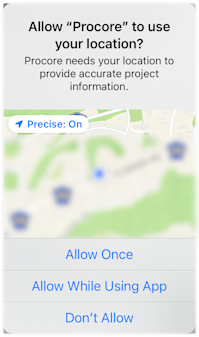
Procore app prompt
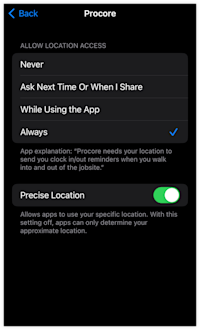
iOS device settings - Procore
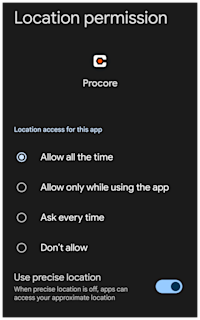
Android device settings - Procore
Where is my location information stored?
When stored, location data is application data and is written to the applicable application zone. See Where and how does Procore store customer information?
Does Procore track my live location?
No, Procore does not support a live location tracking capability.
Tools
Equipment
Scanning an Equipment Quick Response Code update the Equipment's location on the tool's map. This update uses the GPS location of the scanning device, if location services are enabled.
My Time
When using My Time on the Procore mobile application, a Snapshot of your location is taken when you clock in or out if location services are enabled on your mobile device. Administrators of the project and your Procore company account can see the location Snapshot when reviewing your time entry.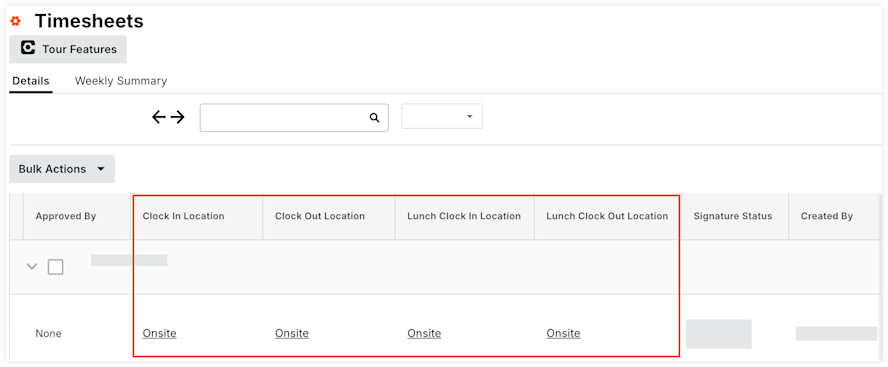
Enabling clock in and clock out reminders requires the application to track your geofence proximity, but this location data is neither stored nor is it shared with anyone. Procore uses privacy-centric, device-level capabilities to remind you to enter time when you enter a project’s geolocation. The notification happens on your device, only if you permit it.
Photos
iOS -When taking photos using the Procore mobile application, your location is included in the photo's metadata if location services are enabled for your device’s camera AND for the Procore mobile application. This allows you to see your photos on a map.
See How do item in Procore appear on the map?
Android - When taking photos using the Procore mobile application, your location is included in the photo's metadata if location services are enabled for the Procore mobile application. This allows you to see your photos on a map.
See How do item in Procore appear on the map?
See Also
Loading related articles...