Which data columns are in a Field Production report?
Answer
The Field Production report provides Procore users with the ability to compare a construction project's Budget production quantities with its installed production quantities. With the appropriate permissions, you can view this report with the project's 360 Reporting or timesheets tool. See View a Field Production report.
For customers using Procore's Resource tracking and Project Financials tools, production quantities and hours entered on your project's variations automatically update data in these Procore features, when variations are placed in the 'Approved' status:
The Procore labour productivity cost budget view.
The field production report. See Which data columns are in a field production report?
Field production report columns
The following image shows you a field production report.
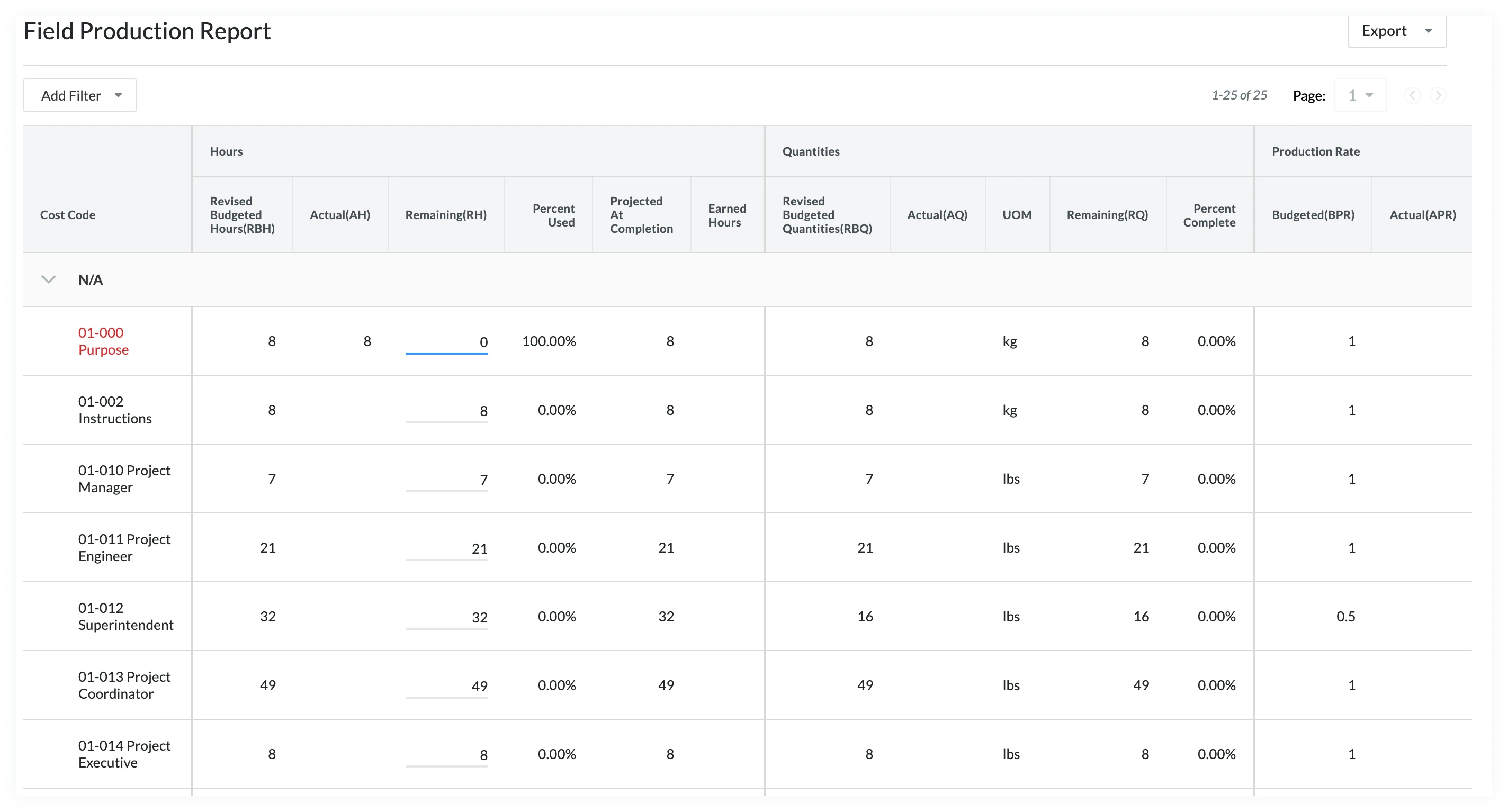
The following table details the report columns in the 'Field production report.' It also details how calculation and configured in each column. You cannot customise the columns in this report.
Report section | Column name | Column type | Column format | Column description | Column configuration | |
|---|---|---|---|---|---|---|
Hours | Revised Budget hours (RBH) | Source | Number | Shows the Budget number of hours for the cost code. | - | |
Hours | Actual (AH) | Source | Number | Shows the actual number of hours entered to date for the cost code. | - | |
Hours | Remaining hours (RH) | Calculated | Number | Shows the remaining number of hours for the cost code. | Budget hours subtract (-) actual hours | |
Hours | Percent used | Calculated | Percentage | Shows how much of the current Budget unit quantity (labour hours) have been used based on time submitted in Procore. | Timesheet hours divide (/) revised Budget unit quantity | |
Hours | Projected at completion | Calculated | currency | Shows the estimated labour hours needed to complete production for the cost code based on the work produced to date. | (Remaining quantity divide (/) actual production rate) add (+) actual hours | |
Hours | Earned hours 1 | Calculated | Number | Shows the number of labour hours earned (merited) based on the work produced to date for that cost code. | (Budget Hours multiply (*) Actual quantity) divide (/) Revised Budget quantity | |
Quantity | Revised Budget quantities (RBQ)1 | Source | Number | Shows the Budget production quantity for the cost code. | - | |
Quantity | Actual (AQ) | Source | Number | Shows the actual production quantity to date for the cost code. | - | |
Quantity | UoM | Source | N/A | Shows the UoM for the cost code | Source category: Production UoM source: Budget production UoM source filtering: n/a | |
Quantity | Remaining (RQ) | Calculated | Number | Shows the remaining production quantity for the cost code. | Budget production quantity minus (-) remaining production quantity | |
Quantity | Percent Complete | Calculated | Percentage | Shows the percentage of the production quantity has been installed to date of the current Budget production quantity for the cost code. | Actual quantity installed divide (/) revised Budget production quantity | |
Production rate | Budget (BPR) 1 | Calculated | Number | Calculates the production rate based on the Budget number of hours and Budget quantity. | Budget production quantity divide (/) revised budget hours | |
Production rate | Actual (APR) | Calculated | Number | Calculates the actual production rate based on the actual number of hours and installed production quantities updated in Procore to date. | Actual quantity installed divide (/) actual hours | |
Production rate | Variance | Calculated | Number | Calculates the difference the actual and Budget production rate. | Actual production rate minus (-) Budget production rate |
1 If the project has any variations in the 'Approved' status, the 'Budget (BQ)' column label changes to 'Revised Budget (RBQ)'. In addition, the RBQ is used to calculate the values in the Budget production rate (BPR) and earned hours columns.