About the modernised Analytics tool
Overview
The Modernised Analytics tool brings data connections, reports, configurations and schema exploration together into a single, streamlined experience. Every Analytics page features a shared header containing links to Analytics tutorials, Release notes and the support page. The 'Data connectors', 'Power BI reports', 'Data configuration' and 'Data explorer' tabs are visible to a user based on their assigned permission level.
Key features
Centralised data connectors: Replaces legacy connector pages with a unified hub featuring guided onboarding wizards, connection status tracking and a 3-step setup checklist (Configure authentication, access connection kit and confirm connection).
Flexible authentication methods: support security tokens (with countdown tracking), OpenID Connect (OIDC) authentication (for centralised access and downloading
.shareprofile files) and Databricks Direct Connections.Searchable Power BI report library: Replaces static file download tables with searchable report cards, grid/table view toggles, category filtering, package-based access indicators (Included, partial, n/a) and report downloads.
Consolidated data configuration: Allows admin to configure custom Budget and forecasting views with real-time preparation tracking, alongside secure public photo link access management complete with audit logging.
Interactive Data Explorer: Enhances schema exploration by allowing user to search tables/columns, view detailed metadata, trace primary (PK) and foreign (FK) key relationships and download ERDs directly in-product.
Things to Consider
Required User Permissions:
'Read Only' or higher permissions to the Company level Analytics tool.
Databricks Direct Connection and data configuration tab permissions:
'Admin' level permission to the Company level Analytics tool.
Analytics tool features
Set up or add platform connections
Show / Hide steps
Depending on whether your company is new to Analytics or migrating existing connections, follow the appropriate pathway:
New users (no active token or Databricks connection)
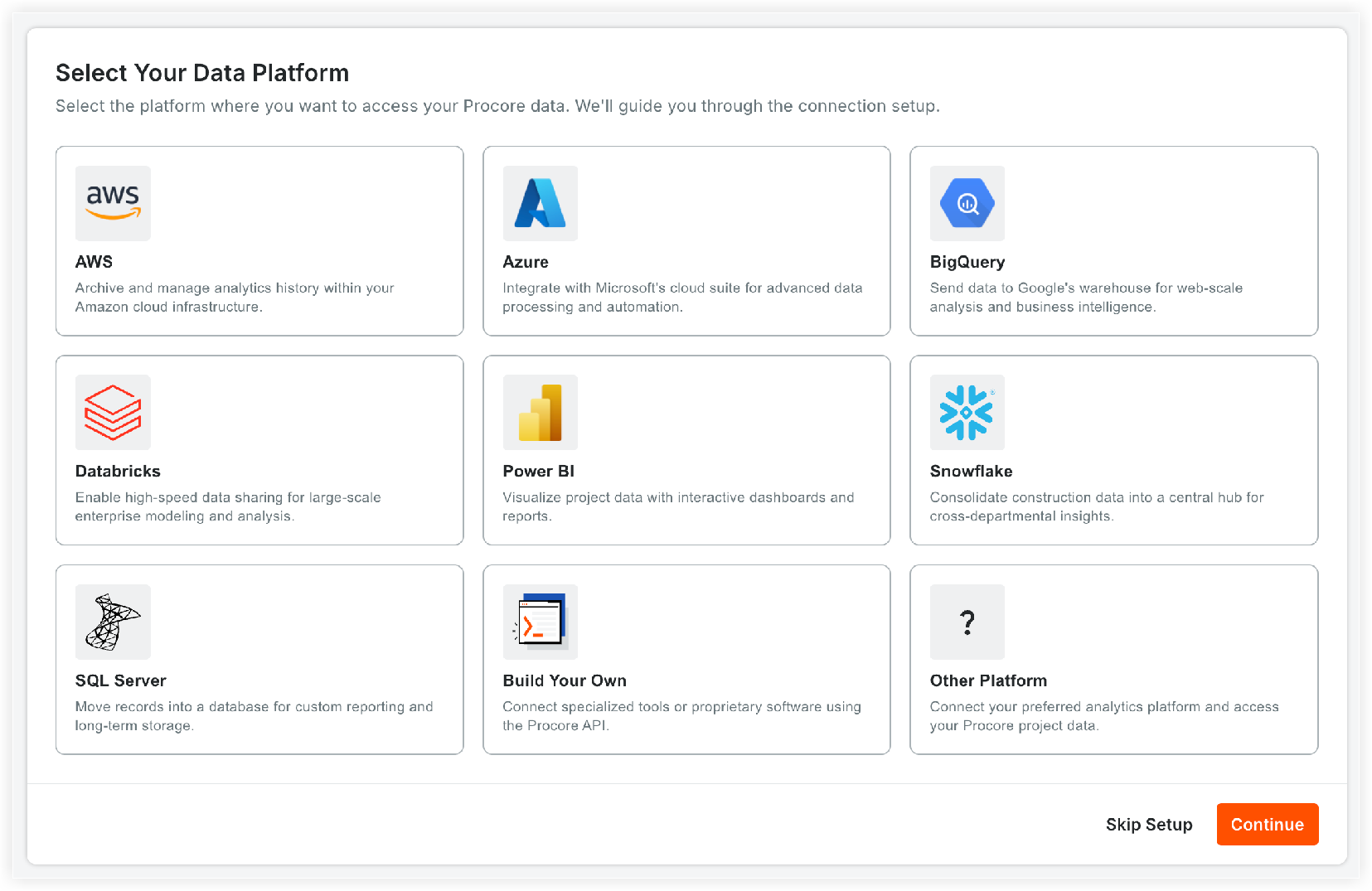
A guided onboarding wizard opens automatically.
Follow the prompt to select your data platform and generate credentials.
(Optional) Click Skip setup to go to the 'Data connectors' page and complete setup later via the Connect your data card.

Existing users (with an active token or Databricks connection)
Read the one-time welcome message summarising changes.
Note: Existing tokens/connections transfer automatically without needing regeneration.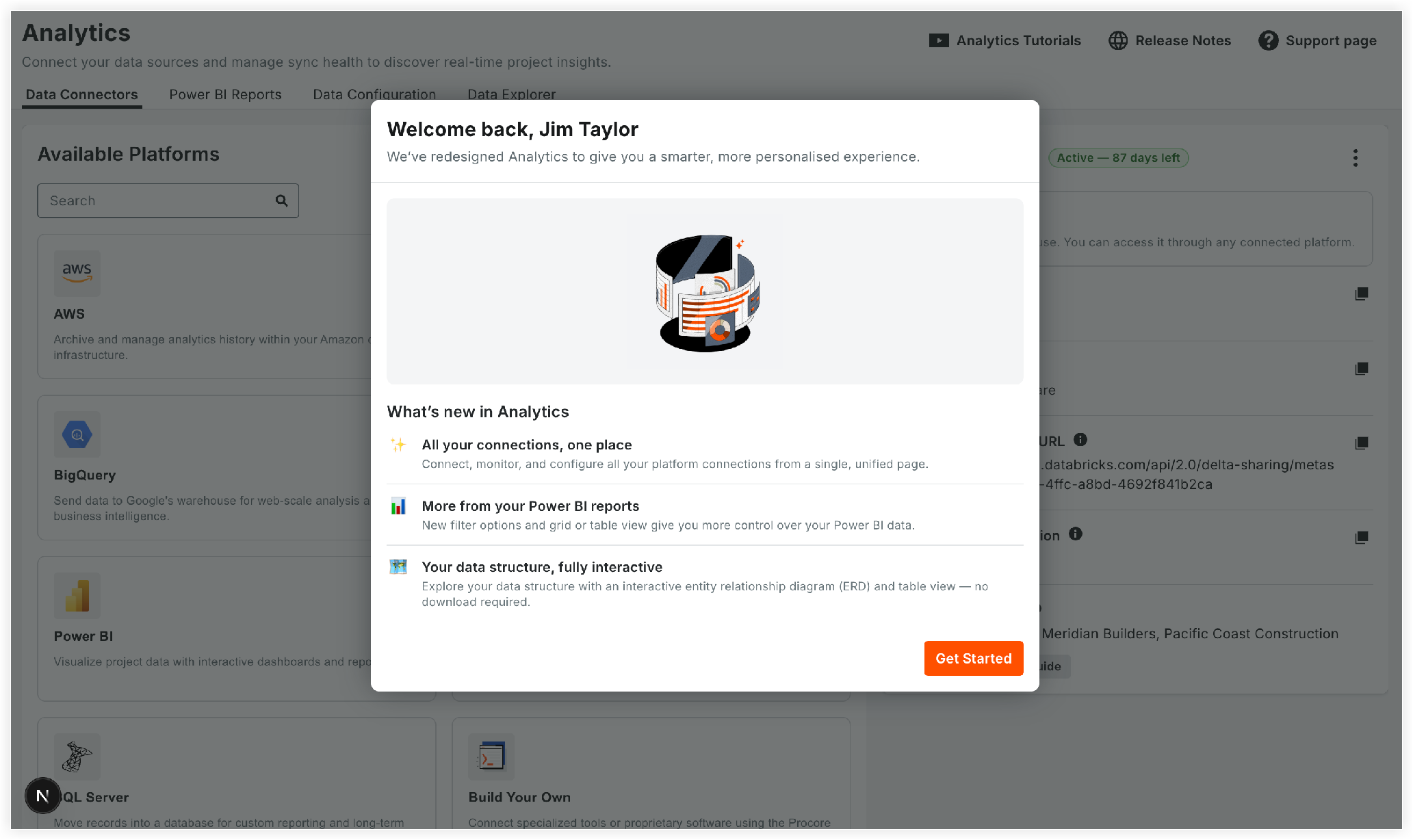
Select Add platforms.
Mark the tickbox next to each data platform your company currently uses (e.g., AWS, Azure, BigQuery, Databricks, Power BI, Snowflake, SQL Server).
Click Continue.
Note: The selected connections will be marked as connected in your Analytics Dashboard.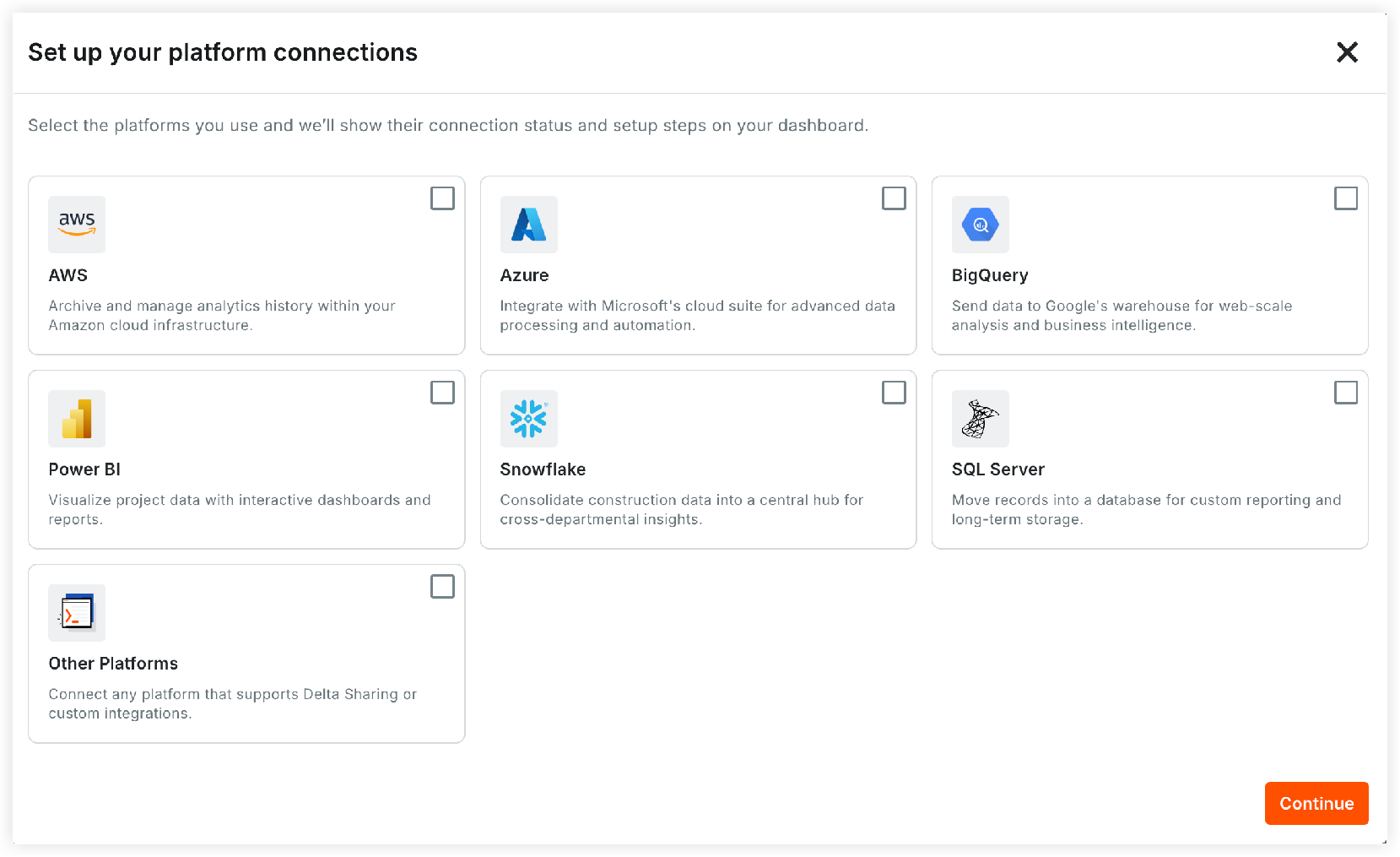


Manage platform connections
Show / hide details
The Data Connectors page replaces the legacy 'Getting Started' tab and individual data connector pages (Azure, Snowflake, AWS, BigQuery and more).
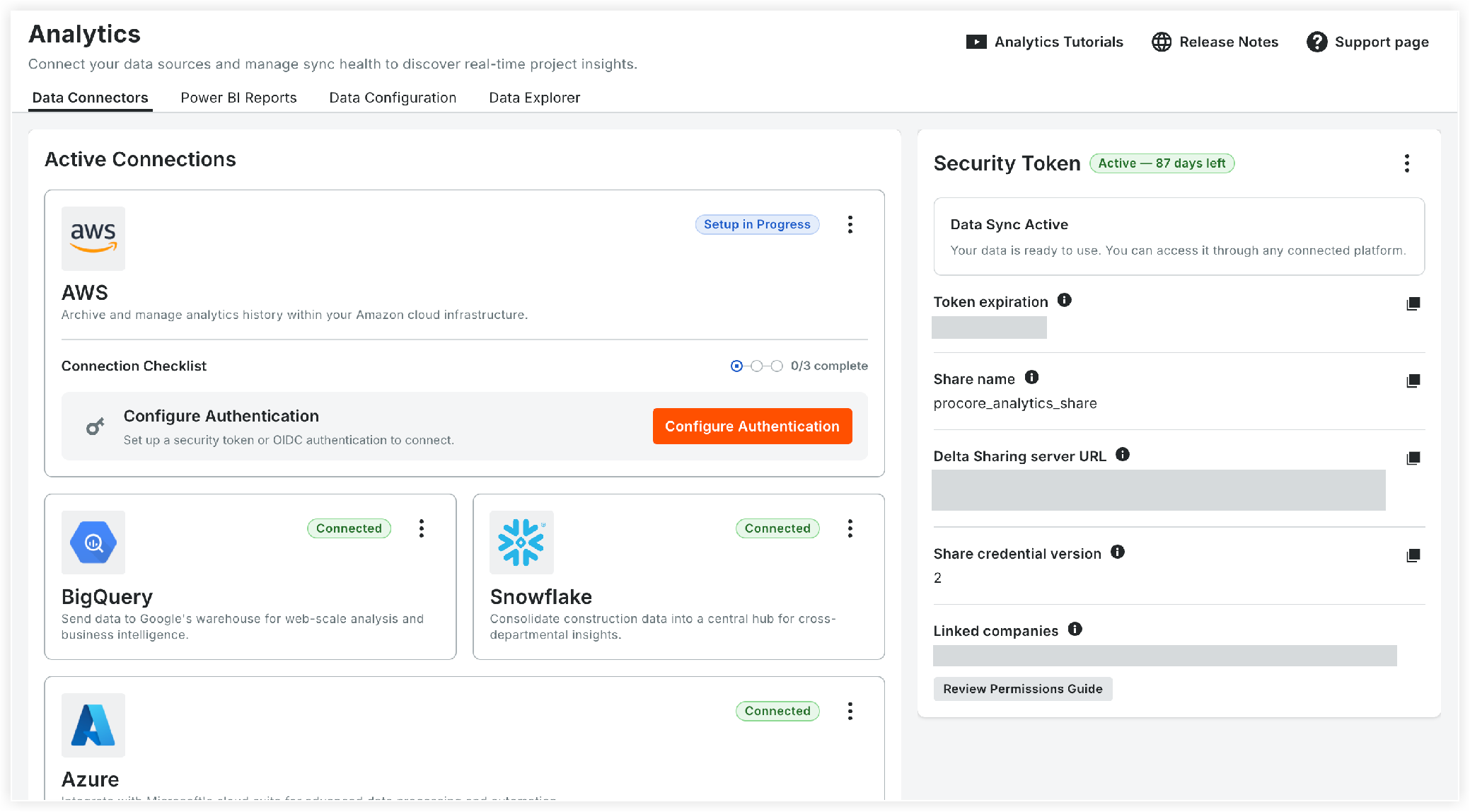
Data connectors page layout
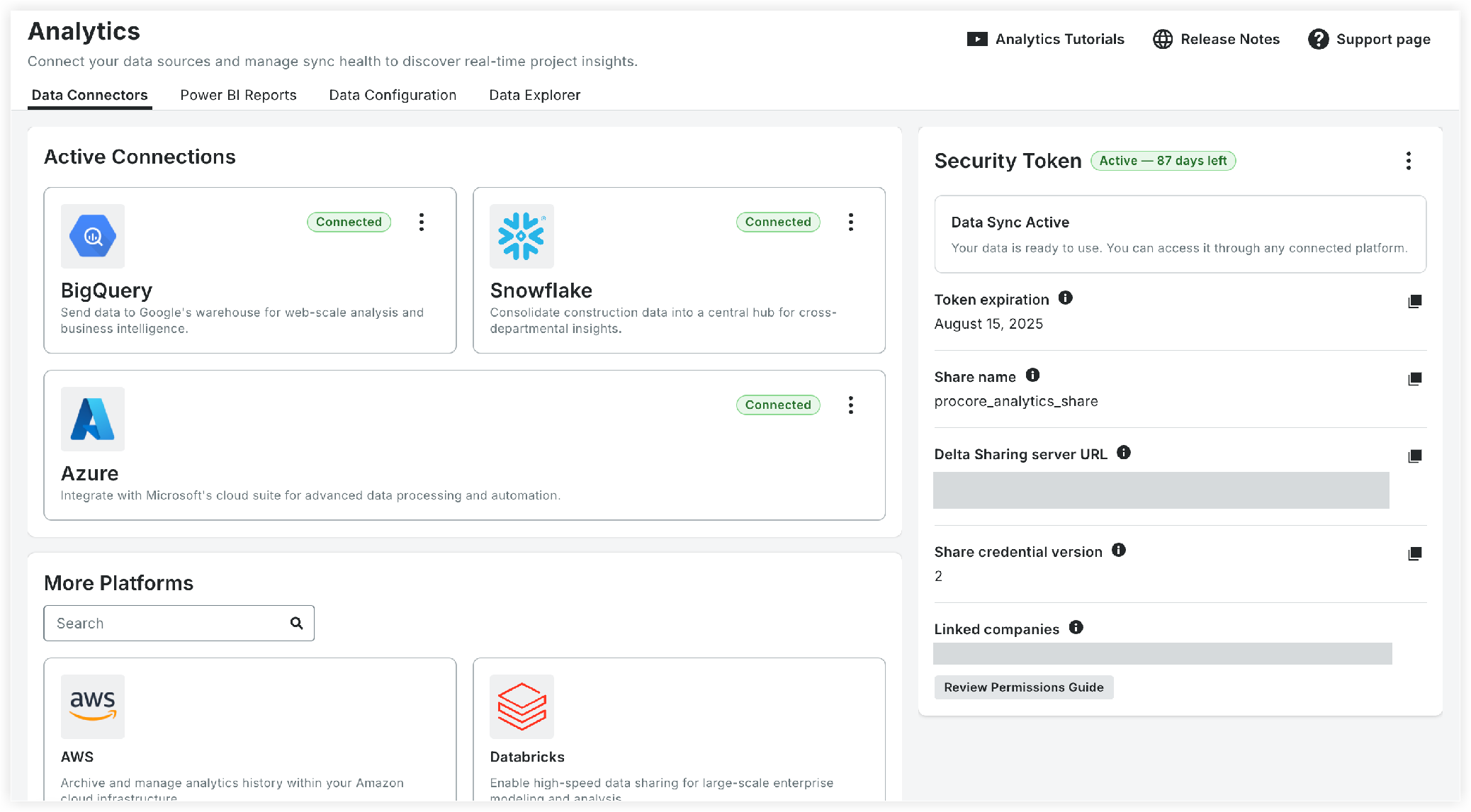
Left panel (platforms):
Active connections: Displays cards for added platform with their setup checklist and status.
Available platforms: Lists supported platforms (AWS, Azure, BigQuery, Databricks, Power BI, Snowflake, SQL Server, Build Your Own and Other) with a search box.
Right panel (credentials): Displays bearer token details, expiration countdowns, share names, Delta Sharing server URL, share credential versions, data sync status and linked Procore company.

Platform connection checklist
Every added platform uses a 3-step checklist tracked on its platform card:
Configure authentication: Choose and set up a security token or OIDC authentication.
Access connection kit: Download the technical guides and asset required for platform setup.
Note: Power BI, Build Your Own and other platform use an inline step-by-step guide instead of a downloadable kit. Databricks skips to completion upon successful direct connection.Confirm connection: Confirm setup completion to mark the connection status as active.

Platform connection status
Each platform card displays one of the following status:
Setup in progress: One or more checklist steps are incomplete.
Connected: All checklist steps are completed.
Connection interrupted: The underlying credential was deleted. The platform resets to step 1 in the connection checklist, requiring re-authentication.
Configure authentication methods
Show / Hide steps
Select one of the three available authentication methods during initial setup:

Option 1: Security token
Generate a personal access token by selecting a fixed duration or a specific expiration date.
Copy and save all token details immediately before closing the window.
Note: Procore does not store your token and it cannot be recovered after the window closes.Monitor token validity using the Active — {N} days left countdown card on the Data Connectors page.
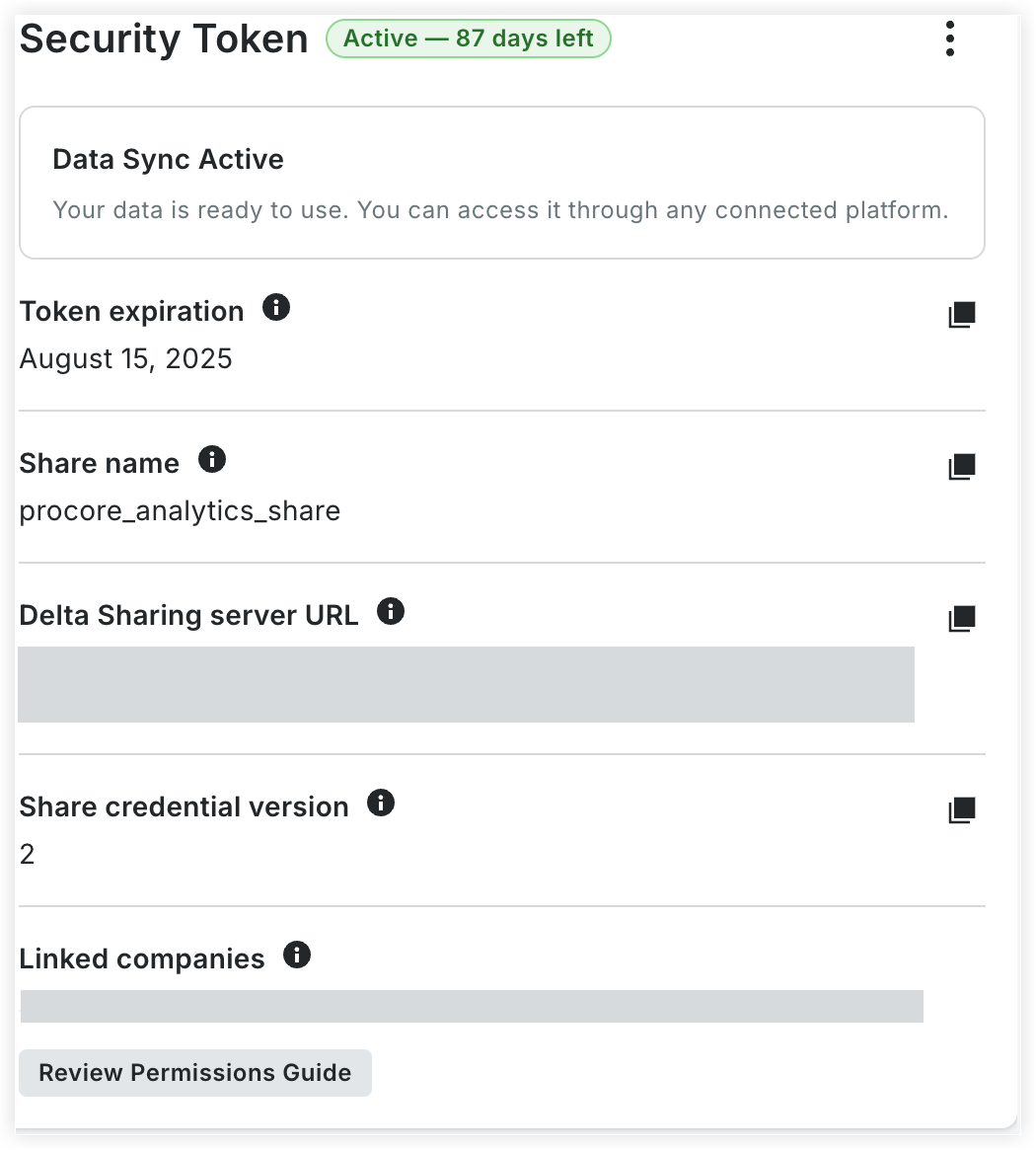

Note: Expired tokens cannot be extended. Delete the expired token and generate a new token to restore platform data sync.
Option 2: OIDC authentication
You can now authenticate through your organisation's identity provider using OpenID Connect authentication for centralised and secure access.
Retrieve four required values from your organisation’s identity provider: Issuer URL, Subject Claim, Subject and Audiences.
Enter these four values into the setup form.
Note: OIDC generates no token to store and has no expiration cycle.Access the Credentials tab on the 'OIDC' card to copy or download
.sharefiles for three profile types:Power BI connection URL: For direct Power BI integration.
Tableau and other BI tools (
tableau-profile.share): OAuth authorisation-code profile.Machine-to-Machine (
m2m-profile.share): OAuth client-credentials profile for automated server-to-server access.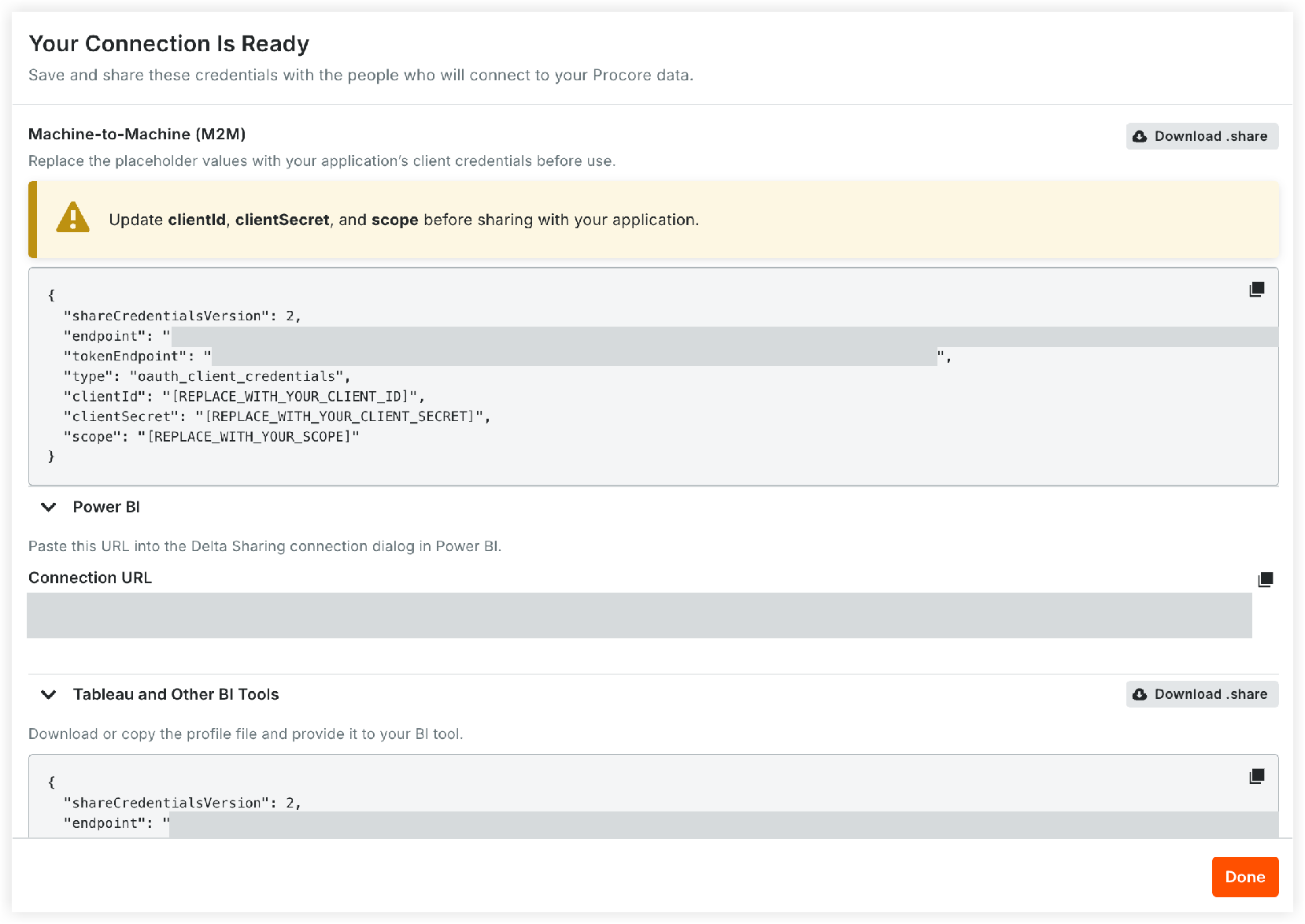
(Optional) Open the downloaded M2M
.sharefile and replace the placeholder values forclientId,clientSecretandscopebefore attempting a connection.

Option 3: Databricks direct connection (admin only)
Enter your workspace sharing identifier into the setup prompt.
Note: A setup guide is linked in the flow if you need help locating your identifier.Submit to complete authentication and connectivity in a single step.
Note: Security Token and OIDC authentication methods are alternatives. You configure one authentication method per connection. Once an authentication method is active, reopening it shows the credential details rather than the setup form.
Connection lifecycle & maintenance actions
Show / Hide steps
Attention banners: Display notifications and suggestions when credentials are deleted or updated.
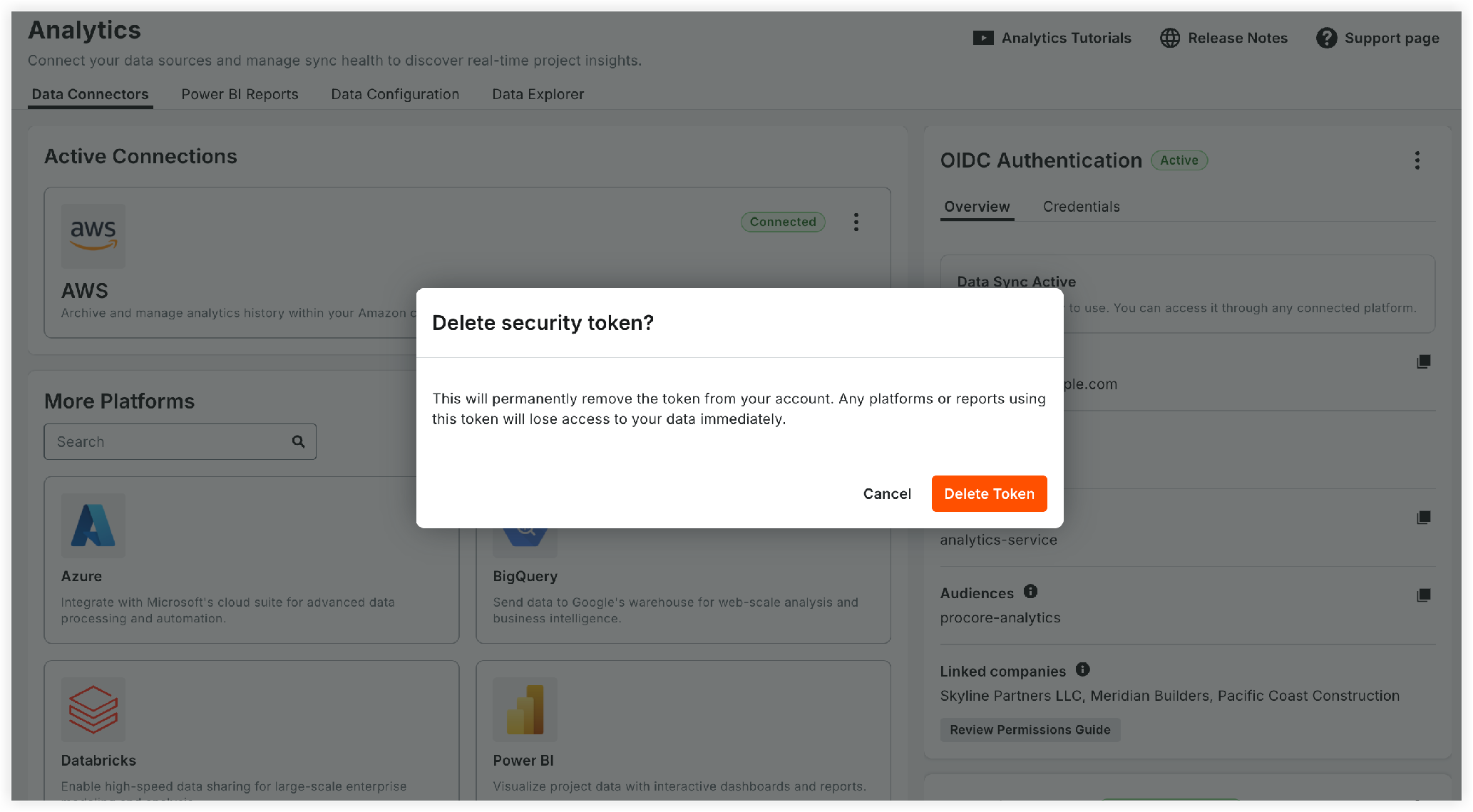
Deleting a credential: Deleting a security token or OIDC configuration permanently revokes access. Connected platforms lose access immediately, change status to Connection Interrupted and reset to Step 1 in the connection checklist.
Reconnecting Databricks: Select Reconnect on the 'Databricks Direct Connection' card to restart setup. Data sync pauses until reconnection is complete.
Removing a platform card:
In 'Setup in progress' status: Click the ellipsis
 icon next to this status on a card and select Remove setup to discard checklist progress and return the platform to 'Available platforms'.
In 'Connected' status: Click the ellipsis
icon next to this status on a card and select Remove connection to hide the card from your Dashboard view.
Note: This does not delete credentials or stop data sync. To revoke access completely, delete the underlying security token or OIDC configuration.

Access and download Power BI reports
Show / Hide steps
The Power BI report page replaces the legacy file download table with a searchable report library.

Report cards and views: Includes report names, descriptions, thumbnails, categories, package access status and a toggle between grid and table views.
Search and filters: Use the Search bar to find report by name or description, or the All categories filter to filter report by category (cost management, Project execution, Quality & Safety and more).
Package-based access: Indicates whether each report is included, partial or n/a based on the Procore packages your company has purchased.
Opening a report reveals a Pages tab listing every page and the package each one requires.
Note: Report with partial access display a banner explaining which pages are unavailable.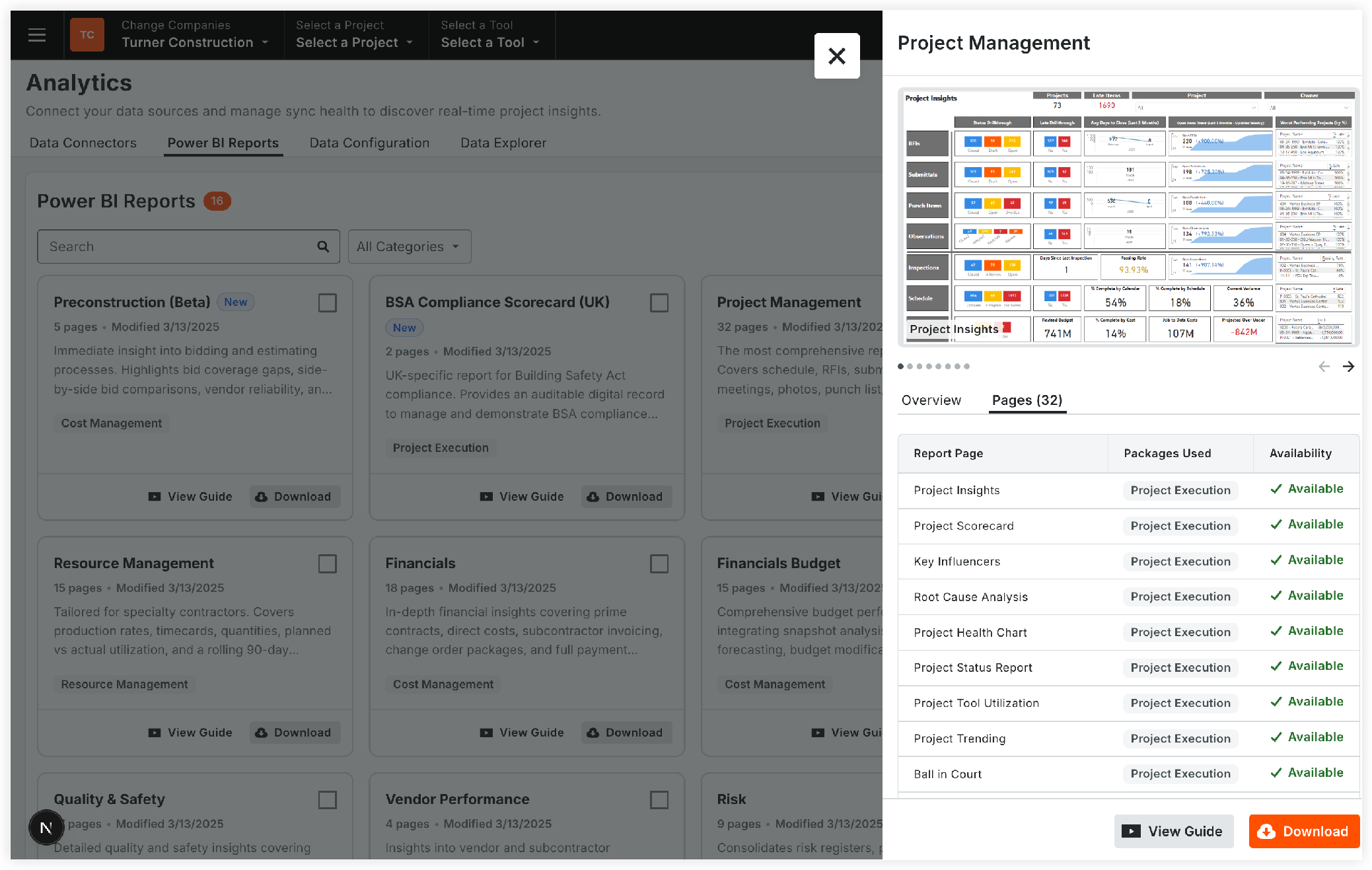
Downloads: Download individual or multiple report.
Power BI guide: Access video tutorials using the Power BI guide button in the page header.

Configure company settings (admin only)
Show / Hide steps
The Data configuration tab consolidates setting that were previously in separate location. It contains two sections:

Budget and forecasting view
The standalone 'Budget and Forecasting' tab has been integrated into this section.
Custom views & inline saving: Override Procore standard Budget and forecasting views with custom Budget and forecasting views. All changes now save inline.
Data preparation tracking & status: Custom Budget and forecasting data must be prepared before it appears in Analytics report. A new progress panel displays real-time status (ETA, percentage complete) and a Last synced timestamp once complete.
Instant data preparation: Procore Standard Budget and forecasting views require no preparation time.
View switching: Selecting a different custom budget or forecasting view automatically restarts data preparation.
Public photo link access
The controls for public photo links are now available in the 'Data Configuration' page with additional safeguards:
Enable/disable toggle: Control whether anyone with a link can download photos without logging in to Procore. Enabling this feature requires acknowledging a security disclaimer, since publicly accessible links are open and unprotected.
Update links: Regenerates all photo links across the company. Any previously shared links will stop working immediately, ideal for revoking external access.
View history: Track every action with a complete audit log showing who made a change, when it occurred and the exact action taken (Enabled, Disabled, Links update, Update in progress or Update cancelled).
Explore data schema in Data Explorer
Show / Hide steps
The schema tree and detail table have been improved and the static download cards (Field Mapping spreadsheet, Column Inventory PDF and ERD PDF) have been removed for richer in-product exploration:
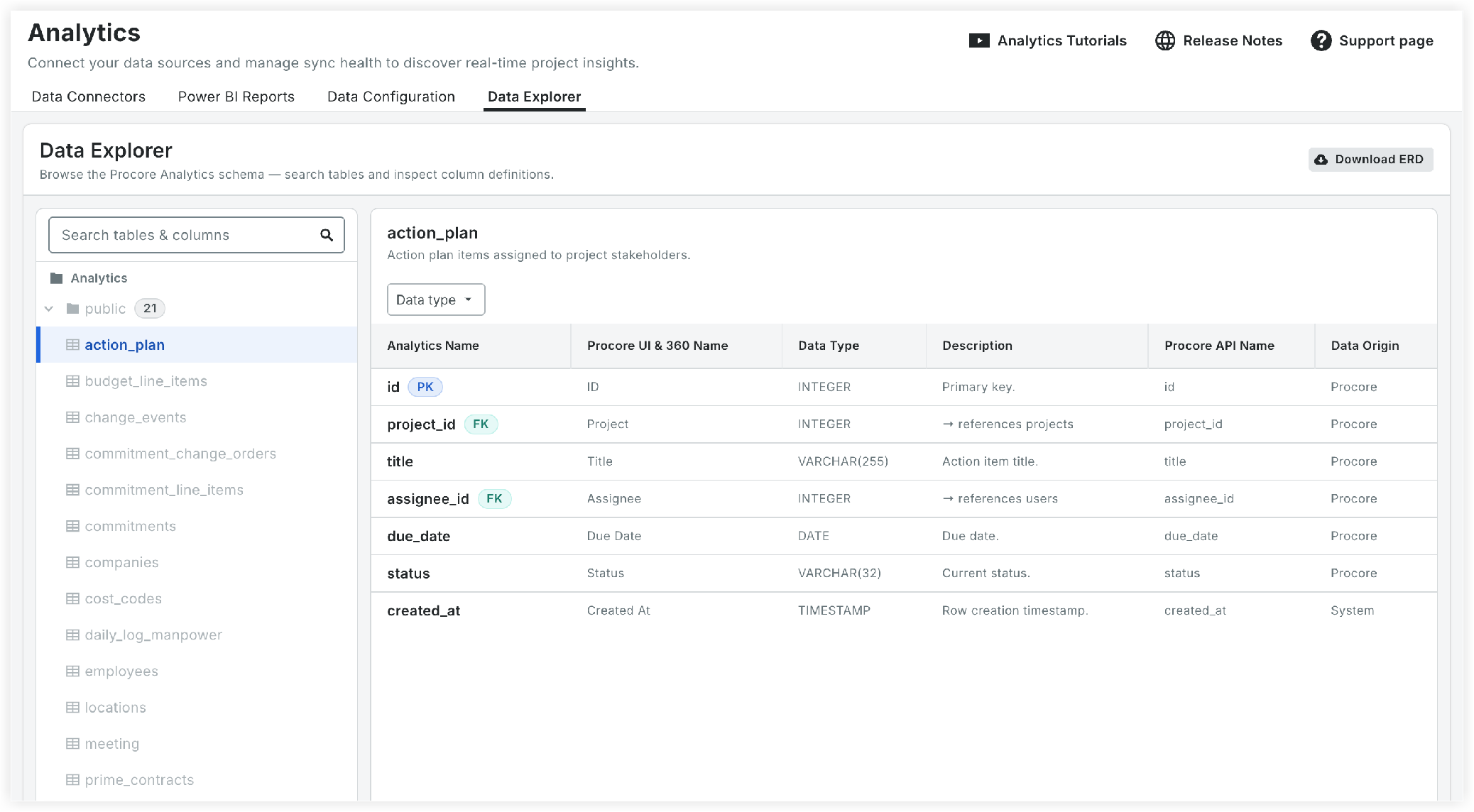
Search tables and columns: Find items instantly by table or column name, with matching column counts shown per table.
Richer column metadata: View key details for every column, including analytics name, Procore UI & 360 name, data type (filterable), description, Procore API name and data origin.
Trace table relationships: Primary and foreign keys are now marked with PK and FK pills. Click any FK to jump directly to its referenced table.
Download ERD: Click Download ERD in the page header to export the entity relationship diagram.

Quick reference: Location mapping
Feature/item | New location in the Analytics tool |
|---|---|
Getting started tab | Replaced by the Data Connectors page |
Individual platform tool pages | Unified under Data Connectors (kits via Step 2 of Connection checklist) |
Token generation | Moved from user profile to the Data connectors page and to the Onboarding wizard |
PBIX file download table | Replaced by the Power BI report library grid/table view |
Power BI tutorial videos | Accessible via the Power BI guide button in the Power BI reports page header |
Budget and forecasting tab | Consolidated under the Data configuration tab |
Column inventory PDF | Replaced by interactive table metadata in Data Explorer |
ERD PDF | Exportable via the Download ERD button in Data Explorer |
Field mapping spreadsheet (1.0 → 2.0) | Removed |
See Also
Loading related articles...