View or edit markup estimates on change event line items
Background
The 'Revenue rough order of magnitude' feature in Procore is designed to reflect the potential impact of a change event on your project's Budget before your team creates a A variation (VAR) is a written record of a contract modification that details any amendment(s) to the original agreement’s scope of work. Most construction contracts are executed with a clearly defined scope of work, so any work that is added, substituted or deleted from the original contract’s scope (such as changes to a project’s designs, conditions, programmes and/or costs) will typically require an approved variation.
If you have the required user permissions, you can also apply a setting in the Configure settings page of the project's change events tool to specify the main contract's markup settings to use for estimating markup as follows:
You can select which main contract to use to estimate markup on all new change event.
You can copy the main contract setting to estimate markup on all existing change events.
Things to Consider
Required User Permissions:
To edit any change event or change event configurations, 'admin' level permissions on the change event tool.
ORTo edit only the change events you created, 'Standard' level permissions on the change events tool.
Steps
Add estimated markup to a single change event
ORAdd estimated markup to all of the change events on a project
ORBeta edit financial markup estimate on a change event
Add estimated markup to a single change event
Navigate to the project's change event tool.
Locate the change event to work with.
Click the Edit button next to that change event.
In the 'General' tab, under 'General Information' scroll down to the main contract (for markup estimates) drop-down list.
Select the appropriate main contract from the drop-down list.
Click Save.
Add estimated markup to all of the change events on a project
Navigate to the project's change event tool.
Click Configure Settings
 .
Click Copy to existing change events to copy the markup setting from the default main contract (this is the first main contract on your project when sorted by number then title).
Click Confirm.
NotesMarkup is calculated using the revenue ROM values based on the markup settings defined for the main contract. See Add financial markup to main contract variations.
Edit financial markup (vertical) estimate on a change event
Note: A main contract for markup estimates must be selected on a change event before markup can be edited on individual line item. See Add estimated markup to a single change event.
Navigate to the project's change event tool.
Locate the change event with the financial markup (vertical) to be edited and click its number to view the change event.
Click the value being edited in the markup section of the change event.
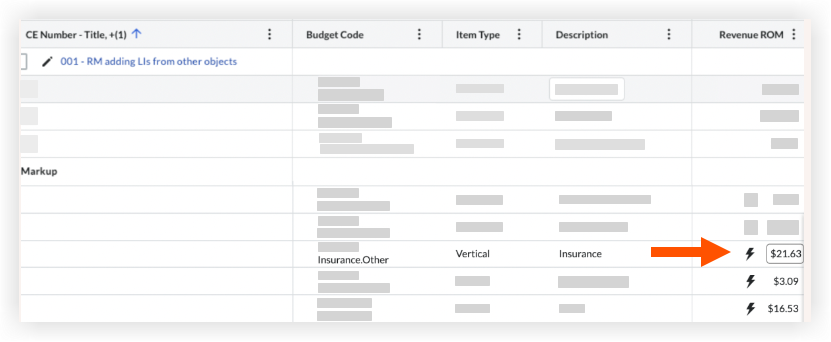
Click Manual markup and enter a new markup amount.
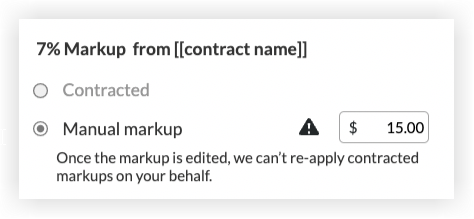
Changes are saved automatically once you click outside of the experience.
If you manually enter a markup value, it will no longer stay updated with the main contract's markup settings.
To reapply the contracted financial markup to the change event line items, the user must remove the current financial markup from the change event then complete the steps list here: Add estimated markup to a single change event.
When users create a main contract variation from a change event with the edited financial markup, the main contract variation will inherit the edited financial markup percentages entered on the change event.
Only vertical markup can be edited on a change event
There are some scenarios where edited financial markup in change events will not be able to pass to the main contract variation due to complexity and the possibility of conflicting markup rules and logic.
In the following scenarios, the user will have to edit the variation markup in the main contract variation Bill of Quantities.
Note: Edited markups will remain in the change event, but the new main contract variation will use the selected main contract markup rulesWhen multiple change event are used to create a variation.
When adding change event line item to an existing main contract variation with markup logic already applied
Creating a new main contract variation from a change event where the selected main contract conflicts with the change event 'Main contract for markup estimates' field