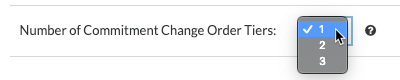
Configure the number of commitment variation tiers
Background
When setting up a project's commitment tool, most Procore clients choose to implement a 1- or 2-tier configuration setting. This setting:
Determines how many steps are required to manage variations for your project's commitments. To learn more, see What are the different variation tier setting in Project Financials?
Must always be configured before your project team starts creating variations. You are NOT permitted to change this setting after your team creates a variation.
Things to Consider
Required User Permissions:
'Admin' level permissions on the commitment tool.
Additional Information:
To learn about the supported variation tiers in Procore, see What are the different variation tier settings in Project Financials?
Your variation tier setting MUST be configured in Procore before you create the first variation on the project.
If you do NOT specify a setting, the default setting on the tool is the 1-tier configuration.
It is strongly recommended that you do NOT change this setting after you have created commitment variations on your project.
If your team is considering changing this setting during the course of the project, please be aware of the following before making a setting change:
You can increase the number of variation tiers from two (2) tiers to (3) tiers at any time.
You cannot decrease the number of variation tiers unless you first delete all of your project's existing variations.
If you choose the two (2) or three (3) tier variation configuration setting, you have an option to allow your collaborators to create their own potential variations. Both tier settings utilise PVs. You must also enable the 'Allow Standard level users to create PVs' tickbox. To learn more, see Allow collaborators to submit site-initiated variations (Beta).

 .