About Coordination Issue (CI) Templates
Planned feature: Pre-release documentation
This article documents a planned feature. Release timing is not guaranteed and functionality described here may change before launch.
Streamline 3D clash resolution with standardised company and Project level coordination issue (CI) templates. With CI templates, teams can cut down on repetitive data entry and resolve model clashes faster.
Once created and toggled on in Procore Projects, templates are available for use inside the Next-gen viewer, Building Information Modelling and virtual design and construction teams can pin issues directly to spatial coordinates when viewing model to keep projects moving forward.
Coordination issue templates use a dual-tier inheritance model that balances enterprise governance with on-site flexibility:
Feature/action | Company level templates | Project levelTemplates |
|---|---|---|
Template creation | Created by Procore administrators. Automatically inherited by all projects. | Created or duplicated by project admins to fulfil project-specific needs. |
Category & abbreviation | Globally locked. Renaming fields automatically propagates across projects for new issue creation. | Active Company level templates are read-only. New and duplicated templates at the Project level are fully-editable. |
Field customisation | Establishes company-wide default (priority, due date, trade, type) | Can override defaults and configure project-specific fields (location, assignee, watchers and custom fields) |
Activation toggle | Globally activates/deactivates Company level templates across all active projects in the company account. | Project admins can toggle activate or deactivate Company or Project level templates to match their project scope. |
Deletion rules | Deletion removes the template from all linked Procore projects and immediately prevent users from creating new issues with it. | Project admins can delete Project level templates and can only deactivate Company level templates. |
Instant 3D pin placement in Model manager
In the Next-gen viewer, user can drop spatial pins directly on model geometry to create new coordination issues. The new issue form is pre-filled with template data, reducing the amount of time spent doing data entry for new issues.
4-character visual pin abbreviations:
Every template features a unique, up to 4-character uppercase abbreviation (e.g., CLSH, DUCT, ELEC) that renders directly on the 3D pin icon, providing immediate visual identification of issue types within a project model's federated scene.
Multi-surface & authoring tool support:
Templates are accessible across the Next-gen viewer, the web application and directly within Autodesk® design authoring applications (AutoCAD®, Navisworks® and Revit®) from the Procore BIM plugin.
Category groupings:
Templates are organised by custom categories (e.g., Structural, Mechanical, Architectural) for intuitive browsing, sorted alphabetically in menus and lists.
When a Procore administrator updates a template, Procore protects existing workflows and keeps project team informed:
Automatic update: Uncustomised template fields immediately propagate company-wide across all Procore projects, without needing further administrative action.
Outdated badge: An 'Outdated' badge displays for templates whenever a Company level field update conflicts with a customised Project level field.
Side-by-side review: Project admins fist compare the Company level and Project level fields side-by-side and then choose to apply, skip or sync the changes.
No user disruption: 'Outdated' badges only appear for admins. End users can keep placing pins and creating coordination issues in the Next-gen viewer without interruption.
This diagram outlines the workflow for creating and managing CI templates.

Admins can configure the following fields in Company level CI templates.
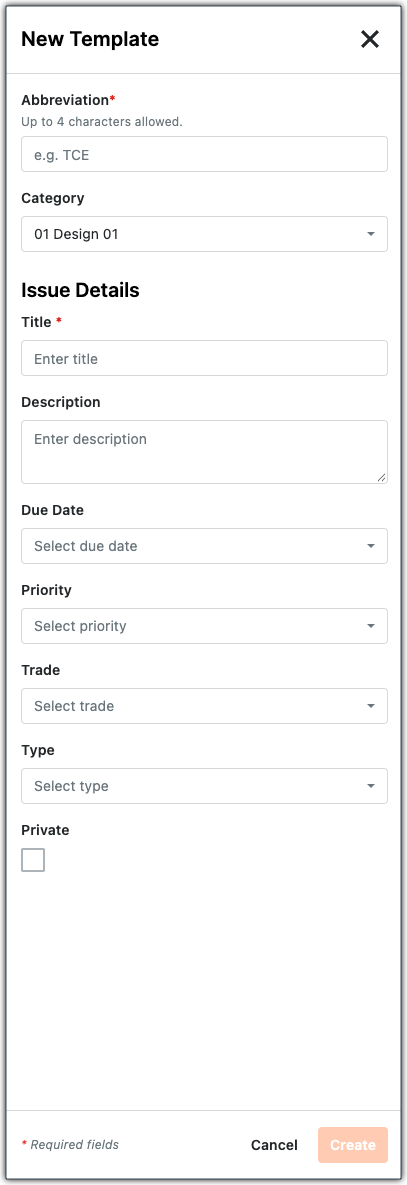
Click a link to learn about the data entry fields:
New template:
Enter up to four (4) characters. Use clear, recognisable shorthand, such as DUCT, ELEC, FIRE, MECH, PIPE or STRU to help site teams and Building Information Modelling/virtual design and construction coordinators quickly identify issues when viewing model. Abbreviations must be unique to your company's library. Keystrokes are automatically converted to uppercase.
Select a name-only grouping (up to 30 characters ) for coordination issues created with the template. Admins update these selections as described in Create Company level coordination issue categories.
Issue details:
Enter a descriptive title for a coordination issue.
Enter any default text, instruction, or standardized phrasing.
Select the number of days from creation for a new issue's due date or define a custom number of days.
Select one of the system's default levels: Low, Medium, High, or Critical.
Select a discipline from the menu. To create selections, see Add a custom trade.
Select a coordination issue type.
Place a mark in this tickbox so any new item created is marked Private at creation. This limits visibility to the issue creator, designated assignee, explicitly added watchers and any project admins.
Get started with CI templates
Loading related articles...