Edit a commitment variation linked to a potential variation for a main contract
Background
If you are working with a main contract PV, you can change the status of an associated commitment potential variation or you can updatee the amount of the commitment variation line item.
Things to Consider
Required User Permissions:
'Admin' level permission on the project's main contract tool.
Requirements:
The change event tool MUST be disabled to use these steps.
Prerequisites
Steps
Navigate to the project's main contract tool.
Locate the contract to work with. Then click its Number link.
Locate the potential variation with the linked commitment variation to edit. Then click View.
Click the Bill of quantities tab.
Click Edit.
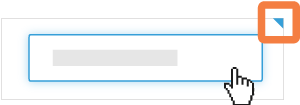
Click the status or commitment amount columns to edit what is shown there.
NoteA blue caret in the corner of a cell indicates you can edit the column inline.
The commitment amount column cannot be edited in the 'Approved' status.
Click Save.