Assign a default workflow template for Procore Pay

 General availability in select markets (United States)

Flag Us Procore Pay is available in the United States. It is designed for main contractors and owner-builders who act as their own main contractors on a job. Procore Pay extends the payment application management functionality in the Procore web application to handle the payment process between main and specialty contractors.
Background

If your company's enables the Company level Workflows tool, you can create multiple payment workflow templates for use with Procore Pay. However, you can only assign one (1) of those templates to be the default workflow to approve and reject your company's disbursements. After a disbursement is approved and the required authorisation step is completed by a workflow's final approver, the amount specified from your funding account in order to pay the beneficiaries named in the disbursement's payment application payment.

Prerequisites

Things to Consider

Steps

  1. Navigate to the Company level Payment tool.

  2. Click the Payment processing tab.

  3. Click the Workflow settings link.
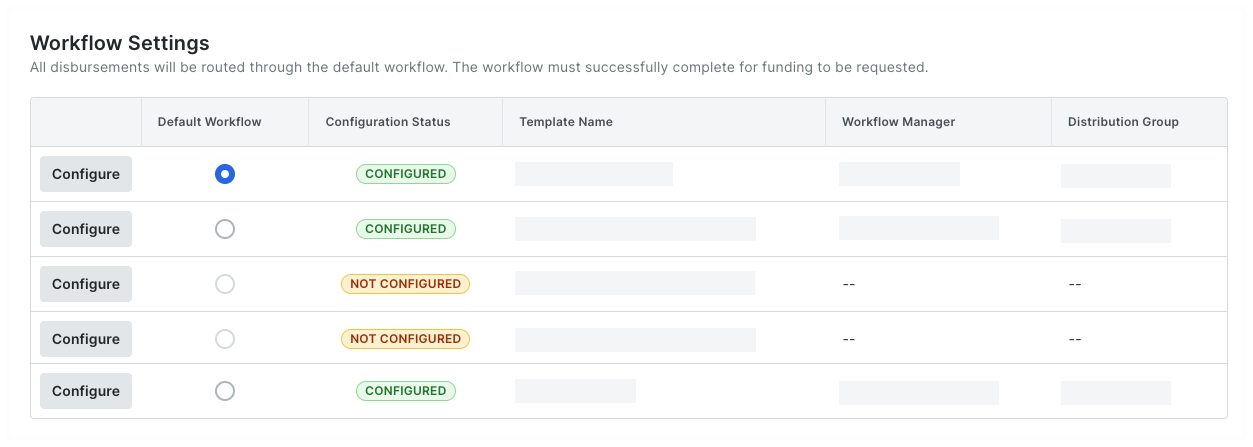
    This opens a list of workflows that have been created for the payment tool. It also shows the configuration status of each workflow.

     Tip

    Do you have existing workflows in the Not configured status? To learn how to configure an existing workflow, see Configure the setting for a payment workflow template.

  4. In the default workflow column, choose the option button that corresponds to the workflow that will be used as the system's default. You can create up to five (5) workflows, but can only assign one (1) default workflow.

     Tip

    What happens if I change the default workflow? If you decide to change the default workflow, all new disbursements created in the payment tool will automatically use the new default workflow. Any disbursements that have already started a workflow process will be unaffected by this change.

    Set Default Workflow

Next Step

See Also

Loading related articles...