Edit lien waiver templates

 General availability in select markets (United States)

Flag Us Procore Pay is available in the United States. It is designed for main contractors and owner-builders who act as their own main contractors on a job. Procore Pay extends the payment application management functionality in the Procore web application to handle the payment process between main and specialty contractors.

Background

Only payment admins and payment disbursers can use the controls in the 'Lien waivers' page under the 'Payment requirements' tab of the Company Payments tool to edit lien waiver templates.

 Tips

What should I include in a lien waiver template? If this is your first time creating a lien waiver template in Procore, see What is a lien waiver? Because lien waiver laws and requirements are varied, Procore recommends contacting an attorney when writing your lien waiver copy to ensure it complies with laws and requirements.

Things to Consider

Prerequisites

Video

Steps

  1. Navigate to the Company level Payment tool.

  2. Click the Payment settings Icon Settings Gear Android icon.
    This opens the payment setting page. The payment processing tab is active by default.

  3. Click the Payment requirements tab.
    The lien waiver page is active by default.

  4. In the lien waiver templates table, locate the template to update. Then click Edit.
    This opens the Edit lien waiver template panel.

  5. Review the template and make the desired changes.

    • To change the copy, update the body of the template as needed.

    • To remove a variable placeholder, click the placeholder in the body of the template and press DELETE.

    • To add a variable placeholder, click a field in the Variables list and use a drag-and-drop operation to move the variable into the desired placeholder position.

       Tip

      Want to make a field required or include replacement text for blank values? Certain variable placeholders have these options:

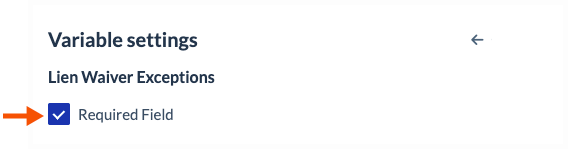
      • To make the field required, place a mark in the Required field tickbox as shown below.

        Variable Settings Required

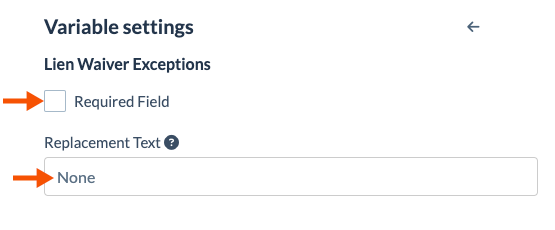
      • To make a field optional, remove the mark from the Required field tickbox. For optional fields, you can also enter a word or phrase, so the text you enter appears when a value isn't available. For example, if there are no lien waiver exceptions to include, the word 'None' will appear on the lien waiver instead of a blank field.

        Variable Settings Replacement

  6. Optional. To preview your changes, click Preview.

  7. Click Save.
    Any update that you make go into effect only go into effect on the next project lien waiver. Update have no effect on existing lien waiver.

Next Step

See Also

Loading related articles...