Enable a custom onboarding message with automated reminders as a payor

 General availability in select markets (United States)

Flag Us Procore Pay is available in the United States. It is designed for main contractors and owner-builders who act as their own main contractors on a job. Procore Pay extends the payment application management functionality in the Procore web application to handle the payment process between main and specialty contractors.

Background

Procore Pay's custom email message feature with automated reminders empowers you, as a payment admin, to enhance communication with your specialty contractors. By tailoring their invitation to join your Procore Pay organisation, you can proactively send a customised welcome message or provide specialty contractors with important contact information. This fosters stronger relationships and streamlines the onboarding process, ensuring a smoother and more efficient experience for everyone involved.

Things to Consider

Prerequisites

Steps

  1. Navigate to the Company level Payment tool.

  2. Click the payments settings Icon Settings Gear Android icon.
    This opens the payment setting page.

  3. Click the Payment processing tab.

  4. Click custom email message.

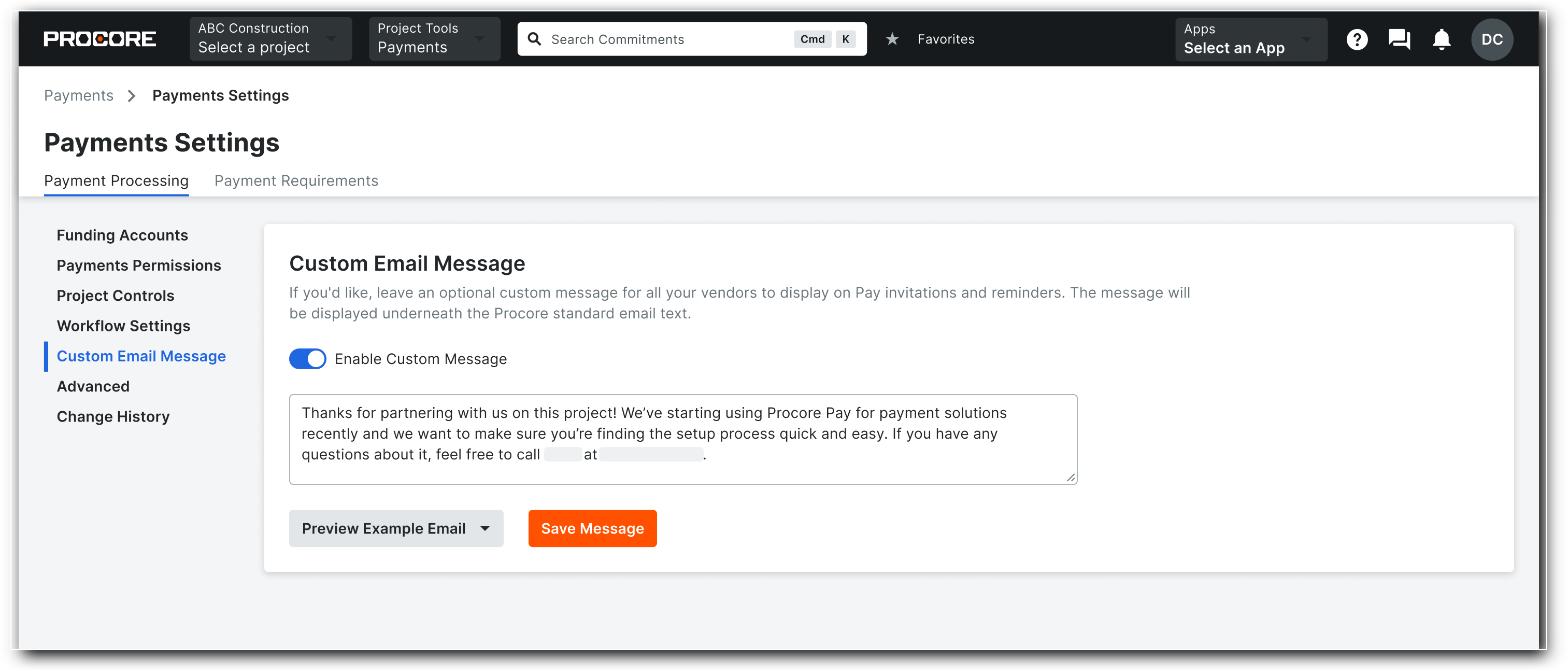
  5. Move the Enable custom message toggle to the right to turn a custom message ON.

  6. Enter a custom message in the custom reminder message box. For example, include your company's contact information and include the name and phone number of an employee who can answer a specialty contractor's questions.
    Custom Email Message

  7. Click Preview example email to view your custom message.

  8. Click Save message.
    The system will apply this message to outgoing invites. Regular reminders are also sent when your speciality contractors don't respond, the cadence of reminder messages cannot be modified.

Next Step

See Also

Loading related articles...