Create a submittal
Background
In the construction industry, a submittal consists of information provided by subcontractors to the main contractor and design team for approval of Equipment and materials before they are fabricated and delivered to a project. Submittal can include shop drawings, Equipment cut sheets or material samples. These allow architect and engineers to verify that the correct products will be installed in compliance with design and contract documents.
Using the Submittals tool helps project teams streamline the review process. Typically, a submittal manager—often a project manager or engineer—oversees the submittal throughout its lifecycle. While the person who creates the submittal is assigned as the manager by default, this role can be reassigned to ensure continuity if project team members change. Once the manager creates the submittal and the subcontractor provides documentation, it is sent to the design team for official review and approval.
Things to Consider
Additional Information:
Alternate methods for adding submittal to a project include:
Importing your submittal into the Project level Submittal tool. View Send a completed submittal import template to Procore.
Generating a submittal log from the Project level Specifications tool. View Submittal builder: Generate submittals from Specifications.
Steps
Navigate to the project's submittal tool.
Click + Create and choose submittal from the dropdown menu.
Create a new submittal as follows:
Update the delivery information
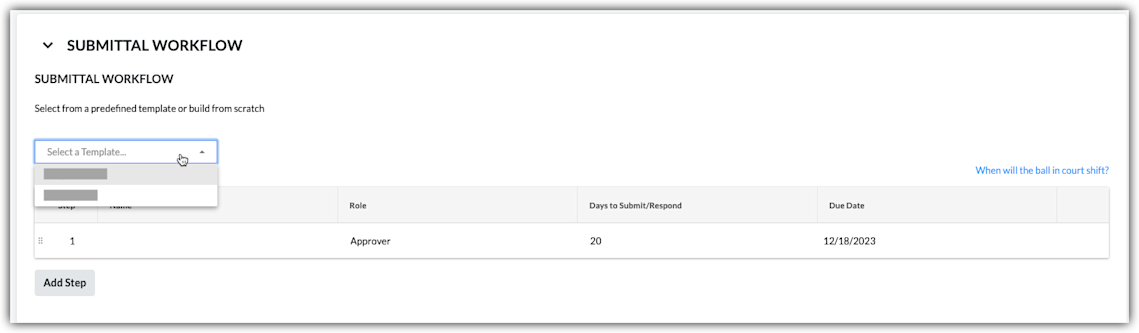
Apply a submittal workflow template
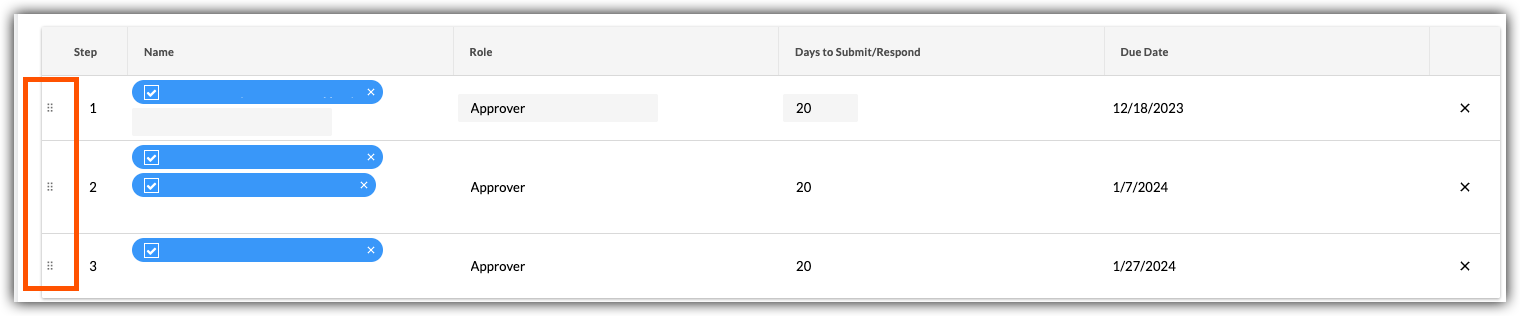
Add users to the submittal workflow