Configure advanced settings: Tasks
Background
The Tasks tool allows you to configure advanced settings, such as default due dates for task items, default distribution lists and task notification emails.
Things to Consider
Required User Permissions:
To configure tasks project settings, see Tasks - user permissions.
To send task notification email for task that you created, see Task - user permission.
Steps
Navigate to the project's tasks tool.
Click Configure setting
 .
Configure the following setting:
Task items private by default:
Mark this tickbox to make task items 'Private' by default.
Default due date for task items:
Enter the desired default number of days in which a new task item will be due.
Note: The due date respects which days are set as 'working days' for the project.
See Set project working days.
Default distribution list:
Users added to this field will be automatically added to the distribution list for all new tasks created after their addition to the list.
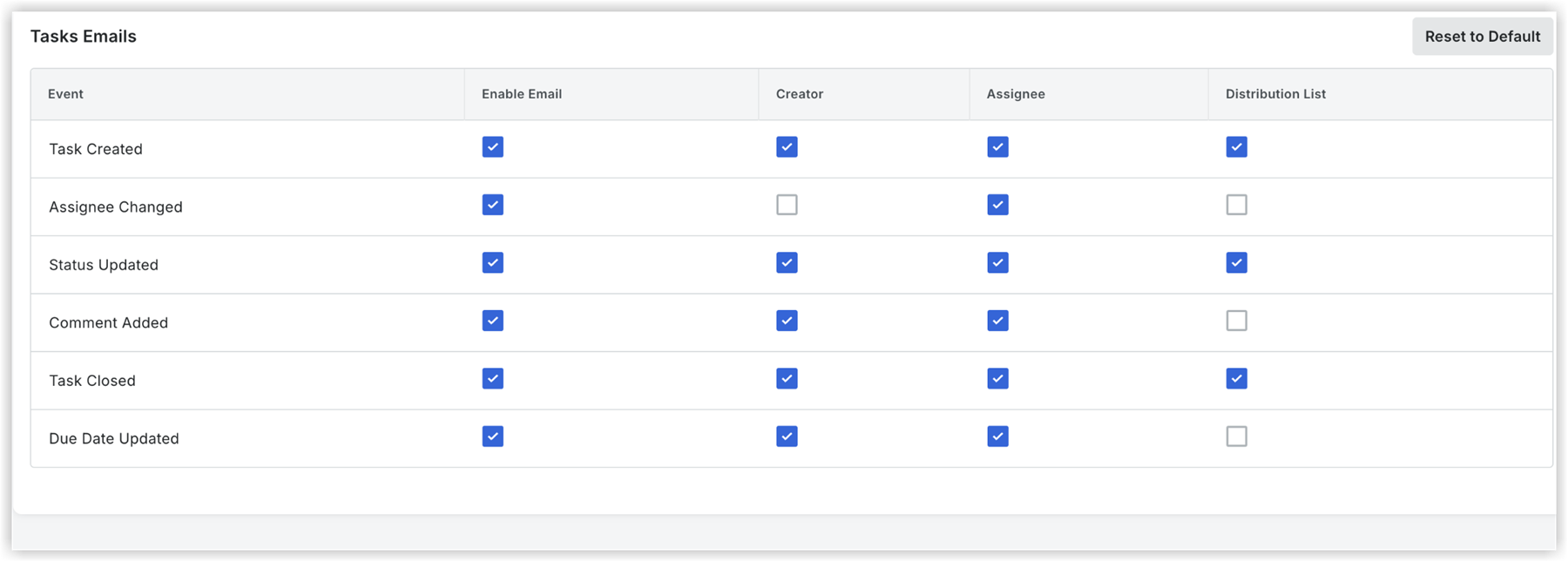
Tasks emails:
Select the events for which you want to receive notifications.
Adjust the notification setting to specify which recipient should receive update for each event.
Default setting are:
 Note
Task createdevent email are not sent immediately upon task creation. These email are delivered after clicking 'Send mine/all' from the banner at the top of the page.
All other event email are sent automatically. However, they depend on the 'task created' email being sent first. If the 'task created' email hasn’t been sent, notifications for all other events will not be delivered, even if they are enabled.