Add quantities to a timesheet (Android)
Background
Production quantities are a measurable amount of work on a construction project. For example, cubic yards of concrete, number of light fixtures or linear feet of piping. In Procore, there are two types of production quantity:
Budget production quantity refers to the measurable amount a team plans to install on a project.
Installed production quantity refers to the actual amount installed on a project by a point in time.
After installed production quantity have been entered in a timesheet, they can be tracked against the imported Budget production quantity using the Production quantity report.
Things to Consider
For customers using Procore Project Financials, you can allow the quantity entered on a timesheet to display with the Procore labour productivity cost budget view.
The imported 'Budget quantity' automatically fills the 'Unit of Measure' and 'Percent complete' using the cost code.
If sub jobs are enabled on your project, the 'sub job' associated with your 'Units installed' entry will appear in the Add quantity window.
Prerequisites
Steps
After you create your timesheet, perform the following actions:
Tap Submit.
Under 'Select an option', Submit and add quantity.
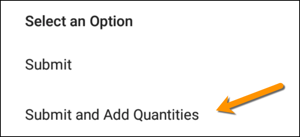
Tap Add quantity.
Tap Add units.
In the Units installed today field, enter the number of item installed for the day.
Optional: Enter any notes.
Tap Apply to save your changes.
See Also
Loading related articles...