¿Cómo se manejan los archivos PDF bloqueados o restringidos en la herramienta Administración de documentos?

Regional availability

The Document Management tool is available in select countries. It is not yet available for Procore accounts in the U.S. To learn more, please reach out to your Procore point of contact.

Fondo

Los archivos PDF restringidos (también conocidos como archivos bloqueados) cargados en la herramienta Administración de documentos del proyecto funcionan de manera diferente a los archivos sin restricciones de seguridad. Cuando se carga un archivo restringido, su funcionalidad puede verse limitada dentro de Procore según las restricciones de seguridad del archivo.

Recomendamos cargar archivos sin restricciones de seguridad en la herramienta Administración de documentos para garantizar la funcionalidad completa de los archivos en Procore.

Answer

Restricted PDF files uploaded to a project's Document Management tool have the following limitations:

  • If a PDF file has viewing restrictions and requires a password to open it, the file cannot be opened or viewed within Procore. You can choose to download the file to your computer and open it in another viewer if you have the appropriate access.

  • A restricted PDF files that is NOT password protected can be opened and viewed in the viewer, but a persistent banner is shown (shown below), stating it is restricted and markup functionality is blocked. Since these files restrict alterations, adding markups to them within Procore would prevent them from being downloaded or distributed from Procore.
    restricted-file-banner-doc-mgmt.png

How to Tell if Your PDF Has Copying or Editing Restrictions

If you upload a PDF file from your local computer to the Document Management tool, Procore checks the PDF for security restrictions. You can choose to cancel attaching the file, or to proceed.

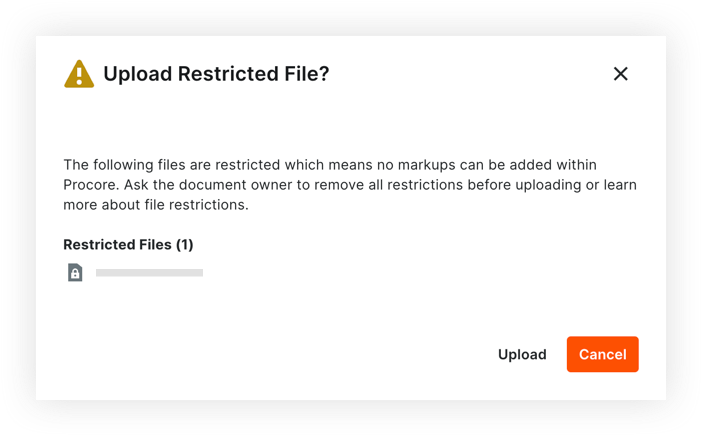
If the PDF has copying or editing restrictions, a warning message appears with any files that are restricted (shown below).upload-restricted-file-doc-mgmt.png

See Also

Loading related articles...