• Productos
  • Guías de procesos
  • Certificaciones

    Obtenga la certificación de Procore gratis con cursos de formación online basados en roles

    Biblioteca de vídeos de formación

    Busque vídeos de formación en nuestra biblioteca

    Glosario de términos
    Estado del sistema

    Consulte el estado de la aplicación

    Comunidad

    Haga preguntas, encuentre ideas y artículos y conecte con otros

    Novedades de productos

    Descubra las funciones más recientes para conocer lo que está por llegar a la plataforma

    Desarrolladores

    Desarrolle aplicaciones en la plataforma de Procore

  • Notas de la versión
  • Productos
  • Guías de procesos
    • Certificaciones
    • Biblioteca de vídeos de formación
    • Glosario de términos
    • Estado del sistema
    • Comunidad
    • Novedades de productos
    • Desarrolladores
  • Notas de la versión
Australia (English)
Brasil (Português)
Canada (English)
Canada (Français)
Deutschland (Deutsch)
España (Español)
France (Français)
Latinoamérica (Español)
Polska (Polski)
United Kingdom (English)
United States (English)
新加坡 (中文)
日本 (日本語)
  • Australia (English)
  • Brasil (Português)
  • Canada (English)
  • Canada (Français)
  • Deutschland (Deutsch)
  • España (Español)
  • France (Français)
  • Latinoamérica (Español)
  • Polska (Polski)
  • United Kingdom (English)
  • United States (English)
  • 新加坡 (中文)
  • 日本 (日本語)
  1. Support Home
  2. Payments Admin Guide
  3. ¿Qué es Pagar?

Payments Admin Guide

  • Welcome
    • Get Started as a Payments Admin
    • ¿Qué es Pagar?
    • How do funds flow?
    • What is a Payments Admin?
  • Multi-Factor Authentication (MFA)
    • How does MFA work with Procore Pay?
    • Set Up MFA for Procore Pay
    • Log in to Procore Pay with MFA
    • Complete the Transactional MFA Challenge
  • Funding Accounts
    • About Bank Accounts
    • Add Funding Accounts
    • Edit Funding Accounts
    • Set a Default Funding Account
    • Deactivate a Funding Account
    • View Funding Accounts
  • Payments Permissions
    • Add or Remove Payments Admins
    • Add Payments Disbursers
    • Add Payments Beneficiary Approvers
    • Remove Payments Disbursers
    • Remove Payments Beneficiary Approvers
    • View Payment Permissions
  • Project Controls
    • Enable or Disable Pay on Projects
    • Update Project Controls in Bulk
    • Update Bank Accounts on Projects
  • Workflow Settings
    • Best Practices
    • Configure Workflow Settings
    • Assign a Default Template
  • Advanced Settings
    • Enable Disbursements
    • Disable Disbursements
  • View Change History
  • Lien Waivers & Templates
    • Enable Lien Waivers
    • Create Templates
    • Edit Templates
    • Delete Templates
  • Sub-Tier Waivers
    • About the Sub-Tiers Card on a Subcontractor Invoice
    • Enable Sub-Tier Waivers on Projects
  • Payment Requirements
    • Configure Company Requirements
    • View Payment Requirements
  • Subcontractor Invoices
    • About the Subcontractor Invoices Tab
    • Apply Search & Filter Options
    • Manage Rows & Columns
    • Export a List of Invoices
    • Create Disbursements
  • About the Disbursements Tab
  • Beneficiaries
    • About the Beneficiaries Tab
    • Approve Beneficiary Accounts
  • Welcome
    • Get Started as a Payments Admin
    • ¿Qué es Pagar?
    • How do funds flow?
    • What is a Payments Admin?
  • Multi-Factor Authentication (MFA)
    • How does MFA work with Procore Pay?
    • Set Up MFA for Procore Pay
    • Log in to Procore Pay with MFA
    • Complete the Transactional MFA Challenge
  • Funding Accounts
    • About Bank Accounts
    • Add Funding Accounts
    • Edit Funding Accounts
    • Set a Default Funding Account
    • Deactivate a Funding Account
    • View Funding Accounts
  • Payments Permissions
    • Add or Remove Payments Admins
    • Add Payments Disbursers
    • Add Payments Beneficiary Approvers
    • Remove Payments Disbursers
    • Remove Payments Beneficiary Approvers
    • View Payment Permissions
  • Project Controls
    • Enable or Disable Pay on Projects
    • Update Project Controls in Bulk
    • Update Bank Accounts on Projects
  • Workflow Settings
    • Best Practices
    • Configure Workflow Settings
    • Assign a Default Template
  • Advanced Settings
    • Enable Disbursements
    • Disable Disbursements
  • View Change History
  • Lien Waivers & Templates
    • Enable Lien Waivers
    • Create Templates
    • Edit Templates
    • Delete Templates
  • Sub-Tier Waivers
    • About the Sub-Tiers Card on a Subcontractor Invoice
    • Enable Sub-Tier Waivers on Projects
  • Payment Requirements
    • Configure Company Requirements
    • View Payment Requirements
  • Subcontractor Invoices
    • About the Subcontractor Invoices Tab
    • Apply Search & Filter Options
    • Manage Rows & Columns
    • Export a List of Invoices
    • Create Disbursements
  • About the Disbursements Tab
  • Beneficiaries
    • About the Beneficiaries Tab
    • Approve Beneficiary Accounts

¿Qué es Pagar?

Pay builds on the existing Project Financials and Invoice Management tools in Procore to streamline the subcontractor invoice payment process and automate the lien waiver exchange.
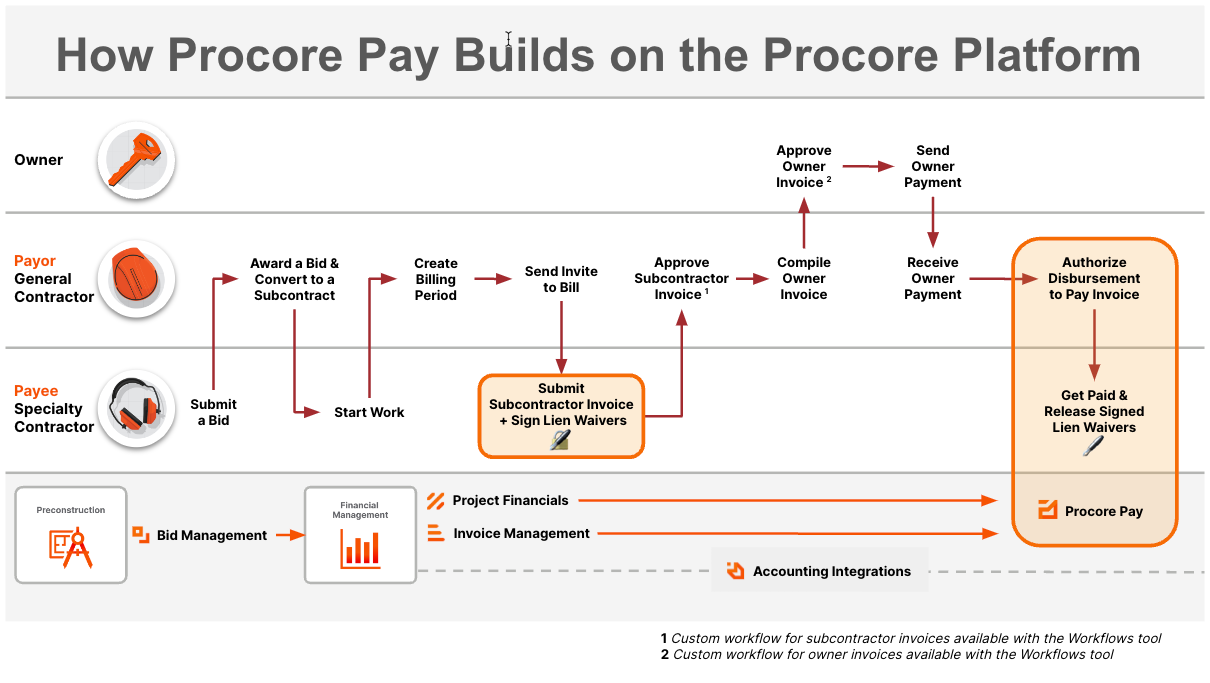
how-procore-pay-builds-on-the-procore-platform.png

Get Started as a Payments Admin
How do funds flow?

Procore está comprometido a hacer que el sector de la construcción progrese mejorando las vidas de los trabajadores de la construcción, fomentando la innovación tecnológica y construyendo una comunidad global de pioneros. Nuestra plataforma universal y conectada para la construcción reúne a todos las partes interesadas de un proyecto, con acceso ilimitado a soporte técnico y un modelo empresarial diseñado para el sector de la construcción.

Twitter Youtube Facebook LinkedIn Instagram

Acerca de Procore

  • Sitio web
  • Estado del sistema
  • App Marketplace
  • Contactar con soporte técnico

Descargas

  • App Store de Apple
  • Google Play Store

© 2025 Procore Technologies, Inc.