Download Model Snapshots for Offline Viewing

Estado de implementación y disponibilidad regional

Gestor de modelos, el reemplazo de próxima generación de Procore para la herramienta Modelos , se lanzó oficialmente en disponibilidad general en todas las regiones. El soporte técnico de la aplicación móvil de Procore (iOS/Android) también está disponible en versión beta, ya que Procore continúa transformando los flujos de trabajo de modelo 3D. Estén atentos para conocer funciones adicionales en futuras versiones.
For platform deployment status & regional availability Show/Hide

The Gestor de modelos and the Models tool can be active on the same project at once. Administrators are not required to disable the Models tool.

Platform

Deployment Status/Region

Learn More

Web

  • General Availability:

    • United Kingdom & Ireland (UKI) on October 15, 2026

    • All other regions on November 17, 2026

iOS

  • Beta: All regions

Android

  • Beta: All regions

Gestor de modelos Beta: Access & Guidelines

  • Registration: Participating companies must sign the Procore Beta Agreement. Once signed, your Procore Administrator will coordinate with your Punto de contacto de Procore to enable Gestor de modelos on specific projects. It is not available in Procore Explore.

  • Support & Feedback: Please report critical or breaking issues directly to Procore Customer Support. For general feedback, feature requests, and non-critical issues, contact your dedicated Beta program lead or Punto de contacto de Procore.

  • Beta Notice: This feature and its supporting documentation are in active development. Beta services are provided strictly "as is" for evaluation purposes, carry no standard warranties or liability, and are subject to change or discontinuation without notice. For full terms, please refer to the Procore Subscription Services Agreement.

Función planificada: documentación de prelanzamiento

Este artículo documenta una función planificada. No se garantiza el momento del lanzamiento, y la funcionalidad descrita aquí puede cambiar antes del lanzamiento.

Offline model snapshots enable field teams to review coordinated model content on-site without an internet connection. Viewing snapshots offline preserves the camera view and section state captured when the snapshot was created. This helps ensure your teams maintain access to critical model views in areas with limited or missing connectivity.

Things to Consider

  • Required User Permissions

  • Additional Information:

    • Offline viewing applies only to downloaded snapshots and does not support live federated scenes.

    • Snapshots exclude hidden geometry and objects outside the saved section volume to minimize file size and speed up offline performance.

    • Offline snapshots do not automatically update when project changes occur online. Connect to the internet and re-download the snapshot to view recent project changes.

Prerequisites

  • Access: Verify access to a project using the Gestor de modelos tool.

  • Authentication: Sign in to the Procore for Mobile app on an iOS or Android device.

  • Status: Ensure the target model snapshot is published.

  • Hardware: Confirm the mobile device has sufficient storage space to save snapshot files.

  • Connectivity: Establish an active internet connection before downloading or refreshing snapshots.

Steps

  1. Navigate to the project's Gestor de modelos tool.

  2. View a model.

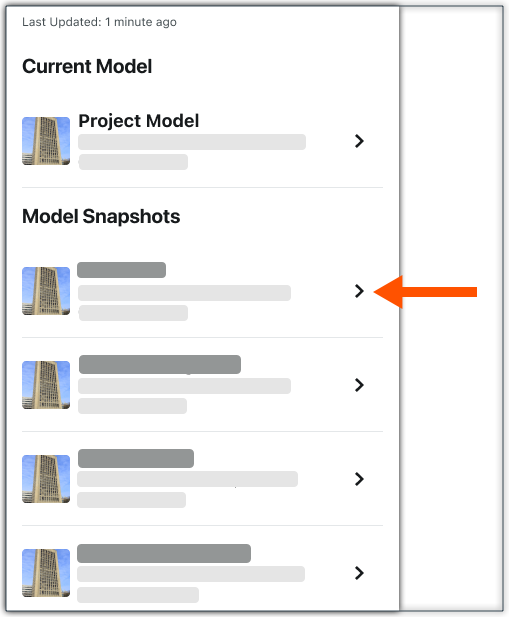
  3. Tap the snapshot to download.
    This image shows how to open a Model Snapshot in Model Manager from a Procore Mobile app (iOS/Android)

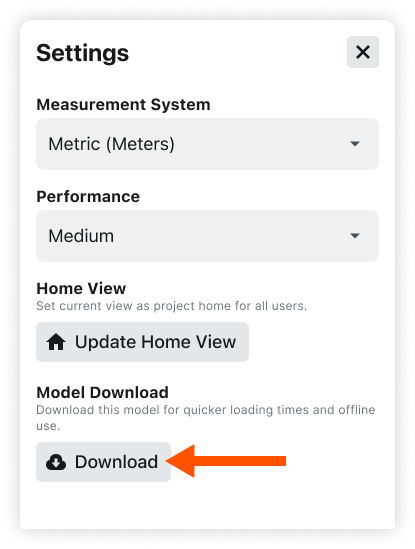
  4. Under Model Download, tap Download. A progress indicator shows the download in progress.
    This image shows the Download button when viewing the Settings for a Model Snapshots in the Next-Gen Viewer of the Model Manager tool on an iOS/Android device.

  5. When you device is offline, the snapshot is now available to open.

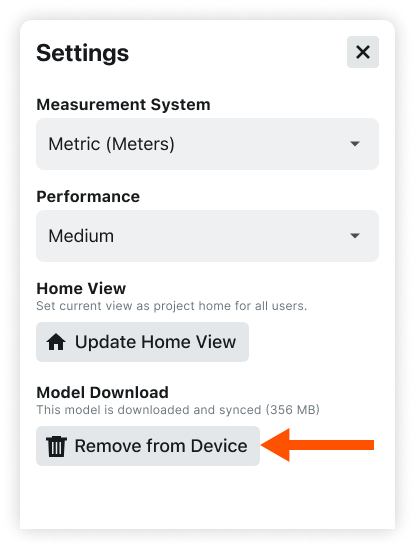
  6. To remove the download from your device later, tap Remove from Device. This image shows the Remove from Device button for a Model Download for a Model Snapshots from the Procore Mobile app (iOS/Android)